
主题
智能体
关于在 CrewAI 框架中创建和管理智能体的详细指南。
智能体概述
在 CrewAI 框架中,Agent 是一个自主单元,可以:
- 执行特定任务
- 根据其角色和目标做出决策
- 使用工具实现目标
- 与其他智能体沟通和协作
- 维护交互记忆
- 在允许时委派任务
TIP
将智能体视为一名具有特定技能、 专业知识和职责的专门团队成员。例如,Researcher 智能体可能擅长 收集和分析信息,而 Writer 智能体可能更擅长 创建内容。
NOTE
CrewAI AMP 包含一个可视化智能体构建器,无需编写代码即可简化智能体的创建与配置。你可以以可视化方式设计智能体,并实时测试它们。
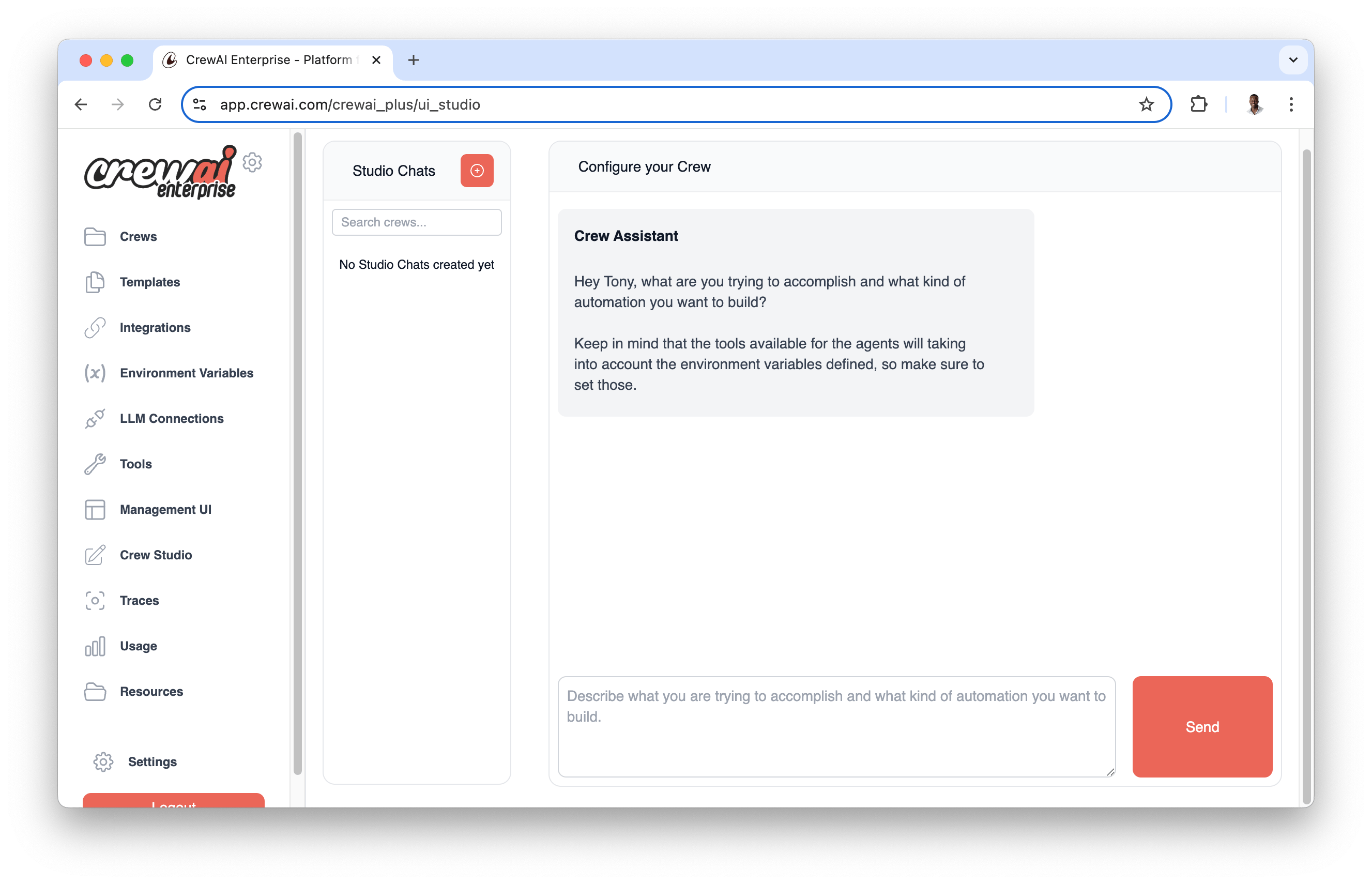
可视化智能体构建器支持:
- 直观的智能体配置,配有基于表单的界面
- 实时测试与验证
- 模板库,包含预配置的智能体类型
- 轻松自定义智能体属性与行为
智能体属性
| 属性 | 参数 | 类型 | 描述 |
|---|---|---|---|
| 角色 | role | str | 定义智能体在团队中的职能与专长。 |
| 目标 | goal | str | 指导智能体决策的个体目标。 |
| 背景故事 | backstory | str | 为智能体提供背景与个性,丰富交互。 |
| LLM (可选) | llm | Union[str, LLM, Any] | 为智能体提供动力的语言模型。默认使用 OPENAI_MODEL_NAME 中指定的模型或 "gpt-4"。 |
| 工具 (可选) | tools | List[BaseTool] | 智能体可用的能力或函数。默认是空列表。 |
| 函数调用 LLM (可选) | function_calling_llm | Optional[Any] | 用于工具调用的语言模型,若指定则覆盖团队的 LLM。 |
| 最大迭代次数 (可选) | max_iter | int | 智能体必须提供最佳答案前的最大迭代次数。默认是 20。 |
| 最大 RPM (可选) | max_rpm | Optional[int] | 每分钟最大请求数,以避免限流。 |
| 最大执行时间 (可选) | max_execution_time | Optional[int] | 任务执行的最长时间(秒)。 |
| 详细模式 (可选) | verbose | bool | 启用详细执行日志以进行调试。默认是 False。 |
| 允许委派 (可选) | allow_delegation | bool | 允许智能体将任务委派给其他智能体。默认是 False。 |
| 步骤回调 (可选) | step_callback | Optional[Any] | 在每个智能体步骤后调用的函数,覆盖团队回调。 |
| 缓存 (可选) | cache | bool | 启用工具使用缓存。默认是 True。 |
| 系统模板 (可选) | system_template | Optional[str] | 智能体的自定义系统提示词模板。 |
| 提示词模板 (可选) | prompt_template | Optional[str] | 智能体的自定义提示词模板。 |
| 响应模板 (可选) | response_template | Optional[str] | 智能体的自定义响应模板。 |
| 允许代码执行 (可选) | allow_code_execution | Optional[bool] | 启用智能体的代码执行。默认是 False。 |
| 最大重试限制 (可选) | max_retry_limit | int | 发生错误时的最大重试次数。默认是 2。 |
| 遵循上下文窗口 (可选) | respect_context_window | bool | 通过摘要将消息保持在上下文窗口大小以内。默认是 True。 |
| 代码执行模式 (可选) | code_execution_mode | Literal["safe", "unsafe"] | 代码执行模式:'safe'(使用 Docker)或 'unsafe'(直接执行)。默认是 'safe'。 |
| 多模态 (可选) | multimodal | bool | 智能体是否支持多模态能力。默认是 False。 |
| 注入日期 (可选) | inject_date | bool | 是否自动将当前日期注入智能体的提示词中。默认是 False。 |
| 日期格式 (可选) | date_format | str | 启用 inject_date 时的日期格式字符串。默认是 "%Y-%m-%d"(ISO 格式)。 |
| 推理 (可选) | reasoning | bool | 智能体是否应在执行任务前进行反思并制定计划。默认是 False。 |
| 最大推理尝试次数 (可选) | max_reasoning_attempts | Optional[int] | 执行任务前的最大推理尝试次数。如果为 None,将一直尝试直到准备就绪。 |
| 嵌入器 (可选) | embedder | Optional[Dict[str, Any]] | 智能体所用嵌入器的配置。 |
| 知识来源 (可选) | knowledge_sources | Optional[List[BaseKnowledgeSource]] | 智能体可用的知识来源。 |
| 使用系统提示词 (可选) | use_system_prompt | Optional[bool] | 是否使用系统提示词(用于支持 o1 模型)。默认是 True。 |
创建智能体
在 CrewAI 中创建智能体有两种常见方式:使用 JSONC 项目配置(推荐用于新团队) 或直接在代码中定义。
JSONC 配置(推荐)
使用 crewai create crew <name> 创建的新项目采用 JSON 优先配置。每个智能体定义在 agents/<agent_name>.jsonc 中,而 crew.jsonc 会列出哪些智能体属于该团队。
按照安装部分所述创建 CrewAI 项目后,编辑 agents/ 中生成的文件。
NOTE
在 role、goal 或 backstory 中使用 {placeholder} 值。将默认值放在 crew.jsonc 的 inputs 下;crewai run 会提示填写任何缺失的值。
以下是一个 agents/researcher.jsonc 文件示例:
jsonc
{
  "role": "{topic} Senior Data Researcher",
  "goal": "Uncover cutting-edge developments in {topic}",
  "backstory": "You find the most relevant information and present it clearly.",
  "llm": "openai/gpt-4o",
  "tools": ["SerperDevTool"],
  "settings": {
    "verbose": true,
    "allow_delegation": false,
    "max_iter": 20
  }
}然后在 crew.jsonc 中包含该智能体:
jsonc
{
  "name": "Research Crew",
  "agents": ["researcher"],
  "tasks": [
    {
      "name": "research_task",
      "description": "Research {topic}",
      "expected_output": "A concise briefing about {topic}",
      "agent": "researcher"
    }
  ],
  "inputs": {
    "topic": "AI Agents"
  }
}智能体文件支持任何公开的 Agent 字段。常见字段包括 role、goal、backstory、llm、tools、function_calling_llm、guardrail、step_callback 和 settings。诸如 verbose、allow_delegation、max_iter、max_rpm、memory、cache、planning_config 和 use_system_prompt 等行为选项可放在顶层或 settings 下;settings 中的值优先。
NOTE
JSONC 支持注释和尾随逗号。如果 agents/<name>.jsonc 和 agents/<name>.json 同时存在,CrewAI 会使用 JSONC 文件。
经典 YAML 配置
使用 crewai create crew <name> --classic 创建的经典项目使用 config/agents.yaml 以及 crew.py 中的 @CrewBase 类。对于希望使用 Python 装饰器或已有 YAML 项目的团队,这仍然受支持。
直接代码定义
你可以通过实例化 Agent 类直接在代码中创建智能体。以下是一个展示所有可用参数的完整示例:
python
from crewai import Agent
from crewai_tools import SerperDevTool

# Create an agent with all available parameters
agent = Agent(
    role="Senior Data Scientist",
    goal="Analyze and interpret complex datasets to provide actionable insights",
    backstory="With over 10 years of experience in data science and machine learning, "
              "you excel at finding patterns in complex datasets.",
    llm="gpt-4",  # Default: OPENAI_MODEL_NAME or "gpt-4"
    function_calling_llm=None,  # Optional: Separate LLM for tool calling
    verbose=False,  # Default: False
    allow_delegation=False,  # Default: False
    max_iter=20,  # Default: 20 iterations
    max_rpm=None,  # Optional: Rate limit for API calls
    max_execution_time=None,  # Optional: Maximum execution time in seconds
    max_retry_limit=2,  # Default: 2 retries on error
    allow_code_execution=False,  # Default: False
    code_execution_mode="safe",  # Default: "safe" (options: "safe", "unsafe")
    respect_context_window=True,  # Default: True
    use_system_prompt=True,  # Default: True
    multimodal=False,  # Default: False
    inject_date=False,  # Default: False
    date_format="%Y-%m-%d",  # Default: ISO format
    reasoning=False,  # Default: False
    max_reasoning_attempts=None,  # Default: None
    tools=[SerperDevTool()],  # Optional: List of tools
    knowledge_sources=None,  # Optional: List of knowledge sources
    embedder=None,  # Optional: Custom embedder configuration
    system_template=None,  # Optional: Custom system prompt template
    prompt_template=None,  # Optional: Custom prompt template
    response_template=None,  # Optional: Custom response template
    step_callback=None,  # Optional: Callback function for monitoring
)让我们分解一些常见用例的关键参数组合:
基础研究智能体
python
research_agent = Agent(
    role="Research Analyst",
    goal="Find and summarize information about specific topics",
    backstory="You are an experienced researcher with attention to detail",
    tools=[SerperDevTool()],
    verbose=True  # Enable logging for debugging
)代码开发智能体
python
dev_agent = Agent(
    role="Senior Python Developer",
    goal="Write and debug Python code",
    backstory="Expert Python developer with 10 years of experience",
    allow_code_execution=True,
    code_execution_mode="safe",  # Uses Docker for safety
    max_execution_time=300,  # 5-minute timeout
    max_retry_limit=3  # More retries for complex code tasks
)长时间运行的分析智能体
python
analysis_agent = Agent(
    role="Data Analyst",
    goal="Perform deep analysis of large datasets",
    backstory="Specialized in big data analysis and pattern recognition",
    memory=True,
    respect_context_window=True,
    max_rpm=10,  # Limit API calls
    function_calling_llm="gpt-4o-mini"  # Cheaper model for tool calls
)自定义模板智能体
python
custom_agent = Agent(
    role="Customer Service Representative",
    goal="Assist customers with their inquiries",
    backstory="Experienced in customer support with a focus on satisfaction",
    system_template="""<|start_header_id|>system<|end_header_id|>
                        {{ .System }}<|eot_id|>""",
    prompt_template="""<|start_header_id|>user<|end_header_id|>
                        {{ .Prompt }}<|eot_id|>""",
    response_template="""<|start_header_id|>assistant<|end_header_id|>
                        {{ .Response }}<|eot_id|>""",
)具备推理能力的日期感知智能体
python
strategic_agent = Agent(
    role="Market Analyst",
    goal="Track market movements with precise date references and strategic planning",
    backstory="Expert in time-sensitive financial analysis and strategic reporting",
    inject_date=True,  # Automatically inject current date into the prompt
    date_format="%B %d, %Y",  # Format as "May 21, 2025"
    reasoning=True,  # Enable strategic planning
    max_reasoning_attempts=2,  # Limit planning iterations
    verbose=True
)推理智能体
python
reasoning_agent = Agent(
    role="Strategic Planner",
    goal="Analyze complex problems and create detailed execution plans",
    backstory="Expert strategic planner who methodically breaks down complex challenges",
    reasoning=True,  # Enable reasoning and planning
    max_reasoning_attempts=3,  # Limit reasoning attempts
    max_iter=30,  # Allow more iterations for complex planning
    verbose=True
)多模态智能体
python
multimodal_agent = Agent(
    role="Visual Content Analyst",
    goal="Analyze and process both text and visual content",
    backstory="Specialized in multimodal analysis combining text and image understanding",
    multimodal=True,  # Enable multimodal capabilities
    verbose=True
)参数详情
关键参数
role、goal和backstory是必填项,并塑造智能体的行为llm决定所使用的语言模型(默认:OpenAI 的 GPT-4)
记忆与上下文
memory:启用后可维护对话历史respect_context_window:防止 token 限制问题knowledge_sources:添加领域特定的知识库
执行控制
max_iter:在给出最佳答案前的最大尝试次数max_execution_time:超时时间(秒)max_rpm:API 调用的限流max_retry_limit:出错时重试次数
代码执行
WARNING
allow_code_execution 和 code_execution_mode 已弃用。CodeInterpreterTool 已从 crewai-tools 中移除。请使用专用的沙箱服务(如 E2B 或 Modal)进行安全的代码执行。
allow_code_execution(已弃用):以前通过CodeInterpreterTool启用内置代码执行。code_execution_mode(已弃用):以前控制执行模式("safe"用于 Docker,"unsafe"用于直接执行)。
高级功能
multimodal:启用多模态能力以处理文本和视觉内容reasoning:使智能体能够在执行任务前进行反思并制定计划inject_date:自动将当前日期注入智能体的提示词中
模板
system_template:定义智能体的核心行为prompt_template:构建输入格式response_template:格式化智能体响应
NOTE
使用自定义模板时,请确保同时定义 system_template 和 prompt_template。response_template 是可选的,但 建议使用它以实现一致的输出格式。
NOTE
使用自定义模板时,你可以在模板中使用 {role}、{goal} 和 {backstory} 等变量。这些变量将在执行期间 自动填充。
智能体工具
可以为智能体配备各种工具以增强其能力。CrewAI 支持来自以下来源的工具:
以下是如何向智能体添加工具:
python
from crewai import Agent
from crewai_tools import SerperDevTool, WikipediaTools

# Create tools
search_tool = SerperDevTool()
wiki_tool = WikipediaTools()

# Add tools to agent
researcher = Agent(
    role="AI Technology Researcher",
    goal="Research the latest AI developments",
    tools=[search_tool, wiki_tool],
    verbose=True
)智能体记忆与上下文
智能体可以保留其交互的记忆,并使用之前任务中的上下文。这对于需要在多个任务之间保留信息的复杂工作流特别有用。
python
from crewai import Agent

analyst = Agent(
    role="Data Analyst",
    goal="Analyze and remember complex data patterns",
    memory=True,  # Enable memory
    verbose=True
)NOTE
启用 memory 后,智能体将在多个 交互之间维护上下文,从而提高其处理复杂的多步骤任务的能力。
上下文窗口管理
CrewAI 包含先进的自动上下文窗口管理功能,用于处理对话超出语言模型 token 限制的情况。这一强大功能由 respect_context_window 参数控制。
上下文窗口管理如何工作
当智能体的对话历史增长到超出 LLM 的上下文窗口时,CrewAI 会自动检测这种情况,并可以执行以下任一操作:
- 自动摘要内容(当
respect_context_window=True时) - 因错误停止执行(当
respect_context_window=False时)
自动上下文处理(respect_context_window=True)
对于大多数用例,这是默认且推荐的设置。启用后,CrewAI 将:
python
# Agent with automatic context management (default)
smart_agent = Agent(
    role="Research Analyst",
    goal="Analyze large documents and datasets",
    backstory="Expert at processing extensive information",
    respect_context_window=True,  # 🔑 Default: auto-handle context limits
    verbose=True
)超出上下文限制时会发生什么:
- ⚠️ 警告消息:
"Context length exceeded. Summarizing content to fit the model context window." - 🔄 自动摘要:CrewAI 会智能地摘要对话历史
- ✅ 继续执行:任务执行会借助摘要后的上下文无缝继续
- 📝 保留信息:在减少 token 数量的同时保留关键信息
严格上下文限制(respect_context_window=False)
当你需要精确控制,并且宁愿停止执行也不愿丢失任何信息时:
python
# Agent with strict context limits
strict_agent = Agent(
    role="Legal Document Reviewer",
    goal="Provide precise legal analysis without information loss",
    backstory="Legal expert requiring complete context for accurate analysis",
    respect_context_window=False,  # ❌ Stop execution on context limit
    verbose=True
)超出上下文限制时会发生什么:
- ❌ 错误消息:
"Context length exceeded. Consider using smaller text or RAG tools from crewai_tools." - 🛑 执行停止:任务执行立即停止
- 🔧 需要手动干预:你需要修改你的方法
选择合适的设置
在以下情况下使用 respect_context_window=True(默认):
- 处理可能超出上下文限制的大型文档
- 长时间运行的对话,其中一定程度的摘要可以接受
- 研究任务,其中总体上下文比精确细节更重要
- 原型设计与开发,你希望执行更稳健
python
# Perfect for document processing
document_processor = Agent(
    role="Document Analyst",
    goal="Extract insights from large research papers",
    backstory="Expert at analyzing extensive documentation",
    respect_context_window=True,  # Handle large documents gracefully
    max_iter=50,  # Allow more iterations for complex analysis
    verbose=True
)在以下情况下使用 respect_context_window=False:
- 精确性至关重要且信息丢失不可接受
- 法律或医疗任务需要完整上下文
- 代码审查中遗漏细节可能引入 bug
- 财务分析中准确性至关重要
python
# Perfect for precision tasks
precision_agent = Agent(
    role="Code Security Auditor",
    goal="Identify security vulnerabilities in code",
    backstory="Security expert requiring complete code context",
    respect_context_window=False,  # Prefer failure over incomplete analysis
    max_retry_limit=1,  # Fail fast on context issues
    verbose=True
)处理大型数据的替代方法
处理非常大的数据集时,请考虑以下策略:
1. 使用 RAG 工具
python
from crewai_tools import RagTool

# Create RAG tool for large document processing
rag_tool = RagTool()

rag_agent = Agent(
    role="Research Assistant",
    goal="Query large knowledge bases efficiently",
    backstory="Expert at using RAG tools for information retrieval",
    tools=[rag_tool],  # Use RAG instead of large context windows
    respect_context_window=True,
    verbose=True
)2. 使用知识来源
python
# Use knowledge sources instead of large prompts
knowledge_agent = Agent(
    role="Knowledge Expert",
    goal="Answer questions using curated knowledge",
    backstory="Expert at leveraging structured knowledge sources",
    knowledge_sources=[your_knowledge_sources],  # Pre-processed knowledge
    respect_context_window=True,
    verbose=True
)上下文窗口最佳实践
- 监控上下文使用情况:启用
verbose=True以查看上下文管理的实际运行 - 面向效率设计:组织任务结构以尽量减少上下文累积
- 使用合适的模型:选择上下文窗口适合你任务的 LLM
- 测试两种设置:分别尝试
True和False,看你的使用场景下哪种效果更好 - 与 RAG 结合:对于超大数据集,使用 RAG 工具,而不是只依赖上下文窗口
上下文问题排查
如果你遇到上下文限制错误:
python
# Quick fix: Enable automatic handling
agent.respect_context_window = True

# Better solution: Use RAG tools for large data
from crewai_tools import RagTool
agent.tools = [RagTool()]

# Alternative: Break tasks into smaller pieces
# Or use knowledge sources instead of large prompts如果自动摘要丢失了重要信息:
python
# Disable auto-summarization and use RAG instead
agent = Agent(
    role="Detailed Analyst",
    goal="Maintain complete information accuracy",
    backstory="Expert requiring full context",
    respect_context_window=False,  # No summarization
    tools=[RagTool()],  # Use RAG for large data
    verbose=True
)NOTE
上下文窗口管理功能会在后台自动运行。 你无需调用任何特殊函数——只需将 respect_context_window 设置为你期望的行为,CrewAI 就会处理 其余部分!
使用 kickoff() 直接与智能体交互
使用 kickoff() 方法,智能体可以不经由任务或团队工作流直接被使用。当你不需要完整的团队编排能力时,这提供了一种更简单的方式与智能体交互。
kickoff() 如何工作
kickoff() 方法允许你直接向智能体发送消息并获取响应,类似于与 LLM 交互的方式,但具备智能体的全部能力(工具、推理等)。
python
from crewai import Agent
from crewai_tools import SerperDevTool

# Create an agent
researcher = Agent(
    role="AI Technology Researcher",
    goal="Research the latest AI developments",
    tools=[SerperDevTool()],
    verbose=True
)

# Use kickoff() to interact directly with the agent
result = researcher.kickoff("What are the latest developments in language models?")

# Access the raw response
print(result.raw)参数与返回值
| 参数 | 类型 | 描述 |
|---|---|---|
messages | Union[str, List[Dict[str, str]]] | 可以是字符串查询,也可以是包含 role/content 的消息字典列表 |
response_format | Optional[Type[Any]] | 用于结构化输出的可选 Pydantic 模型 |
该方法返回一个 LiteAgentOutput 对象,包含以下属性:
raw:包含原始输出文本的字符串pydantic:解析后的 Pydantic 模型(如果提供了response_format)agent_role:产生该输出的智能体的角色usage_metrics:本次执行的 token 使用量指标
结构化输出
你可以通过提供 Pydantic 模型作为 response_format 来获得结构化输出:
python
from pydantic import BaseModel
from typing import List

class ResearchFindings(BaseModel):
    main_points: List[str]
    key_technologies: List[str]
    future_predictions: str

# Get structured output
result = researcher.kickoff(
    "Summarize the latest developments in AI for 2025",
    response_format=ResearchFindings
)

# Access structured data
print(result.pydantic.main_points)
print(result.pydantic.future_predictions)多条消息
你也可以提供一组消息字典作为对话历史:
python
messages = [
    {"role": "user", "content": "I need information about large language models"},
    {"role": "assistant", "content": "I'd be happy to help with that! What specifically would you like to know?"},
    {"role": "user", "content": "What are the latest developments in 2025?"}
]

result = researcher.kickoff(messages)最后一条 user 消息是智能体要回答的请求。其他每条消息 都保留自己的角色以及它在该请求周围的位置,因此一段 以 assistant 或 tool 消息结尾的对话仍然会提出用户的问题,并且仍然 会在其后传递这些末尾轮次。如果完全没有 user 消息,则最后 一条消息会被视为请求。
异步支持
通过 kickoff_async() 可获得异步版本,参数相同:
python
import asyncio

async def main():
    result = await researcher.kickoff_async("What are the latest developments in AI?")
    print(result.raw)

asyncio.run(main())NOTE
kickoff() 方法在内部使用 LiteAgent,它提供了更简单的 执行流程,同时保留智能体的全部配置(角色、目标、 背景故事、工具等)。
重要注意事项与最佳实践
安全与代码执行
WARNING
allow_code_execution 和 code_execution_mode 已弃用,CodeInterpreterTool 已被移除。请使用专用的沙箱服务(如 E2B 或 Modal)来安全地执行代码。
性能优化
- 使用
respect_context_window: true以避免 token 限制问题 - 设置合适的
max_rpm以避免限流 - 启用
cache: true以提升重复性任务的性能 - 根据任务复杂度调整
max_iter和max_retry_limit
记忆与上下文管理
- 利用
knowledge_sources提供领域特定信息 - 使用自定义嵌入模型时配置
embedder - 使用自定义模板(
system_template、prompt_template、response_template)对智能体行为进行细粒度控制
高级功能
- 对于需要在执行复杂任务前进行规划与反思的智能体,启用
reasoning: true - 设置合适的
max_reasoning_attempts以控制规划迭代次数(None 表示不限次数) - 使用
inject_date: true让智能体感知当前日期,适用于时间敏感的任务 - 使用标准 Python datetime 格式代码,通过
date_format自定义日期格式 - 对于需要同时处理文本和视觉内容的智能体,启用
multimodal: true
智能体协作
- 当智能体需要协同工作时,启用
allow_delegation: true - 使用
step_callback监控并记录智能体交互 - 考虑为不同用途使用不同的 LLM:
- 主
llm用于复杂推理 function_calling_llm用于高效的工具调用
- 主
日期感知与推理
- 使用
inject_date: true让智能体感知当前日期,适用于时间敏感的任务 - 使用标准 Python datetime 格式代码,通过
date_format自定义日期格式 - 有效的格式代码包括:%Y(年)、%m(月)、%d(日)、%B(完整月份名称)等
- 无效的日期格式会被记录为警告,并且不会修改任务描述
- 对于能从前期规划和反思中受益的复杂任务,启用
reasoning: true
模型兼容性
- 对于不支持系统消息的较旧模型,设置
use_system_prompt: false - 确保你选择的
llm支持你所需的功能(例如函数调用)
常见问题排查
限流:如果你触发了 API 速率限制:
- 实施合适的
max_rpm - 对重复性操作使用缓存
- 考虑批量发起请求
- 实施合适的
上下文窗口错误:如果你超出了上下文限制:
- 启用
respect_context_window - 使用更高效的提示词
- 定期清空智能体记忆
- 启用
代码执行问题:如果代码执行失败:
- 确认已安装 Docker 以使用安全模式
- 检查执行权限
- 检查代码沙箱设置
记忆问题:如果智能体的响应看起来不一致:
- 检查知识源配置
- 检查对话历史管理
请记住,智能体只有按其具体使用场景进行配置时效果才最好。花些时间理解你的需求,并据此调整这些参数。