
主题
检查点
自动保存执行状态,使团队、流程和智能体在失败后能够恢复。
检查点会在运行过程中保存执行状态的快照,使团队、流程或智能体在失败后能够恢复,或分叉为另一个分支。
Explanation
检查点如何工作:事件、存储与继承。
Tutorial
5 分钟演练:运行、中断、恢复。
How-to guides
面向常见工作流的任务型实操方案。
Reference
CheckpointConfig、事件、服务商与 CLI。
说明
什么是检查点
检查点会捕获 CrewAI 在运行中途重建一次运行所需的全部内容:团队、流程或智能体的完整状态——配置、智能体记忆和知识源、任务进度、中间输出、内部状态和属性——以及 kickoff 输入、截至该点的事件历史,以及一个将该检查点与其来源运行关联起来的谱系 ID。
恢复会重建该状态并继续运行。已完成的任务会被跳过,记忆和知识会被重新注入,后续工作会基于原始运行产出的相同输出继续执行。分叉会在新的谱系下执行同样的恢复,因此新分支和原始运行可以并排写入检查点而不会相互覆盖。
检查点何时写入
检查点由事件驱动。运行时会订阅你通过 on_events 选择的事件,并在每次事件触发时写入一个检查点。默认的 task_completed 会为每个已完成的任务生成一个检查点——这是在粒度和磁盘占用之间的合理权衡。像 llm_call_completed 这样更高频的事件可用于细粒度恢复,但会写入多得多的文件。
存储
CrewAI 内置两种服务商:
JsonProvider为每个检查点写入一个文件。便于人类阅读和检查。SqliteProvider写入单个 SQLite 数据库。更适合高频检查点写入。
当设置了 max_checkpoints 时,两者都会修剪最旧的检查点。
NOTE
自动检查点写入(事件驱动)是尽力而为的:写入失败会被记录日志,运行继续执行。手动调用 state.checkpoint() 和 state.acheckpoint() 时,失败会重新抛出。
继承模型
Crew、Flow 和 Agent 都接受 checkpoint 参数。子级会从父级继承,除非它们设置了自己的值或传入 False 选择退出。在团队上启用一次检查点,每个智能体都会参与,也可以有选择地排除某个智能体。
教程:恢复失败的团队
本演练约需 5 分钟。你将运行一个包含两个任务的团队,中途终止它,然后从已保存的检查点恢复。
Create the crew with checkpointing enabled
python
from crewai import Agent, Crew, Task

researcher = Agent(role="Researcher", goal="Research", backstory="Expert")
writer = Agent(role="Writer", goal="Write", backstory="Expert")

crew = Crew(
    agents=[researcher, writer],
    tasks=[
        Task(description="Research AI trends", agent=researcher, expected_output="bullets"),
        Task(description="Write a summary", agent=writer, expected_output="paragraph"),
    ],
    checkpoint=True,
)Run it and interrupt after the first task
python
result = crew.kickoff()在第一个任务完成后按 Ctrl+C。查看 ./.checkpoints/ —— 名为 <timestamp>_<uuid>.json 的文件就是检查点。
Resume from the checkpoint
python
from crewai import CheckpointConfig

result = crew.kickoff(
    from_checkpoint=CheckpointConfig(
        restore_from="./.checkpoints/<timestamp>_<uuid>.json",
    ),
)研究会话会被跳过,写作智能体会基于已保存的研究输出运行,团队随后完成。
操作指南
使用默认配置启用检查点
python
crew = Crew(agents=[...], tasks=[...], checkpoint=True)每次 task_completed 时写入 ./.checkpoints/。
自定义存储与频率
python
from crewai import Crew, CheckpointConfig

crew = Crew(
    agents=[...],
    tasks=[...],
    checkpoint=CheckpointConfig(
        location="./my_checkpoints",
        on_events=["task_completed", "crew_kickoff_completed"],
        max_checkpoints=5,
    ),
)选择存储服务商
python
from crewai import Crew, CheckpointConfig
from crewai.state import JsonProvider

crew = Crew(
    agents=[...],
    tasks=[...],
    checkpoint=CheckpointConfig(
        location="./my_checkpoints",
        provider=JsonProvider(),
        max_checkpoints=5,
    ),
)python
from crewai import Crew, CheckpointConfig
from crewai.state import SqliteProvider

crew = Crew(
    agents=[...],
    tasks=[...],
    checkpoint=CheckpointConfig(
        location="./.checkpoints.db",
        provider=SqliteProvider(),
        max_checkpoints=50,
    ),
)TIP
SQLite 会启用 WAL 日志模式以支持并发读取。高频检查点写入建议优先使用它。
让某个智能体退出检查点
python
crew = Crew(
    agents=[
        Agent(role="Researcher", ...),
        Agent(role="Writer", ..., checkpoint=False),
    ],
    tasks=[...],
    checkpoint=True,
)分叉到新分支
fork() 会在全新谱系下恢复检查点,因此新运行不会与原始运行冲突。
python
config = CheckpointConfig(restore_from="./my_checkpoints/<file>.json")
crew = Crew.fork(config, branch="experiment-a")
result = crew.kickoff(inputs={"strategy": "aggressive"})branch 标签是可选的;如果省略,会自动生成一个。
为团队、流程或智能体创建检查点
python
crew = Crew(
    agents=[researcher, writer],
    tasks=[research_task, write_task, review_task],
    checkpoint=CheckpointConfig(location="./crew_cp"),
)默认触发:task_completed。
手动写入检查点
在任意事件上注册处理程序,并调用 state.checkpoint()。
python
from __future__ import annotations

from typing import TYPE_CHECKING, Any

from crewai.events.event_bus import crewai_event_bus
from crewai.events.types.llm_events import LLMCallCompletedEvent

if TYPE_CHECKING:
    from crewai.state.runtime import RuntimeState

@crewai_event_bus.on(LLMCallCompletedEvent)
def on_llm_done(source: Any, event: LLMCallCompletedEvent, state: RuntimeState) -> None:
    path = state.checkpoint("./my_checkpoints")
print(f"Saved checkpoint: {path}")python
from __future__ import annotations

from typing import TYPE_CHECKING, Any

from crewai.events.event_bus import crewai_event_bus
from crewai.events.types.llm_events import LLMCallCompletedEvent

if TYPE_CHECKING:
    from crewai.state.runtime import RuntimeState

@crewai_event_bus.on(LLMCallCompletedEvent)
async def on_llm_done_async(source: Any, event: LLMCallCompletedEvent, state: RuntimeState) -> None:
    path = await state.acheckpoint("./my_checkpoints")
print(f"Saved checkpoint: {path}")当处理程序接收三个参数时,会自动提供 state 参数。完整事件目录请参阅事件监听器。
从 CLI 浏览、恢复和分叉
bash
crewai checkpoint
crewai checkpoint --location ./my_checkpoints
crewai checkpoint --location ./.checkpoints.db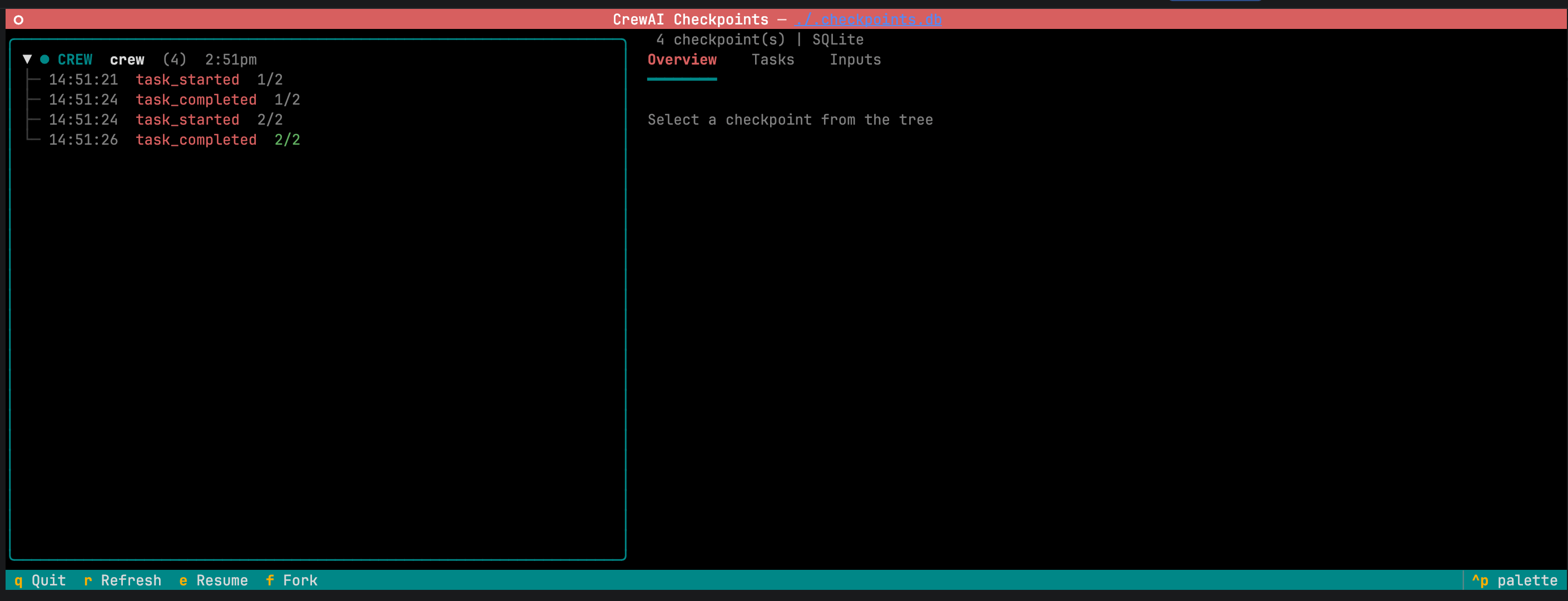
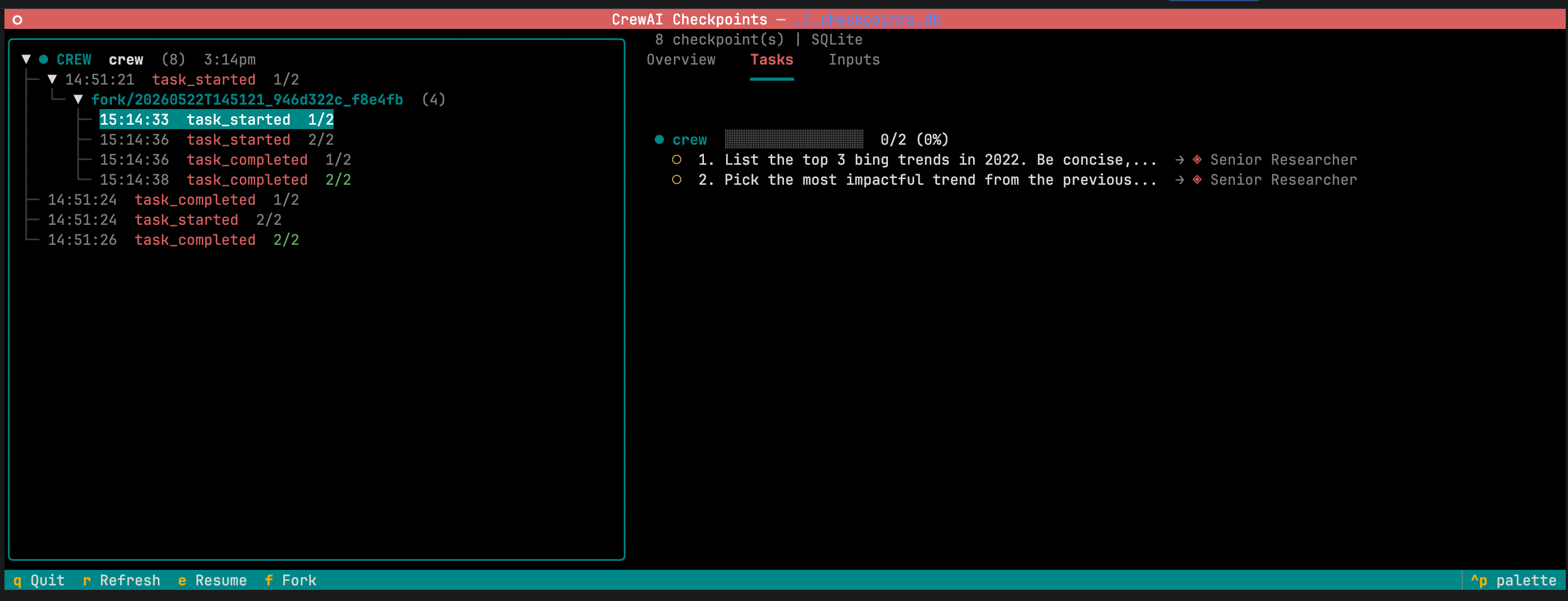
左侧面板按分支对检查点进行分组;分叉嵌套在其父级下。选择某个检查点会打开详情面板,其中包含元数据、实体状态和任务进度。恢复会继续运行;分叉会启动一个新分支。
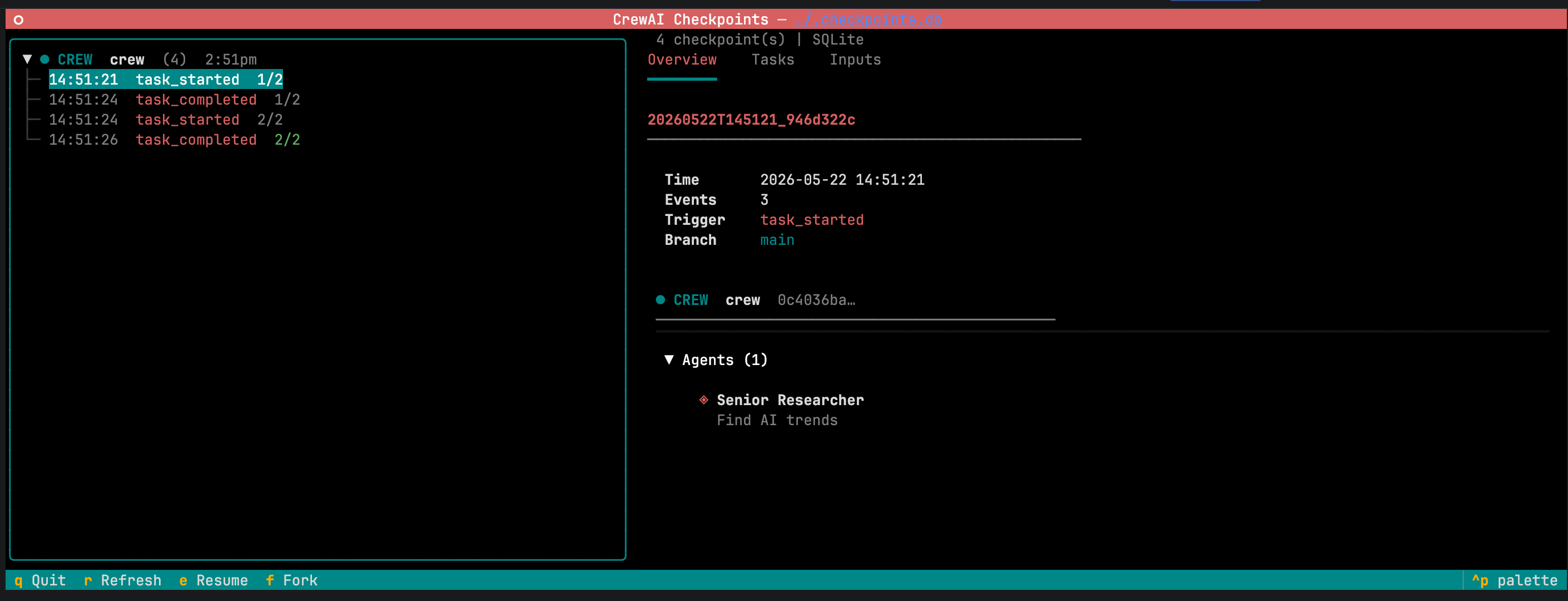
详情面板提供两个可编辑区域:
- 输入 — 原始 kickoff 输入,已预填且可编辑。
<img src="/crewai-img/582563ca1c58.png" alt="Editable kickoff inputs" width="2820" height="1080" />
- 任务输出 — 已完成任务的输出。编辑输出并点击 分叉 会使下游任务失效,以便它们针对修改后的上下文重新运行。
<img src="/crewai-img/f574d169934c.png" alt="Editable task outputs" width="2820" height="1080" />
TIP
适用于“假设”探索:分叉、调整、观察。
无需 TUI 查看检查点
bash
crewai checkpoint list ./my_checkpoints
crewai checkpoint info ./my_checkpoints/<file>.json
crewai checkpoint info ./.checkpoints.db参考
CheckpointConfig
locationstr默认 "./.checkpoints"
存储目标位置。对于 JsonProvider 是目录,对于 SqliteProvider 是数据库文件路径。
on_eventslist[CheckpointEventType | Literal["*"]]默认 ["task_completed"]
触发检查点的事件类型。CheckpointEventType 是一个 Literal —— 你的类型检查器会自动补全并拒绝不支持的值。完整列表请参阅事件类型。
providerBaseProvider默认 JsonProvider()
存储后端。可以是 JsonProvider 或 SqliteProvider。
max_checkpointsint | None默认 None
要保留的最大检查点数。每次写入后会修剪最旧的检查点。
restore_fromPath | str | None默认 None
通过 from_checkpoint 传入时要从中恢复的检查点。
checkpoint 字段值
可由 Crew、Flow 和 Agent 接受。
Nonedefault
从父级继承。
Truebool
使用默认值启用。
Falsebool
显式退出。停止继承。
CheckpointConfig(...)CheckpointConfig
自定义配置。
事件类型
on_events 接受 CheckpointEventType 值的任意组合。默认的 ["task_completed"] 会为每个已完成任务写入一个检查点;["*"] 匹配每个事件。
WARNING
["*"] 和高频事件(如 llm_call_completed)会写入大量检查点,并可能降低性能。请将它们与 max_checkpoints 搭配使用。
所有支持的事件
- 任务 —
task_started,task_completed,task_failed,task_evaluation - 团队 —
crew_kickoff_started,crew_kickoff_completed,crew_kickoff_failed,crew_train_started,crew_train_completed,crew_train_failed,crew_test_started,crew_test_completed,crew_test_failed,crew_test_result - 智能体 —
agent_execution_started,agent_execution_completed,agent_execution_error,lite_agent_execution_started,lite_agent_execution_completed,lite_agent_execution_error,agent_evaluation_started,agent_evaluation_completed,agent_evaluation_failed - 流程 —
flow_created,flow_started,flow_finished,flow_paused,method_execution_started,method_execution_finished,method_execution_failed,method_execution_paused,human_feedback_requested,human_feedback_received,flow_input_requested,flow_input_received - LLM —
llm_call_started,llm_call_completed,llm_call_failed,llm_stream_chunk,llm_thinking_chunk - LLM 护栏 —
llm_guardrail_started,llm_guardrail_completed,llm_guardrail_failed - 工具 —
tool_usage_started,tool_usage_finished,tool_usage_error,tool_validate_input_error,tool_selection_error,tool_execution_error - 记忆 —
memory_save_started,memory_save_completed,memory_save_failed,memory_query_started,memory_query_completed,memory_query_failed,memory_retrieval_started,memory_retrieval_completed,memory_retrieval_failed - 知识 —
knowledge_search_query_started,knowledge_search_query_completed,knowledge_query_started,knowledge_query_completed,knowledge_query_failed,knowledge_search_query_failed - 推理 —
agent_reasoning_started,agent_reasoning_completed,agent_reasoning_failed - MCP —
mcp_connection_started,mcp_connection_completed,mcp_connection_failed,mcp_tool_execution_started,mcp_tool_execution_completed,mcp_tool_execution_failed,mcp_config_fetch_failed - 观察 —
step_observation_started,step_observation_completed,step_observation_failed,plan_refinement,plan_replan_triggered,goal_achieved_early - 技能 —
skill_discovery_started,skill_discovery_completed,skill_loaded,skill_activated,skill_load_failed - 日志 —
agent_logs_started,agent_logs_execution - A2A —
a2a_delegation_started,a2a_delegation_completed,a2a_conversation_started,a2a_conversation_completed,a2a_message_sent,a2a_response_received,a2a_polling_started,a2a_polling_status,a2a_push_notification_registered,a2a_push_notification_received,a2a_push_notification_sent,a2a_push_notification_timeout,a2a_streaming_started,a2a_streaming_chunk,a2a_agent_card_fetched,a2a_authentication_failed,a2a_artifact_received,a2a_connection_error,a2a_server_task_started,a2a_server_task_completed,a2a_server_task_canceled,a2a_server_task_failed,a2a_parallel_delegation_started,a2a_parallel_delegation_completed,a2a_transport_negotiated,a2a_content_type_negotiated,a2a_context_created,a2a_context_expired,a2a_context_idle,a2a_context_completed,a2a_context_pruned - 系统信号 —
SIGTERM,SIGINT,SIGHUP,SIGTSTP,SIGCONT - 通配符 —
"*"匹配每个事件。
存储服务商
JsonProviderprovider
每个检查点一个文件,位于 location 内,命名为 <timestamp>_<uuid>.json。
SqliteProviderprovider
在 location 处使用单个数据库文件,并启用 WAL 日志模式。
CLI
| 命令 | 用途 |
|---|---|
crewai checkpoint | 启动 TUI;自动检测存储。 |
crewai checkpoint --location <path> | 针对指定位置启动 TUI。 |
crewai checkpoint list <path> | 列出检查点。 |
crewai checkpoint info <path> | 检查检查点文件或 SQLite 数据库中的最新条目。 |