
主题
构建你的第一个 Flow
了解如何创建结构化、事件驱动的工作流,并精确控制执行过程。
使用 Flows 掌控 AI 工作流
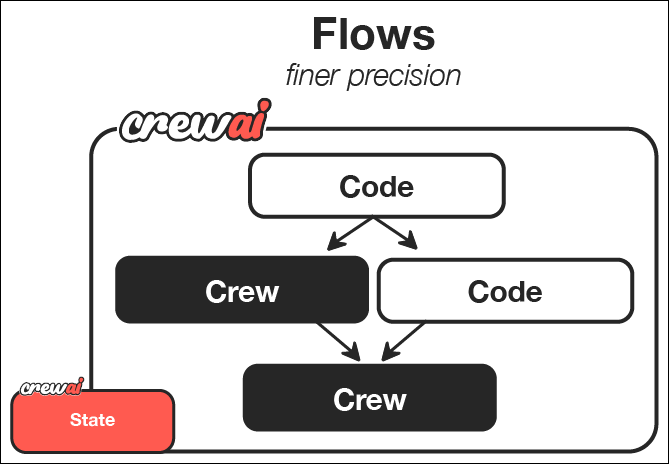
CrewAI Flows 代表了 AI 编排的下一个层次——将 AI 智能体团队的协作能力与过程式编程的精确性和灵活性相结合。团队擅长智能体协作,而流程让你能够精细控制 AI 系统各组件交互的方式和时机。
在本指南中,我们将逐步创建一个强大的 CrewAI Flow,它可以针对任意主题生成全面的学习指南。本教程将展示 Flows 如何通过结合常规代码、直接的 LLM 调用和基于团队的处理,为你的 AI 工作流提供结构化、事件驱动的控制。
Flows 的强大之处
Flows 让你能够:
- 组合不同的 AI 交互模式 - 对复杂的协作任务使用团队,对较简单的操作使用直接的 LLM 调用,对过程式逻辑使用常规代码
- 构建事件驱动系统 - 定义各组件如何响应特定事件和数据变化
- 跨组件维护状态 - 在应用的不同部分之间共享和转换数据
- 与外部系统集成 - 将你的 AI 工作流无缝连接到数据库、API 和用户界面
- 创建复杂的执行路径 - 设计条件分支、并行处理和动态工作流
你将构建和学习的内容
读完本指南后,你将:
- 创建一个精密的内容生成系统,结合用户输入、AI 规划和多智能体内容创作
- 编排信息流在你的系统不同组件之间流动
- 实现事件驱动架构,让每一步都响应前一步的完成
- 为更复杂的 AI 应用奠定基础,你可以扩展和自定义
这个指南创建器流程演示了可应用于创建更高级应用的基本模式,例如:
- 结合多个专用子系统的交互式 AI 助手
- 带有 AI 增强转换的复杂数据处理流水线
- 与外部服务和 API 集成的自主智能体
- 具有人在回路流程的多阶段决策系统
让我们开始构建你的第一个流程吧!
前置条件
开始之前,请确保你已经:
第 1 步:创建新的 CrewAI Flow 项目
首先,我们使用 CLI 创建一个新的 CrewAI Flow 项目。该命令会搭建一个脚手架项目,包含你的流程所需的全部目录和模板文件。
bash
crewai create flow guide_creator_flow
cd guide_creator_flow这将生成一个具有流程所需基本结构的项目。
第 2 步:了解项目结构
生成的项目具有以下结构。起始嵌入式团队使用经典的 Python/YAML 布局,在第 4 步中我们将把内容团队替换为 JSONC 团队。
guide_creator_flow/
├── .gitignore
├── pyproject.toml
├── README.md
├── .env
└── src/
    └── guide_creator_flow/
        ├── __init__.py
        ├── main.py
        ├── crews/
        │   └── poem_crew/
        │       ├── config/
        │       │   ├── agents.yaml
        │       │   └── tasks.yaml
        │       └── poem_crew.py
        └── tools/
└── custom_tool.py这种结构使流程的不同组件之间保持清晰的分离:
- 主流程逻辑位于
src/guide_creator_flow/main.py文件 - 专用团队位于
src/guide_creator_flow/crews目录 - 自定义工具位于
src/guide_creator_flow/tools目录
我们将修改此结构来创建我们的指南创建器流程,它将编排生成全面学习指南的过程。
第 3 步:添加内容撰写团队
我们的流程需要一个专用团队来处理内容创作过程。让我们使用 CrewAI CLI 添加一个内容撰写团队:
bash
crewai flow add-crew content-crew该命令会自动为你的团队创建必要的目录和模板文件。内容撰写团队将负责撰写和审阅本指南的各个部分,并在主应用编排的整体流程中工作。
第 4 步:配置内容撰写团队
现在,我们用 JSONC 配置内容撰写团队。我们将设置两个专用智能体——一个撰写者和一个审阅者——它们协作创建高质量的内容。
- 创建
src/guide_creator_flow/crews/content_crew/agents/content_writer.jsonc:
jsonc
{
  "role": "Educational Content Writer",
  "goal": "Create engaging, informative content that thoroughly explains the assigned topic and provides valuable insights to the reader.",
  "backstory": "You are a talented educational writer who explains complex concepts in accessible language and organizes information clearly.",
  "llm": "provider/model-id",
  "settings": {
    "verbose": true
  }
}- 创建
src/guide_creator_flow/crews/content_crew/agents/content_reviewer.jsonc:
jsonc
{
  "role": "Educational Content Reviewer and Editor",
  "goal": "Ensure content is accurate, comprehensive, well-structured, and consistent with previously written sections.",
  "backstory": "You are a meticulous editor with an eye for detail, clarity, and coherence.",
  "llm": "provider/model-id",
  "settings": {
    "verbose": true
  }
}将 provider/model-id 替换为你使用的模型,例如 openai/gpt-4o、gemini/gemini-3.7-flash 或 anthropic/claude-sonnet-4-6。
- 创建
src/guide_creator_flow/crews/content_crew/crew.jsonc:
jsonc
{
  "name": "Content Crew",
  "agents": ["content_writer", "content_reviewer"],
  "tasks": [
    {
      "name": "write_section_task",
      "description": "Write a comprehensive section on the topic: \"{section_title}\".\n\nSection description: {section_description}\nTarget audience: {audience_level} level learners\n\nYour content should begin with a brief introduction, explain key concepts clearly with examples, include practical applications where appropriate, end with a summary, and be approximately 500-800 words.\n\nPreviously written sections:\n{previous_sections}",
      "expected_output": "A well-structured, comprehensive section in Markdown format that thoroughly explains the topic and is appropriate for the target audience.",
      "agent": "content_writer",
      "markdown": true
    },
    {
      "name": "review_section_task",
      "description": "Review and improve this section on \"{section_title}\":\n\n{draft_content}\n\nTarget audience: {audience_level} level learners\nPreviously written sections:\n{previous_sections}\n\nFix errors, improve clarity, verify consistency, enhance structure, and add missing key information.",
      "expected_output": "An improved, polished version of the section that maintains the original structure but enhances clarity, accuracy, and consistency.",
      "agent": "content_reviewer",
      "context": ["write_section_task"],
      "markdown": true
    }
  ],
  "process": "sequential",
  "verbose": true
}context 字段让评审者可以使用撰写者的输出。
- 用一个小的加载器替换
src/guide_creator_flow/crews/content_crew/content_crew.py:
python
from pathlib import Path

from crewai.project import load_crew

def kickoff_content_crew(inputs: dict):
    crew, default_inputs = load_crew(Path(__file__).with_name("crew.jsonc"))
return crew.kickoff(inputs={**default_inputs, **inputs})这个加载器会在运行时把 crew.jsonc 转换为 Crew。虽然这个团队可以独立运行,但在我们的流程中,它将作为更大系统的一部分被编排。
第 5 步:创建流程
现在到了令人兴奋的部分——创建将编排整个指南创建过程的流程。在这里,我们会把常规 Python 代码、直接的 LLM 调用以及我们的内容创建团队组合成一个有机的整体。
我们的流程将会:
- 获取用户输入的主题和受众水平
- 直接调用 LLM 生成结构化的指南大纲
- 使用内容撰写团队依次处理每个章节
- 将所有内容合并为最终的完整文档
让我们在 main.py 文件中创建我们的流程:
python
#!/usr/bin/env python
import json
import os
from typing import List, Dict
from pydantic import BaseModel, Field
from crewai import LLM
from crewai.flow.flow import Flow, listen, start
from guide_creator_flow.crews.content_crew.content_crew import kickoff_content_crew

# Define our models for structured data
class Section(BaseModel):
    title: str = Field(description="Title of the section")
    description: str = Field(description="Brief description of what the section should cover")

class GuideOutline(BaseModel):
    title: str = Field(description="Title of the guide")
    introduction: str = Field(description="Introduction to the topic")
    target_audience: str = Field(description="Description of the target audience")
    sections: List[Section] = Field(description="List of sections in the guide")
    conclusion: str = Field(description="Conclusion or summary of the guide")

# Define our flow state
class GuideCreatorState(BaseModel):
    topic: str = ""
    audience_level: str = ""
    guide_outline: GuideOutline = None
    sections_content: Dict[str, str] = {}

class GuideCreatorFlow(Flow[GuideCreatorState]):
    """Flow for creating a comprehensive guide on any topic"""

    @start()
    def get_user_input(self):
        """Get input from the user about the guide topic and audience"""
        print("\n=== Create Your Comprehensive Guide ===\n")

        # Get user input
        self.state.topic = input("What topic would you like to create a guide for? ")

        # Get audience level with validation
        while True:
            audience = input("Who is your target audience? (beginner/intermediate/advanced) ").lower()
            if audience in ["beginner", "intermediate", "advanced"]:
                self.state.audience_level = audience
                break
            print("Please enter 'beginner', 'intermediate', or 'advanced'")

        print(f"\nCreating a guide on {self.state.topic} for {self.state.audience_level} audience...\n")
        return self.state

    @listen(get_user_input)
    def create_guide_outline(self, state):
        """Create a structured outline for the guide using a direct LLM call"""
        print("Creating guide outline...")

        # Initialize the LLM
        llm = LLM(model="openai/gpt-4o-mini", response_format=GuideOutline)

        # Create the messages for the outline
        messages = [
            {"role": "system", "content": "You are a helpful assistant designed to output JSON."},
            {"role": "user", "content": f"""
            Create a detailed outline for a comprehensive guide on "{state.topic}" for {state.audience_level} level learners.

            The outline should include:
            1. A compelling title for the guide
            2. An introduction to the topic
            3. 4-6 main sections that cover the most important aspects of the topic
            4. A conclusion or summary

            For each section, provide a clear title and a brief description of what it should cover.
            """}
        ]

        # Make the LLM call with JSON response format
        response = llm.call(messages=messages)

        # Parse the JSON response
        outline_dict = json.loads(response)
        self.state.guide_outline = GuideOutline(**outline_dict)

        # Ensure output directory exists before saving
        os.makedirs("output", exist_ok=True)

        # Save the outline to a file
        with open("output/guide_outline.json", "w") as f:
            json.dump(outline_dict, f, indent=2)

        print(f"Guide outline created with {len(self.state.guide_outline.sections)} sections")
        return self.state.guide_outline

    @listen(create_guide_outline)
    def write_and_compile_guide(self, outline):
        """Write all sections and compile the guide"""
        print("Writing guide sections and compiling...")
        completed_sections = []

        # Process sections one by one to maintain context flow
        for section in outline.sections:
            print(f"Processing section: {section.title}")

            # Build context from previous sections
            previous_sections_text = ""
            if completed_sections:
                previous_sections_text = "# Previously Written Sections\n\n"
                for title in completed_sections:
                    previous_sections_text += f"## {title}\n\n"
                    previous_sections_text += self.state.sections_content.get(title, "") + "\n\n"
            else:
                previous_sections_text = "No previous sections written yet."

            # Run the content crew for this section
            result = kickoff_content_crew(inputs={
                "section_title": section.title,
                "section_description": section.description,
                "audience_level": self.state.audience_level,
                "previous_sections": previous_sections_text,
                "draft_content": ""
            })

            # Store the content
            self.state.sections_content[section.title] = result.raw
            completed_sections.append(section.title)
            print(f"Section completed: {section.title}")

        # Compile the final guide
        guide_content = f"# {outline.title}\n\n"
        guide_content += f"## Introduction\n\n{outline.introduction}\n\n"

        # Add each section in order
        for section in outline.sections:
            section_content = self.state.sections_content.get(section.title, "")
            guide_content += f"\n\n{section_content}\n\n"

        # Add conclusion
        guide_content += f"## Conclusion\n\n{outline.conclusion}\n\n"

        # Save the guide
        with open("output/complete_guide.md", "w") as f:
            f.write(guide_content)

        print("\nComplete guide compiled and saved to output/complete_guide.md")
        return "Guide creation completed successfully"

def kickoff():
    """Run the guide creator flow"""
    GuideCreatorFlow().kickoff()
    print("\n=== Flow Complete ===")
    print("Your comprehensive guide is ready in the output directory.")
    print("Open output/complete_guide.md to view it.")

def plot():
    """Generate a visualization of the flow"""
    flow = GuideCreatorFlow()
    flow.plot("guide_creator_flow")
    print("Flow visualization saved to guide_creator_flow.html")

if __name__ == "__main__":
kickoff()让我们分析一下这个流程中发生了什么:
- 我们为结构化数据定义 Pydantic 模型,确保类型安全和清晰的数据表示
- 我们创建一个状态类,以在流程的不同步骤之间维护数据
- 我们实现三个主要的流程步骤:
- 使用
@start()装饰器获取用户输入 - 通过直接调用 LLM 生成指南大纲
- 使用我们的内容团队处理各个章节
- 使用
- 我们使用
@listen()装饰器在各步骤之间建立事件驱动的关系
这就是流程的强大之处——将不同类型的处理(用户交互、直接 LLM 调用、基于团队的任务)组合成一个连贯的、事件驱动的系统。
第 6 步:设置环境变量
在项目根目录创建一个包含 API 密钥的 .env 文件。有关配置服务商的详细信息,请参阅 LLM 设置 指南。
sh
OPENAI_API_KEY=your_openai_api_key
# or
GEMINI_API_KEY=your_gemini_api_key
# or
ANTHROPIC_API_KEY=your_anthropic_api_key第 7 步:安装依赖
安装所需的依赖:
bash
crewai install第 8 步:运行你的流程
现在是时候看看你的流程实际运行了!使用 CrewAI CLI 运行它:
bash
crewai run运行这个命令时,你会看到你的流程活跃起来:
- 它会提示你输入主题和受众水平
- 它会为你的指南生成结构化的大纲
- 它会处理每个章节,内容撰写者和评审者会在每个章节上协作
- 最后,它会把所有内容汇编成一份完整的指南
这展示了流程在编排涉及多个组件(AI 与非 AI)的复杂过程方面的强大能力。
第 9 步:可视化你的流程
流程的强大特性之一是能够可视化其结构:
bash
crewai flow plot这会生成一个 HTML 文件,展示你的流程结构,包括不同步骤之间的关系以及它们之间流动的数据。这种可视化对于理解和调试复杂流程非常有价值。
第 10 步:查看输出
流程完成后,你会在 output 目录中找到两个文件:
guide_outline.json:包含指南的结构化大纲complete_guide.md:包含所有章节的完整指南
花点时间查看这些文件,并欣赏你所构建的东西——一个结合用户输入、直接的 AI 交互和智能体协作来产出复杂、高质量输出的系统。
无限可能:超越你的第一个流程
你在本指南中学到的内容为创建更为复杂的 AI 系统奠定了基础。以下是扩展这个基础流程的一些方式:
增强用户交互
你可以创建更具交互性的流程,例如:
- 用于输入和输出的 Web 界面
- 实时进度更新
- 交互式反馈与改进循环
- 多阶段用户交互
添加更多处理步骤
你可以为流程增加额外的步骤,用于:
- 在大纲创建之前进行调研
- 为插图生成图像
- 为技术指南生成代码片段
- 最终的质量保证与事实核查
创建更复杂的流程
你可以实现更精细的流程模式:
- 基于用户偏好或内容类型的条件分支
- 独立章节的并行处理
- 带反馈的迭代改进循环
- 与外部 API 和服务集成
应用到不同领域
同样的模式可以应用于创建以下流程:
- 交互式叙事:根据用户输入创建个性化故事
- 商业智能:处理数据、生成洞察并创建报告
- 产品开发:促进创意构思、设计和规划
- 教育系统:创建个性化学习体验
展示的关键特性
这个指南创建流程展示了 CrewAI 的多个强大特性:
- 用户交互:流程直接从用户处收集输入
- 直接的 LLM 调用:使用 LLM 类进行高效、单一目的的 AI 交互
- 使用 Pydantic 的结构化数据:使用 Pydantic 模型确保类型安全
- 带上下文的顺序处理:按顺序撰写章节,并将前面的章节作为上下文提供
- 多智能体团队:利用专门的智能体(撰写者和评审者)进行内容创建
- 状态管理:在流程的不同步骤之间维护状态
- 事件驱动架构:使用
@listen装饰器响应事件
理解流程结构
让我们拆解流程的关键组成部分,帮助你理解如何构建自己的流程:
1. 直接的 LLM 调用
当你需要简单、结构化的响应时,流程允许你直接调用语言模型:
python
llm = LLM(
    model="model-id-here",  # gpt-4o, gemini/gemini-3.7-flash, anthropic/claude...
    response_format=GuideOutline
)
response = llm.call(messages=messages)当你需要特定的、结构化输出时,这比使用团队更高效。
2. 事件驱动架构
流程使用装饰器来建立组件之间的关系:
python
@start()
def get_user_input(self):
    # First step in the flow
    # ...

@listen(get_user_input)
def create_guide_outline(self, state):
    # This runs when get_user_input completes
# ...这为你的应用创建了清晰、声明式的结构。
3. 状态管理
流程在各步骤之间维护状态,使数据共享变得简单:
python
class GuideCreatorState(BaseModel):
    topic: str = ""
    audience_level: str = ""
    guide_outline: GuideOutline = None
sections_content: Dict[str, str] = {}这提供了一种类型安全的方式,在整个流程中跟踪和转换数据。
4. 团队集成
流程可以与团队无缝集成,以完成复杂的协作任务:
python
result = kickoff_content_crew(inputs={
    "section_title": section.title,
    # ...
})这让你能为应用的每个部分使用合适的工具——简单任务用直接的 LLM 调用,复杂协作则用团队。
下一步
现在你已经构建了第一个流程,你可以:
- 尝试更复杂的流程结构和模式
- 尝试使用
@router()在流程中创建条件分支 - 探索
and_和or_函数,以实现更复杂的并行执行 - 将你的流程连接到外部 API、数据库或用户界面
- 在单个流程中组合多个专门的团队
- 使用 会话式流程 构建多轮聊天应用(每条消息调用
kickoff、ChatSession、延迟追踪)
TIP
恭喜!你已成功构建第一个 CrewAI 流程,它结合了常规代码、直接的 LLM 调用和基于团队的处理来生成一份完整的指南。这些基础技能使你能够创建日益复杂的 AI 应用,通过过程控制与协作智能的结合来应对复杂的多阶段问题。