
主题
Arize Phoenix
使用 OpenTelemetry 和 OpenInference 将 Arize Phoenix 与 CrewAI 集成
Arize Phoenix 集成
本指南演示如何通过 OpenInference SDK 使用 OpenTelemetry 将 Arize Phoenix 与 CrewAI 集成。学完本指南后,你将能够追踪你的 CrewAI 智能体并调试智能体行为。
什么是 Arize Phoenix? Arize Phoenix 是来自 Arize AI 的开源可观测性与评估选项。当你希望本地运行或自托管时,请使用 Phoenix。对于生产 AI 系统的托管云平台或企业自托管平台,请使用 Arize AX。
开始使用
我们将通过一个简单示例,演示如何使用 CrewAI,并通过 OpenInference 借助 OpenTelemetry 将其与 Arize Phoenix 集成。
你也可以在 Google Colab 上查看本指南。
第 1 步:安装依赖项
bash
pip install openinference-instrumentation-crewai crewai crewai-tools arize-phoenix-otel第 2 步:设置环境变量
配置你的 Phoenix API 密钥和 OpenTelemetry 端点,以便将追踪发送到 Phoenix。通过修改 collector URL,同样的设置也适用于本地或自托管的 Phoenix 端点。
你可以在这里获取免费的 Serper API 密钥。
python
import os
from getpass import getpass

# Get your Phoenix API key
PHOENIX_API_KEY = getpass("🔑 Enter your Phoenix API key: ")

# Get API keys for services
OPENAI_API_KEY = getpass("🔑 Enter your OpenAI API key: ")
SERPER_API_KEY = getpass("🔑 Enter your Serper API key: ")

# Set environment variables
os.environ["PHOENIX_CLIENT_HEADERS"] = f"api_key={PHOENIX_API_KEY}"
os.environ["PHOENIX_COLLECTOR_ENDPOINT"] = "https://app.phoenix.arize.com" # Change this to your own endpoint if you are using a self-hosted instance
os.environ["OPENAI_API_KEY"] = OPENAI_API_KEY
os.environ["SERPER_API_KEY"] = SERPER_API_KEY第 3 步:使用 Phoenix 初始化 OpenTelemetry
初始化 OpenInference OpenTelemetry 插桩 SDK,开始捕获追踪并将其发送到 Phoenix。
python
from phoenix.otel import register

tracer_provider = register(
    project_name="crewai-tracing-demo",
    auto_instrument=True,
)第 4 步:创建 CrewAI 应用
我们将创建一个 CrewAI 应用,让两个智能体协作研究并撰写一篇关于 AI 进展的博客文章。
python
from crewai import Agent, Crew, Process, Task
from crewai_tools import SerperDevTool
from openinference.instrumentation.crewai import CrewAIInstrumentor
from phoenix.otel import register

# setup monitoring for your crew
tracer_provider = register(
    endpoint="http://localhost:6006/v1/traces")
CrewAIInstrumentor().instrument(skip_dep_check=True, tracer_provider=tracer_provider)
search_tool = SerperDevTool()

# Define your agents with roles and goals
researcher = Agent(
    role="Senior Research Analyst",
    goal="Uncover cutting-edge developments in AI and data science",
    backstory="""You work at a leading tech think tank.
    Your expertise lies in identifying emerging trends.
    You have a knack for dissecting complex data and presenting actionable insights.""",
    verbose=True,
    allow_delegation=False,
    # You can pass an optional llm attribute specifying what model you wanna use.
    # llm=ChatOpenAI(model_name="gpt-3.5", temperature=0.7),
    tools=[search_tool],
)
writer = Agent(
    role="Tech Content Strategist",
    goal="Craft compelling content on tech advancements",
    backstory="""You are a renowned Content Strategist, known for your insightful and engaging articles.
    You transform complex concepts into compelling narratives.""",
    verbose=True,
    allow_delegation=True,
)

# Create tasks for your agents
task1 = Task(
    description="""Conduct a comprehensive analysis of the latest advancements in AI in 2024.
    Identify key trends, breakthrough technologies, and potential industry impacts.""",
    expected_output="Full analysis report in bullet points",
    agent=researcher,
)

task2 = Task(
    description="""Using the insights provided, develop an engaging blog
    post that highlights the most significant AI advancements.
    Your post should be informative yet accessible, catering to a tech-savvy audience.
    Make it sound cool, avoid complex words so it doesn't sound like AI.""",
    expected_output="Full blog post of at least 4 paragraphs",
    agent=writer,
)

# Instantiate your crew with a sequential process
crew = Crew(
    agents=[researcher, writer], tasks=[task1, task2], verbose=1, process=Process.sequential
)

# Get your crew to work!
result = crew.kickoff()

print("######################")
print(result)第 5 步:在 Phoenix 中查看追踪
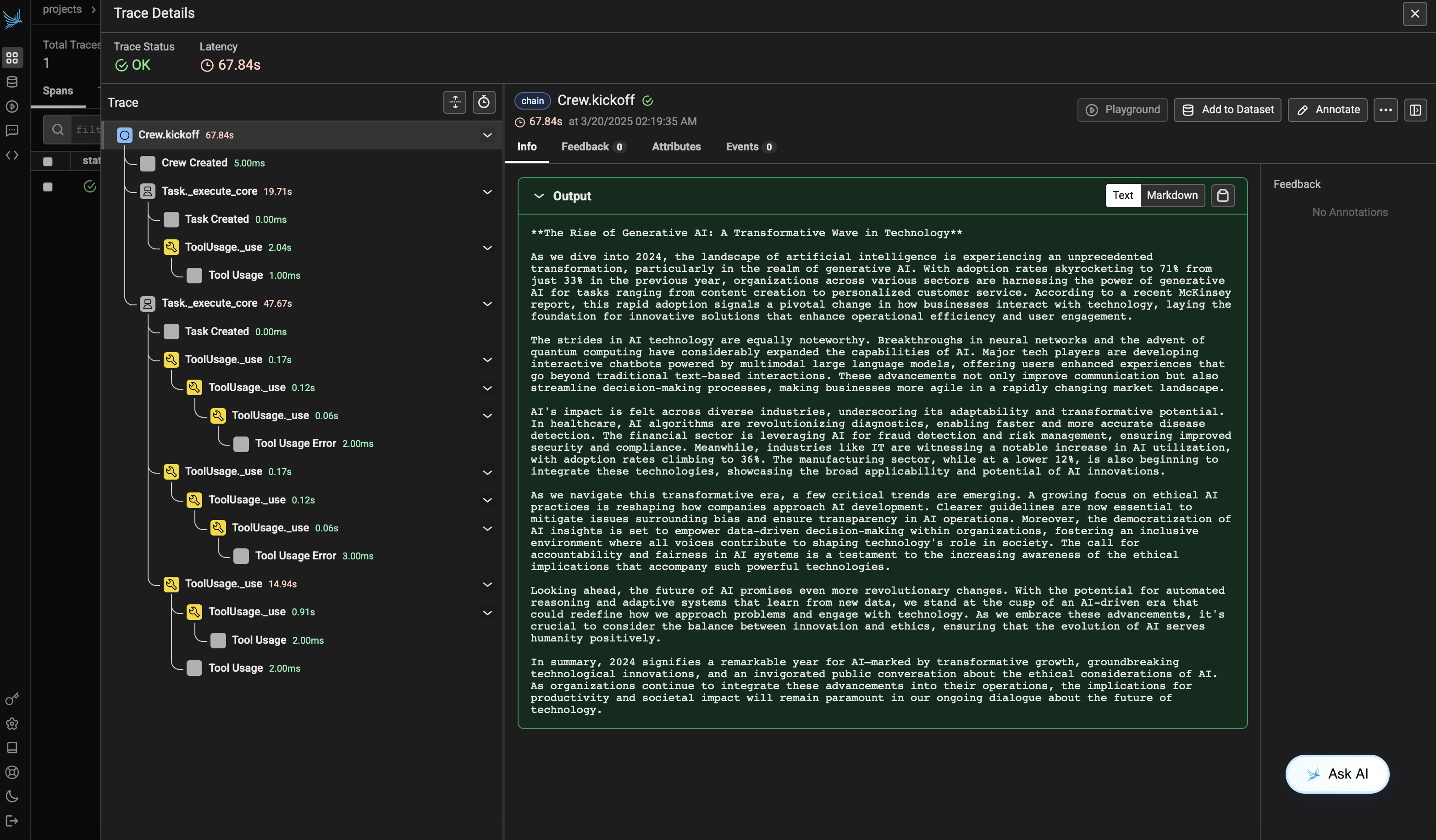
运行智能体后,你可以在 Phoenix 中查看 CrewAI 应用生成的追踪。你应能看到智能体交互和 LLM 调用的详细步骤,这有助于你调试和优化智能体。
打开你的 Phoenix 项目,导航到你在 project_name 参数中指定的项目。你将看到追踪的时间线视图,其中包含所有智能体交互、工具使用和 LLM 调用。
版本兼容性信息
- Python 3.8+
- CrewAI >= 0.86.0
- Arize Phoenix >= 7.0.1
- OpenTelemetry SDK >= 1.31.0
参考
- Phoenix 文档 - Phoenix 平台概览。
- Arize AX - 托管云端以及企业版自托管可观测性与评估。
- Arize 智能体评估指南 - 基于追踪评估智能体行为的生产工作流。
- Arize LLM 评估指南 - 评估 LLM 应用的方法与指标。
- CrewAI 文档 - CrewAI 框架概览。
- OpenTelemetry 文档 - OpenTelemetry 指南
- OpenInference GitHub - OpenInference SDK 的源代码。