
主题
Cloud(SaaS)
Cloud 托管选项是一种全托管模式,由 LangChain 托管并运维所有 LangSmith 基础设施和服务:
- 全托管基础设施:LangChain 负责所有基础设施、更新、扩缩容和维护。
- LangSmith UI:完整使用可观测性、评估、智能体部署管理和 Studio。
- 从 GitHub 部署 Agent Servers:连接你的代码仓库,只需点击几下即可将 Agent Servers 部署到 Cloud。
- Agent Servers 的自动化 CI/CD:你的 Agent Servers 的构建和部署流程由平台自动处理。
| 由谁管理 | 运行位置 | |
|---|---|---|
| LangSmith 平台(UI、API、数据存储) | LangChain | LangChain 的云(AWS 和 GCP) |
| 你的 Agent Servers | LangChain | LangChain 的云(AWS 和 GCP) |
| 你的应用的 CI/CD | LangChain | LangChain 的云(AWS 和 GCP) |
INFO
如果你已准备好将应用部署到 LangSmith Cloud(AWS 或 GCP),请按照Cloud 部署快速入门或完整设置指南操作。本页介绍 Cloud 托管架构,供参考。
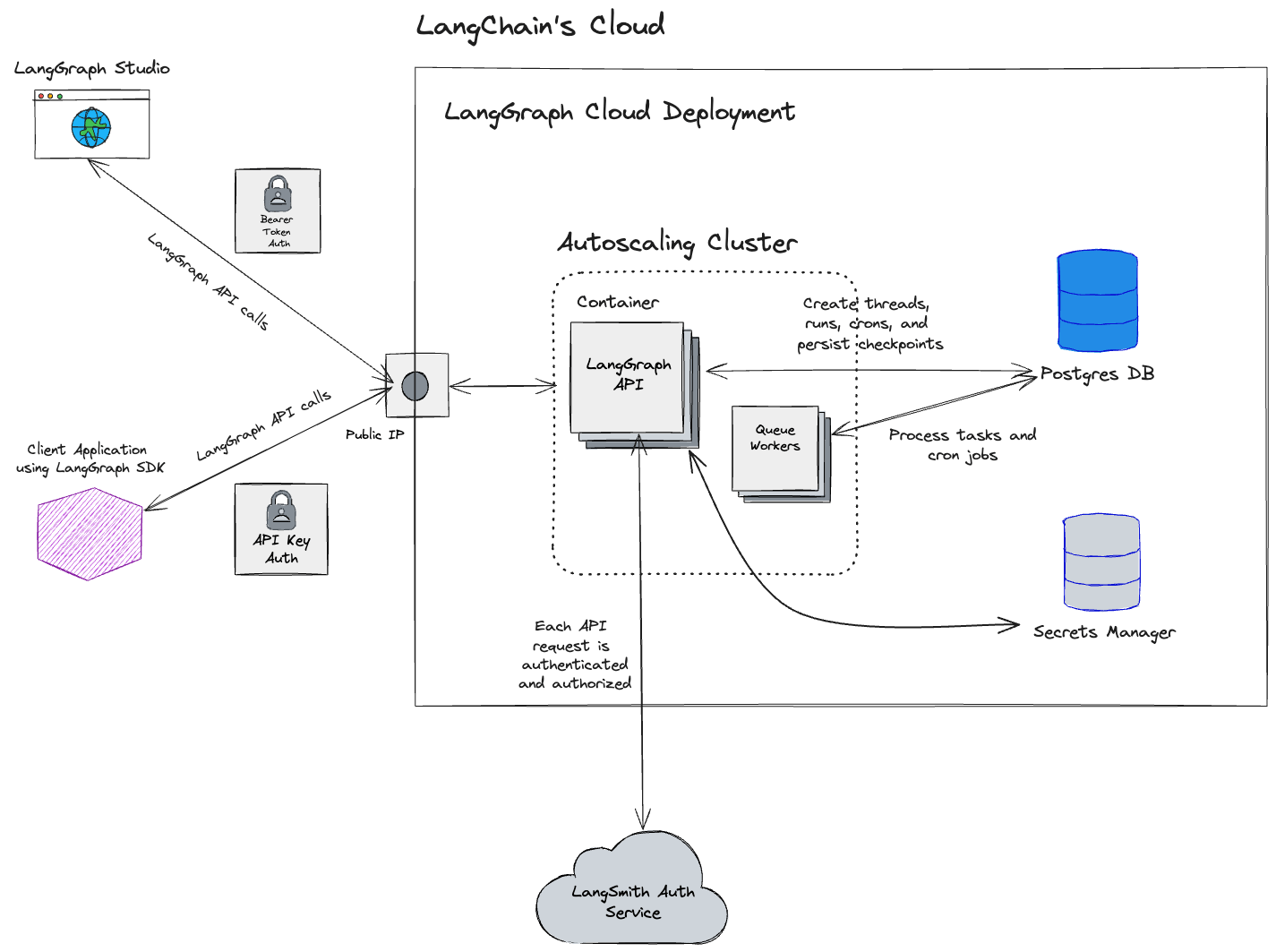
Cloud 架构与可扩展性
NOTE
本节仅适用于以下云端托管的 LangSmith:https://smith.langchain.com、https://eu.smith.langchain.com、https://apac.smith.langchain.com 和 https://aws.smith.langchain.com。
有关自托管 LangSmith 方案的信息,请参阅自托管文档。
对于美国、欧盟和 APAC 的 SaaS 区域,LangSmith 托管在 Google Cloud Platform (GCP) 上;对于由 AWS 托管的美国 SaaS 区域,则托管在 Amazon Web Services (AWS) 上。该平台设计为高度可扩展。许多客户在 LangSmith 上运行生产工作负载,用于 LLM 应用的可观测性、评估和智能体部署。
基于美国的 LangSmith 服务(默认 GCP 区域)托管在 GCP 的 us-central1(爱荷华)区域。
NOTE
基于欧盟的 LangSmith 服务已可用,托管在 GCP 的 europe-west4(荷兰)区域。如果你有兴趣在该区域使用 Enterprise 方案,请联系我们的销售团队。
NOTE
自 2026 年 4 月起,LangSmith SaaS 已在 AWS 的 us-east-2(俄亥俄)区域提供。
NOTE
自 2026 年 5 月起,LangSmith SaaS 已在 APAC 的 GCP australia-southeast1(悉尼)区域提供。
区域化存储
本表中的资源和服务存储在与注册时所用 URL 相对应的位置(GCP US、GCP EU、GCP APAC 或 AWS US)。云端托管的 LangSmith 使用 Supabase 进行身份认证/授权,并使用 ClickHouse Cloud 作为数据仓库。
| GCP US | GCP EU | GCP APAC | AWS US | |
|---|---|---|---|---|
| URL | https://smith.langchain.com | https://eu.smith.langchain.com | https://apac.smith.langchain.com | https://aws.smith.langchain.com |
| API URL | https://api.smith.langchain.com | https://eu.api.smith.langchain.com | https://apac.api.smith.langchain.com | https://aws.api.smith.langchain.com |
| 云 | GCP us-central1(爱荷华) | GCP europe-west4(荷兰) | GCP australia-southeast1(悉尼) | AWS us-east-2(俄亥俄) |
| Supabase | AWS us-east-1(北弗吉尼亚) | AWS eu-central-1(德国) | AWS ap-southeast-2(悉尼) | AWS us-east-2(俄亥俄) |
| ClickHouse Cloud | us-central1(爱荷华) | europe-west4(荷兰) | australia-southeast1(悉尼) | us-east-2(俄亥俄) |
| LangSmith 部署 | GCP us-central1(爱荷华);*.us.langgraph.app | GCP europe-west4(荷兰);*.eu.langgraph.app | GCP australia-southeast1(悉尼);*.apac.langgraph.app | AWS us-east-2(俄亥俄);*.aws.us.langgraph.app |
更多信息请参阅区域常见问题。
与区域无关的存储
此处列出的数据仅存储在美国:
- 通过 Stripe 和 Metronome 处理的支付与计费信息
GCP 服务
以下内容适用于 GCP 上的美国、欧盟和 APAC SaaS 区域。
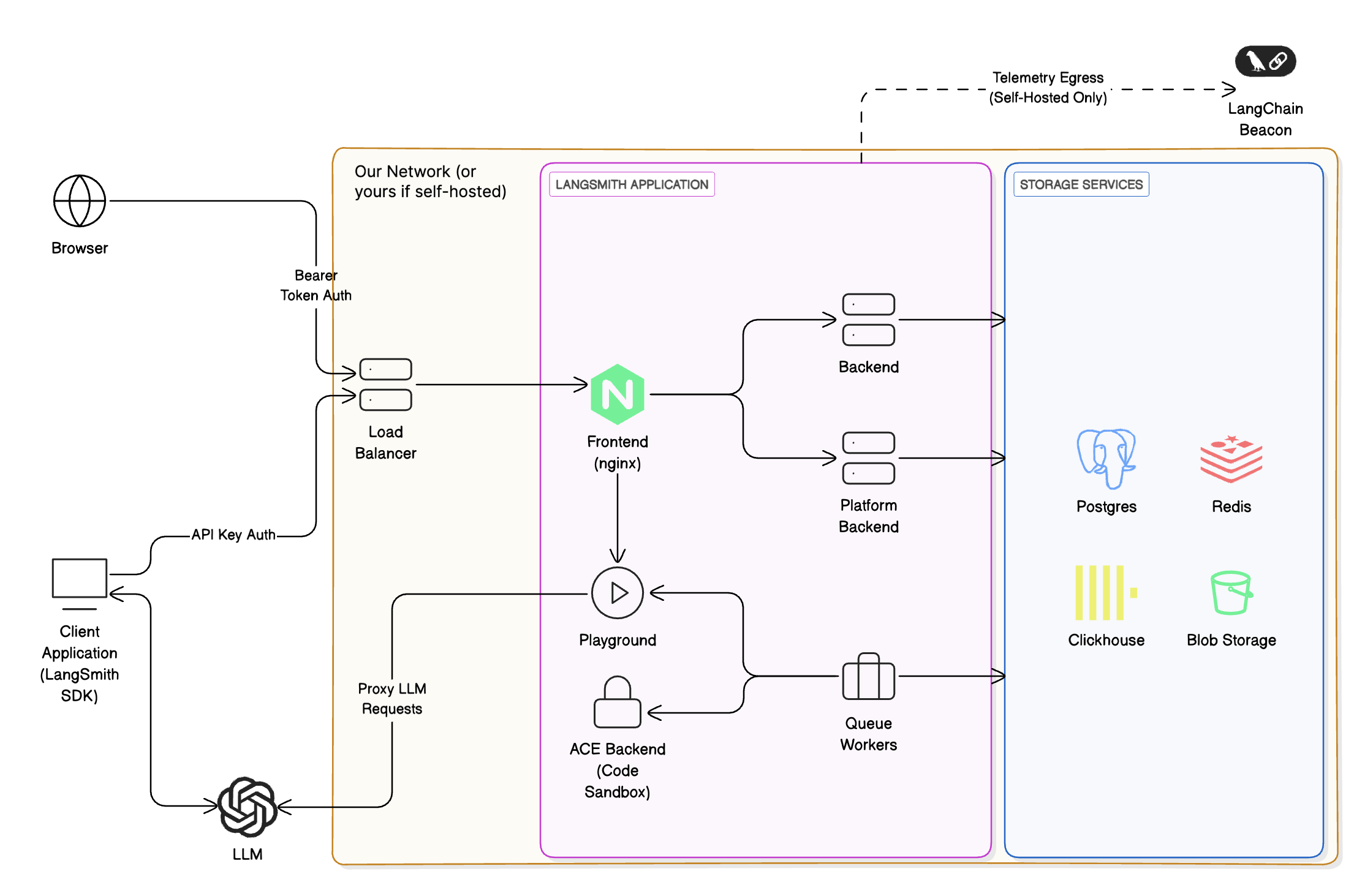
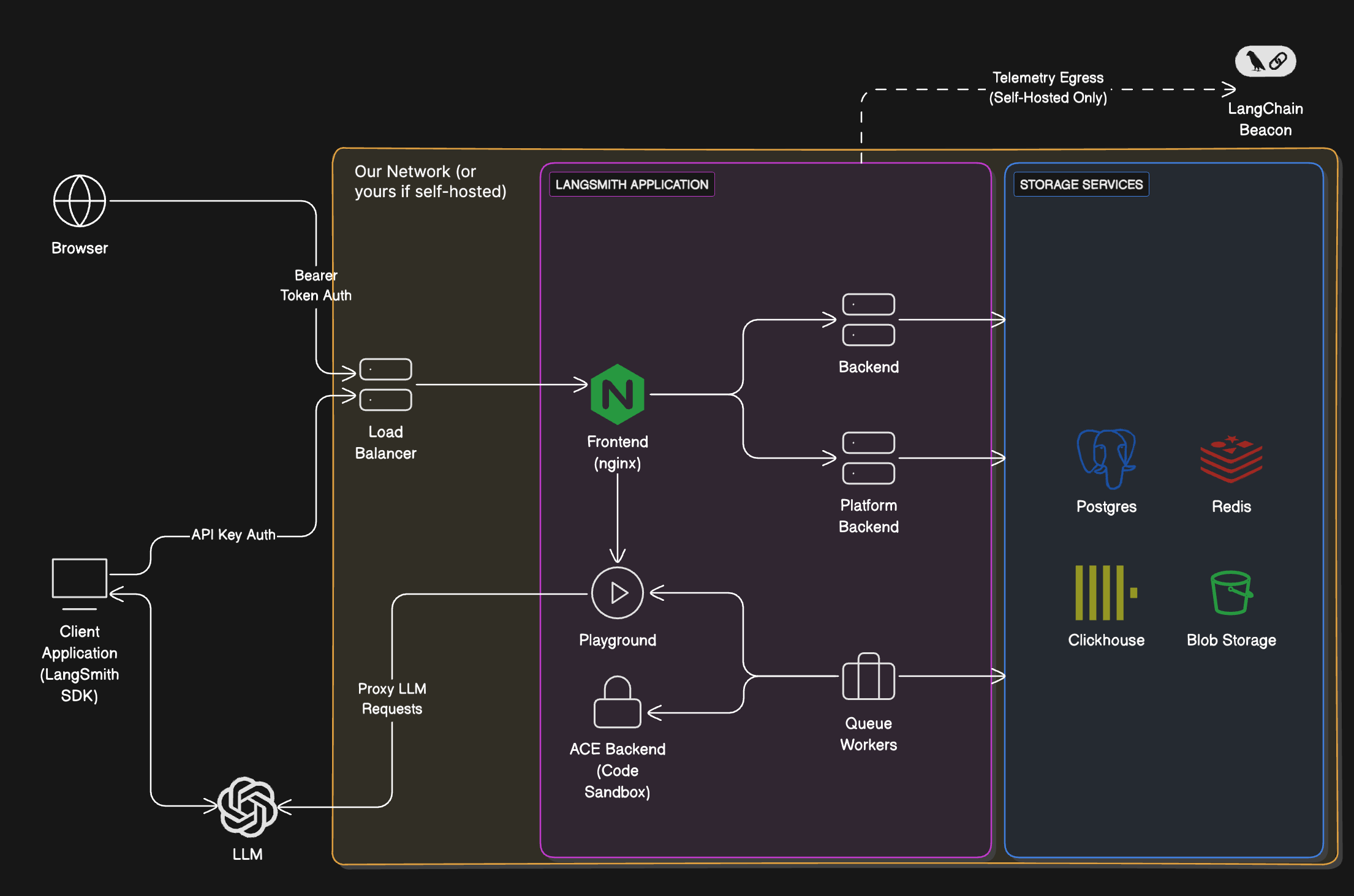
LangSmith 由以下服务组成,全部托管在 Google Kubernetes Engine (GKE) 上:
- LangSmith Frontend:提供 LangSmith UI 服务。
- LangSmith Backend:提供 LangSmith API 服务。
- LangSmith Platform Backend:处理身份认证和其他高吞吐量任务。(内部服务)
- LangSmith Playground:负责为 Playground 功能向各类 LLM 服务商转发请求。
- LangSmith Queue:负责异步任务的处理。(内部服务)
LangSmith 使用以下 GCP 存储服务:
- Google Cloud Storage (GCS):用于存储运行的输入和输出。
- Google Cloud SQL PostgreSQL:用于事务型工作负载。
- Google Cloud Memorystore for Redis:用于队列和缓存。
- GCP 上的 Clickhouse Cloud:用于追踪摄入和分析。我们的服务通过私有端点连接到托管在同一 GCP 区域的 Clickhouse Cloud。
我们使用的其他一些 GCP 服务包括:
- Google Cloud Load Balancer:将流量路由到 LangSmith 服务。
- Google Cloud CDN:用于缓存静态资源。
- Google Cloud Armor:用于安全防护和速率限制。有关我们实施的速率限制的更多信息,请参阅速率限制。
AWS 服务
以下内容适用于 us-east-2(俄亥俄)的 AWS US SaaS 区域。相同的 LangSmith 逻辑组件运行在 Amazon EKS 上,而非 GKE。
LangSmith 由以下服务组成,全部托管在 Amazon EKS 上:
- LangSmith Frontend:提供 LangSmith UI 服务。
- LangSmith Backend:提供 LangSmith API 服务。
- LangSmith Platform Backend:处理身份认证和其他高吞吐量任务。(内部服务)
- LangSmith Playground:负责为 Playground 功能向各类 LLM 服务商转发请求。
- LangSmith Queue:负责异步任务的处理。(内部服务)
LangSmith 使用以下 AWS 存储和数据服务:
- Amazon S3:用于存储运行的输入和输出。
- Amazon RDS for PostgreSQL:用于事务型工作负载。
- Amazon ElastiCache for Redis:用于队列和缓存。
- 通过
us-east-2区域的 AWS PrivateLink 连接的 ClickHouse Cloud:用于追踪摄入和分析,与上文区域化存储表一致。
我们使用的其他一些 AWS 服务包括:
- Elastic Load Balancing(Network Load Balancers)和 Istio ingress:将流量路由到 LangSmith 服务。文档中所列的 API 速率限制在 Istio ingress gateway 处实施。详情请参阅速率限制。
- Amazon CloudFront:用于缓存静态资源(包括 Web UI 主机名
aws.smith.langchain.com)。 - CloudFront 上的 AWS WAF:用于在边缘应用托管规则组(例如 AWS Managed Rules 通用防护和 Bot Control)。
IP 地址允许列表
从 LangChain SaaS 流出的流量
所有离开 LangSmith 服务的流量都将通过 NAT 网关路由。所有流量看起来都源自以下 IP 地址:
| GCP US | GCP EU | GCP APAC | AWS US |
|---|---|---|---|
| 34.59.65.97 | 34.13.192.67 | 34.151.89.217 | 18.188.147.158 |
| 34.67.51.221 | 34.147.105.64 | 34.116.97.4 | 18.219.86.202 |
| 34.46.212.37 | 34.90.22.166 | 34.151.162.199 | 3.21.57.192 |
| 34.132.150.88 | 34.147.36.213 | 34.116.66.129 | |
| 35.188.222.201 | 34.32.137.113 | 35.189.8.125 | |
| 34.58.194.127 | 34.91.238.184 | 35.201.9.237 | |
| 34.59.97.173 | 35.204.101.241 | 35.189.57.29 | |
| 104.198.162.55 | 35.204.48.32 | 34.40.198.11 |
如果你要连接自己的 AzureOpenAI 服务,或连接 Playground 或在线评估可能需要的其他端点,将这些 IP 地址加入允许列表可能会有帮助。
NOTE
部署在 LangSmith Deployment 上的智能体产生的流量通过一组独立的 NAT IP 流出。有关该列表,请参阅 Cloud 平台功能参考中的允许列表 IP 地址。
流入 LangChain SaaS 的流量
对于终止于我们的 GCP 负载均衡器(美国/欧盟/APAC)的流量,或者对于 AWS US,终止于 us-east-2 中 Network Load Balancer(API 和网关主机名)的流量,LangChain 端点映射到以下静态 IP 地址:
| GCP US | GCP EU | GCP APAC | AWS US |
|---|---|---|---|
| 34.8.121.39 | 34.95.92.214 | 34.149.149.213 | 3.129.27.169 |
| 34.107.251.234 | 34.13.73.122 | 13.58.107.119 | |
| 16.59.151.49 | |||
| 16.59.98.147 | |||
| 3.134.146.243 | |||
| 3.150.87.246 |
你可能需要将这些地址加入允许列表,以使来自你的私有网络的流量能够访问 LangSmith SaaS 端点(api.smith.langchain.com、smith.langchain.com、beacon.langchain.com、eu.api.smith.langchain.com、eu.smith.langchain.com、eu.beacon.langchain.com、apac.api.smith.langchain.com、apac.smith.langchain.com、apac.beacon.langchain.com、aws.api.smith.langchain.com、aws.smith.langchain.com)。
私有连接(Enterprise)
INFO
仅限 Enterprise。 私有连接仅面向 Enterprise 客户提供。请联系你的客户代表或 sales@langchain.dev 以启用此功能。
Enterprise 客户可以使用 AWS PrivateLink 或 GCP Private Service Connect (PSC) 连接到 LangSmith,而无需将流量暴露到公共互联网。
AWS PrivateLink
AWS 上的客户可以通过 AWS PrivateLink 连接到 LangSmith,从而从任意 VPC 获得私有连接。原生支持跨区域连接。
端点服务名称
| 区域 | 服务名称 |
|---|---|
美国(us-east-2) | com.amazonaws.vpce.us-east-2.vpce-svc-054f37092752bff6b |
设置
1. 申请访问权限: 联系你的客户代表或 sales@langchain.dev,并提供你的 AWS 账户 ID。LangChain 会将你的账户添加到该端点服务的允许主体列表中。
2. 在你的 AWS 账户中创建一个 Interface VPC Endpoint。 附加一个安全组,允许来自你的 VPC CIDR(或来自需要访问 LangSmith 的实例)的 TCP 443 入站流量:
bash
aws ec2 create-vpc-endpoint \
  --vpc-id <YOUR_VPC_ID> \
  --service-name <SERVICE_NAME_FROM_TABLE_ABOVE> \
  --vpc-endpoint-type Interface \
  --subnet-ids <YOUR_SUBNET_IDS> \
  --security-group-ids <YOUR_SECURITY_GROUP_ID> \
--region <YOUR_REGION>hcl
resource "aws_vpc_endpoint" "langsmith" {
  vpc_id              = "<YOUR_VPC_ID>"
  service_name        = "<SERVICE_NAME_FROM_TABLE_ABOVE>"
  vpc_endpoint_type   = "Interface"
  subnet_ids          = ["<YOUR_SUBNET_IDS>"]
  security_group_ids  = ["<YOUR_SECURITY_GROUP_ID>"]
}3. 等待接受连接。 LangChain 会接受该连接。端点状态将从 pendingAcceptance 变为 available。在接受连接后,请等待几分钟让更改完全传播,然后再测试连通性。
配置 DNS
配置 DNS,使 aws.api.smith.langchain.com 在你的 VPC 内解析为你的 VPC 端点的私有 DNS 名称。你可以使用任何私有 DNS 方案:Route 53 Private Hosted Zones、企业 DNS 解析器,或任何可从你的 VPC 访问的 DNS 服务器。
首先,获取你的端点的 DNS 名称:
bash
aws ec2 describe-vpc-endpoints \
  --vpc-endpoint-ids <YOUR_ENDPOINT_ID> \
  --query 'VpcEndpoints[0].DnsEntries[0].DnsName' \
--output text --region <YOUR_REGION>然后,为 aws.api.smith.langchain.com 创建一条指向该 DNS 名称的 CNAME 记录。以下是使用 Route 53 的示例:
bash
aws route53 create-hosted-zone \
  --name aws.api.smith.langchain.com \
  --vpc VPCRegion=<YOUR_REGION>,VPCId=<YOUR_VPC_ID> \
  --caller-reference langsmith-privatelink-$(date +%s) \
  --hosted-zone-config PrivateZone=true

aws route53 change-resource-record-sets \
  --hosted-zone-id <HOSTED_ZONE_ID> \
  --change-batch '{
    "Changes": [{
      "Action": "CREATE",
      "ResourceRecordSet": {
        "Name": "aws.api.smith.langchain.com",
        "Type": "CNAME",
        "TTL": 300,
        "ResourceRecords": [{"Value": "<ENDPOINT_DNS_NAME>"}]
      }
    }]
}'hcl
resource "aws_route53_zone" "langsmith_privatelink" {
  name = "aws.api.smith.langchain.com"

  vpc {
    vpc_id = "<YOUR_VPC_ID>"
  }
}

resource "aws_route53_record" "langsmith_privatelink" {
  zone_id = aws_route53_zone.langsmith_privatelink.zone_id
  name    = "aws.api.smith.langchain.com"
  type    = "CNAME"
  ttl     = 300
  records = [aws_vpc_endpoint.langsmith.dns_entry[0]["dns_name"]]
}验证连接
从你的 VPC 中的 EC2 实例或容器执行:
bash
curl https://aws.api.smith.langchain.com/okGCP Private Service Connect
GCP 上的企业客户可以通过 Private Service Connect (PSC) 连接到 LangSmith,从而在不将流量暴露到公共互联网的前提下实现私有连接。
服务连接 URI
使用以下服务连接 URI 在你的 VPC 中创建 PSC 端点:
| 区域 | 服务连接 URI |
|---|---|
美国(us-central1) | projects/langchain-prod/regions/us-central1/serviceAttachments/gateway-psc-publish |
欧洲(europe-west4) | projects/langchain-prod/regions/europe-west4/serviceAttachments/gateway-psc-publish |
亚太(australia-southeast1) | projects/langchain-apac-prod/regions/australia-southeast1/serviceAttachments/gateway-psc-publish |
PSC 域名
完成设置后,使用以下域名通过你的 PSC 连接访问 LangSmith:
| 区域 | 域名 |
|---|---|
| 美国 | us-central1.p.api.smith.langchain.com |
| 欧洲 | europe-west4.p.api.smith.langchain.com |
| 亚太 | australia-southeast1.p.api.smith.langchain.com |
设置
申请访问: 联系你的客户经理或 sales@langchain.dev,并提供你的 GCP 项目 ID。LangChain 会将你的项目加入该服务连接的允许使用方列表。
获得访问权限后,创建 PSC 端点,并使用 gcloud CLI 或 Terraform 配置 DNS。
创建 PSC 端点
在你的 VPC 中创建一条指向该服务连接的转发规则:
bash
# 创建 PSC 端点
gcloud compute forwarding-rules create langsmith-psc-endpoint \
  --region=<REGION> \
  --network=<YOUR_VPC_NETWORK> \
  --subnet=<YOUR_SUBNET> \
  --target-service-attachment=projects/langchain-prod/regions/<REGION>/serviceAttachments/gateway-psc-publish \
  --load-balancing-scheme=""

# 获取已分配的 IP 地址
gcloud compute forwarding-rules describe langsmith-psc-endpoint \
  --region=<REGION> \
--format="value(IPAddress)"hcl
resource "google_compute_forwarding_rule" "langsmith_psc" {
  name                  = "langsmith-psc-endpoint"
  project               = "<YOUR_PROJECT_ID>"
  region                = "<REGION>"
  network               = "<YOUR_VPC_NETWORK>"
  subnetwork            = "<YOUR_SUBNET>"
  target                = "projects/langchain-prod/regions/<REGION>/serviceAttachments/gateway-psc-publish"
  load_balancing_scheme = ""
}配置 DNS
在你的 VPC 中创建私有 DNS 区域,并添加一条指向 PSC 端点 IP 的 A 记录:
bash
# 创建私有 DNS 区域
gcloud dns managed-zones create langsmith-psc \
  --dns-name="<REGION>.p.api.smith.langchain.com." \
  --visibility=private \
  --networks=<YOUR_VPC_NETWORK>

# 添加指向 PSC 端点 IP 的 A 记录
gcloud dns record-sets create "<REGION>.p.api.smith.langchain.com." \
  --zone=langsmith-psc \
  --type=A \
--rrdatas=<PSC_ENDPOINT_IP>hcl
resource "google_dns_managed_zone" "langsmith_psc" {
  name        = "langsmith-psc"
  project     = "<YOUR_PROJECT_ID>"
  dns_name    = "<REGION>.p.api.smith.langchain.com."
  visibility  = "private"

  private_visibility_config {
    networks {
      network_url = "<YOUR_VPC_NETWORK_SELF_LINK>"
    }
  }
}

resource "google_dns_record_set" "langsmith_psc" {
  name         = "<REGION>.p.api.smith.langchain.com."
  project      = "<YOUR_PROJECT_ID>"
  managed_zone = google_dns_managed_zone.langsmith_psc.name
  type         = "A"
  ttl          = 300
  rrdatas      = [google_compute_forwarding_rule.langsmith_psc.ip_address]
}验证连接
在你的 VPC 内的虚拟机上执行:
bash
curl https://<REGION>.p.api.smith.langchain.com/okAPI 速率限制
LangSmith 对 API 端点实施速率限制,以确保服务稳定性和公平使用。下表展示了 GCP 美国区域和 GCP 欧洲区域中各个端点的速率限制。GCP 亚太区域和 AWS 美国区域实施相近的服务专属限制;如果你需要所属组织的确切限制,请联系支持团队。请注意:
- 速率限制以
count / interval表示,其中 count 是该时间间隔(单位为秒)内允许的请求数量。例如,2000 / 10表示每 10 秒 2000 个请求。 - 如果端点列中未指定 HTTP 方法,则该速率限制适用于该端点的所有 HTTP 方法。
- 如果列出了具体方法(例如
POST、GET),则速率限制仅适用于该方法。
| 匹配项 / 端点(方法) | 身份键 | 美国生产环境限制 | 欧洲生产环境限制 | 分类 |
|---|---|---|---|---|
OPTIONS、/info、*/v1/metadata/submit | IP | 2000 / 10 | 2000 / 10 | 高吞吐 |
/auth | x-api-key | 2000 / 10 | 2000 / 10 | 高吞吐 |
/auth | x-user-id + IP | 2000 / 10 | 2000 / 10 | 高吞吐 |
/v1/beacon | IP | 2000 / 10 | 2000 / 10 | 高吞吐 |
/repos | x-api-key | 100 / 60 | 100 / 60 | 仓库 |
/repos | x-user-id + IP | 100 / 60 | 100 / 60 | 仓库 |
POST /runs/batch | x-api-key | 2000 / 10 | 2000 / 10 | 高吞吐 |
POST /otel/v1/traces | x-api-key | 2000 / 10 | 2000 / 10 | 运行摄取 |
包含 /charts 的 POST | x-api-key | 750 / 600 | 750 / 600 | 图表 |
包含 /charts 的 POST | x-user-id + IP | 750 / 600 | 750 / 600 | 图表 |
POST /runs/multipart | x-api-key | 6000 / 10 | 6000 / 10 | 多部分摄取 |
POST /runs/query | x-api-key | 15 / 10 | 15 / 10 | 运行查询(API) |
POST /runs/query | x-user-id + IP | 300 / 10 | 300 / 10 | 运行查询(用户) |
/generate | x-api-key | 30 / 3600 | 30 / 3600 | 生成 |
/generate | x-user-id + IP | 30 / 3600 | 30 / 3600 | 生成 |
/commits | x-api-key | 10000 / 60 | 2000 / 60 | 提交 |
/commits | x-user-id + IP | 10000 / 60 | 2000 / 60 | 提交 |
DELETE /sessions 或 */trigger | x-api-key | 10 / 60 | 10 / 60 | 删除 |
DELETE /sessions 或 */trigger | x-user-id + IP | 30 / 60 | 30 / 60 | 删除 |
POST /runs(单次运行摄取) | x-api-key | 2000 / 10 | 2000 / 10 | 运行摄取 |
包含 /runs 的 PATCH | x-api-key | 2000 / 10 | 2000 / 10 | 运行摄取 |
POST /feedback | x-api-key | 2000 / 10 | 2000 / 10 | 高吞吐 |
GET /runs/{uuid} 或 /api/v1/runs/{uuid} | x-api-key | 30 / 60 | 30 / 60 | 运行查找 |
包含 /examples 的 GET | x-api-key | 5000 / 60 | 5000 / 60 | 示例 |
任何带 x-api-key 的请求 | x-api-key | 1000 / 10 | 1000 / 10 | 默认(API key) |
任何带 x-user-id 的请求 | x-user-id + IP | 1000 / 10 | 1000 / 10 | 默认(用户) |
/public/download | IP | 5000 / 60 | 5000 / 60 | 公共下载 |
/runs/stats | x-api-key | 1 / 10 | 20 / 10 | 统计 |
| 所有其他 IP(兜底) | IP | 100 / 60 | 100 / 60 | 公共(兜底) |
速率限制分类
- 高吞吐:用于身份认证、元数据和反馈等核心操作的通用大流量端点。
- 仓库:仓库与提示词管理操作。
- 运行摄取:用于可观测性的单次追踪/运行摄取端点。
- 图表:图表生成与可视化端点。
- 多部分摄取:通过 multipart 上传批量摄取运行,用于大流量追踪。
- 运行查询(API):基于 API key 的运行查询操作,对复杂查询施加更严格的限制。
- 运行查询(用户):基于用户的运行查询操作,为交互式使用提供更高的限制。
- 生成:由 AI 驱动的代码与内容生成端点(加以限制以防止滥用)。
- 提交:提示词版本管理与提交操作。
- 删除:会话删除与工作流触发操作。
- 运行查找:按 UUID 检索特定的运行。
- 示例:获取数据集示例,用于 few-shot 提示。
- 默认(API key):未匹配特定模式的已认证 API 请求的兜底速率限制。
- 默认(用户):未匹配特定模式的已认证用户请求的兜底速率限制。
- 公共下载:用于共享资源的大流量公共下载端点。
- 统计:运行统计与分析端点(适用区域专属限制)。
- 公共(兜底):未认证公共访问的默认速率限制。
有关速率限制和其他服务限制的更多信息,请参阅管理概览。