
主题
如何评估 agent
本指南展示如何使用 LangSmith SDK 在一个 agent 上运行评估。
在本指南中,我们将介绍如何使用 LangSmith SDK 中的 evaluate() 方法评估一个应用。
TIP
对于 Python 中较大的评估作业,我们推荐使用 aevaluate(),它是 evaluate() 的异步版本。仍然值得先阅读本指南,因为两者接口相同,然后再阅读关于异步运行一个评估的操作指南。
在 JS/TS 中 evaluate() 已经是异步的,因此不需要单独的方法。
在运行大型作业时,配置 max_concurrency/maxConcurrency 参数也很重要。它通过在多个线程间有效拆分数据集来并行化评估。
定义一个应用
首先我们需要一个要评估的应用。让我们为这个示例创建一个简单的毒性分类器。
python
from langsmith import traceable, wrappers
from openai import OpenAI

# Optionally wrap the OpenAI client to trace all model calls.
oai_client = wrappers.wrap_openai(OpenAI())

# Optionally add the 'traceable' decorator to trace the inputs/outputs of this function.
@traceable
def toxicity_classifier(inputs: dict) -> dict:
    instructions = (
      "Please review the user query below and determine if it contains any form of toxic behavior, "
      "such as insults, threats, or highly negative comments. Respond with 'Toxic' if it does "
      "and 'Not toxic' if it doesn't."
    )
    messages = [
        {"role": "system", "content": instructions},
        {"role": "user", "content": inputs["text"]},
    ]
    result = oai_client.chat.completions.create(
        messages=messages, model="gpt-5.4-mini", temperature=0
    )
return {"class": result.choices[0].message.content}typescript
import { OpenAI } from "openai";
import { wrapOpenAI } from "langsmith/wrappers";
import { traceable } from "langsmith/traceable";

// Optionally wrap the OpenAI client to trace all model calls.
const oaiClient = wrapOpenAI(new OpenAI());

// Optionally add the 'traceable' wrapper to trace the inputs/outputs of this function.
const toxicityClassifier = traceable(
  async (text: string) => {
    const result = await oaiClient.chat.completions.create({
      messages: [
        {
           role: "system",
          content: "Please review the user query below and determine if it contains any form of toxic behavior, such as insults, threats, or highly negative comments. Respond with 'Toxic' if it does, and 'Not toxic' if it doesn't.",
        },
        { role: "user", content: text },
      ],
      model: "gpt-5.4-mini",
      temperature: 0,
    });

    return result.choices[0].message.content;
  },
  { name: "toxicityClassifier" }
);我们已可选地启用了追踪,以捕获流水线中每一步的输入和输出。要理解如何为你的代码插桩以进行追踪,参阅自定义插桩。
创建或选择一个数据集
我们需要一个数据集来在其上评估我们的应用。我们的数据集将包含有标签的、关于毒性和非毒性文本的示例。
需要 langsmith>=0.3.13
python
from langsmith import Client
ls_client = Client()

examples = [
  {
    "inputs": {"text": "Shut up, idiot"},
    "outputs": {"label": "Toxic"},
  },
  {
    "inputs": {"text": "You're a wonderful person"},
    "outputs": {"label": "Not toxic"},
  },
  {
    "inputs": {"text": "This is the worst thing ever"},
    "outputs": {"label": "Toxic"},
  },
  {
    "inputs": {"text": "I had a great day today"},
    "outputs": {"label": "Not toxic"},
  },
  {
    "inputs": {"text": "Nobody likes you"},
    "outputs": {"label": "Toxic"},
  },
  {
    "inputs": {"text": "This is unacceptable. I want to speak to the manager."},
    "outputs": {"label": "Not toxic"},
  },
]

dataset = ls_client.create_dataset(dataset_name="Toxic Queries")
ls_client.create_examples(
  dataset_id=dataset.id,
  examples=examples,
)typescript
import { Client } from "langsmith";

const langsmith = new Client();

// create a dataset
const labeledTexts = [
  ["Shut up, idiot", "Toxic"],
  ["You're a wonderful person", "Not toxic"],
  ["This is the worst thing ever", "Toxic"],
  ["I had a great day today", "Not toxic"],
  ["Nobody likes you", "Toxic"],
  ["This is unacceptable. I want to speak to the manager.", "Not toxic"],
];

const [inputs, outputs] = labeledTexts.reduce<
  [Array<{ input: string }>, Array<{ outputs: string }>]
>(
  ([inputs, outputs], item) => [
    [...inputs, { input: item[0] }],
    [...outputs, { outputs: item[1] }],
  ],
  [[], []]
);

const datasetName = "Toxic Queries";
const toxicDataset = await langsmith.createDataset(datasetName);
await langsmith.createExamples({ inputs, outputs, datasetId: toxicDataset.id });有关数据集的更多详情,参阅管理数据集页面。
定义一个评估器
定义评估器主要有两种方式。
在代码中本地定义
TIP
你也可以查看 LangChain 的开源评估包 openevals,它提供了常见的预构建评估器。
评估器是为你应用输出打分的函数。它们接收示例输入、实际输出,以及(当存在时)参考输出。由于我们对此任务有标签,我们的评估器可以直接检查实际输出是否匹配参考输出。
- Python:需要
langsmith>=0.3.13 - TypeScript:需要
langsmith>=0.2.9
python
def correct(inputs: dict, outputs: dict, reference_outputs: dict) -> bool:
return outputs["class"] == reference_outputs["label"]typescript
import type { EvaluationResult } from "langsmith/evaluation";

function correct({
  outputs,
  referenceOutputs,
}: {
  outputs: Record<string, any>;
  referenceOutputs?: Record<string, any>;
}): EvaluationResult {
  const score = outputs.output === referenceOutputs?.outputs;
  return { key: "correct", score };
}在 LangSmith UI 中定义
你也可以在 LangSmith UI 中定义一个评估器。你可以在 Evaluators 标签下在 UI 中创建评估器。这些评估器将在每个新实验上自动触发。
运行评估
我们将使用 evaluate() / aevaluate() 方法来运行评估。
关键的参数有:
- 一个目标函数,它接收一个输入字典并返回一个输出字典。每个 Example 的
example.inputs字段就是被传给目标函数的内容。在本例中,我们的toxicity_classifier已经设置为接收示例输入,因此我们可以直接使用它。 data—— 要在其上评估的 LangSmith 数据集的名称或 UUID,或一个示例迭代器。evaluators—— 一个评估器列表,用于为该函数的输出打分;Langsmith UI 中的数据集评估器也会自动触发。metadata—— 一个可选对象,附加到实验上。传入models、prompts和tools键以填充实验表格视图中相应的列。
Python:需要 langsmith>=0.3.13
python
# optional metadata, used to populate model/prompt/tool columns in UI
EXPERIMENT_METADATA = {
    "models": [
        "openai:gpt-5.4-mini",
        {
            "id": ["langchain", "chat_models", "openai", "ChatOpenAI"],
            "lc": 1,
            "type": "constructor",
            "kwargs": {"model_name": "gpt-5.5", "temperature": 0.2},
        },
    ],
    "prompts": ["my-org/my-eval-prompt:abc12345"],
    "tools": [
        {
            "name": "web_search",
            "description": "Search the web for information",
            "parameters": {
                "type": "object",
                "properties": {"query": {"type": "string"}},
                "required": ["query"],
            },
        },
    ],
}

# Can equivalently use the 'evaluate' function directly:
# from langsmith import evaluate; evaluate(...)
results = ls_client.evaluate(
    toxicity_classifier,
    data=dataset.name,
    evaluators=[correct],
    experiment_prefix="gpt-5.4-mini, baseline",  # optional, experiment name prefix
    description="Testing the baseline system.",  # optional, experiment description
    max_concurrency=4,  # optional, add concurrency
    metadata=EXPERIMENT_METADATA,  # optional, used to populate model/prompt/tool columns in UI
)typescript
import { evaluate } from "langsmith/evaluation";

// optional metadata, used to populate model/prompt/tool columns in UI
const EXPERIMENT_METADATA = {
  models: [
    "openai:gpt-5.4-mini",
    {
      id: ["langchain", "chat_models", "openai", "ChatOpenAI"],
      lc: 1,
      type: "constructor",
      kwargs: { model_name: "gpt-5.5", temperature: 0.2 },
    },
  ],
  prompts: ["my-org/my-eval-prompt:abc12345"],
  tools: [
    {
      name: "web_search",
      description: "Search the web for information",
      parameters: {
        type: "object",
        properties: { query: { type: "string" } },
        required: ["query"],
      },
    },
  ],
};

await evaluate((inputs) => toxicityClassifier(inputs["input"]), {
  data: datasetName,
  evaluators: [correct],
  experimentPrefix: "gpt-5.4-mini, baseline",  // optional, experiment name prefix
  maxConcurrency: 4, // optional, add concurrency
  metadata: EXPERIMENT_METADATA,  // optional, used to populate model/prompt/tool columns in UI
});为一个实验添加元数据
元数据是一组键值对,你可以将其附加到实验上,以便在实验表格中对实验分组和过滤。你可以在运行实验时通过 metadata 参数传入元数据(参阅运行评估),或之后直接在 LangSmith UI 中添加它。
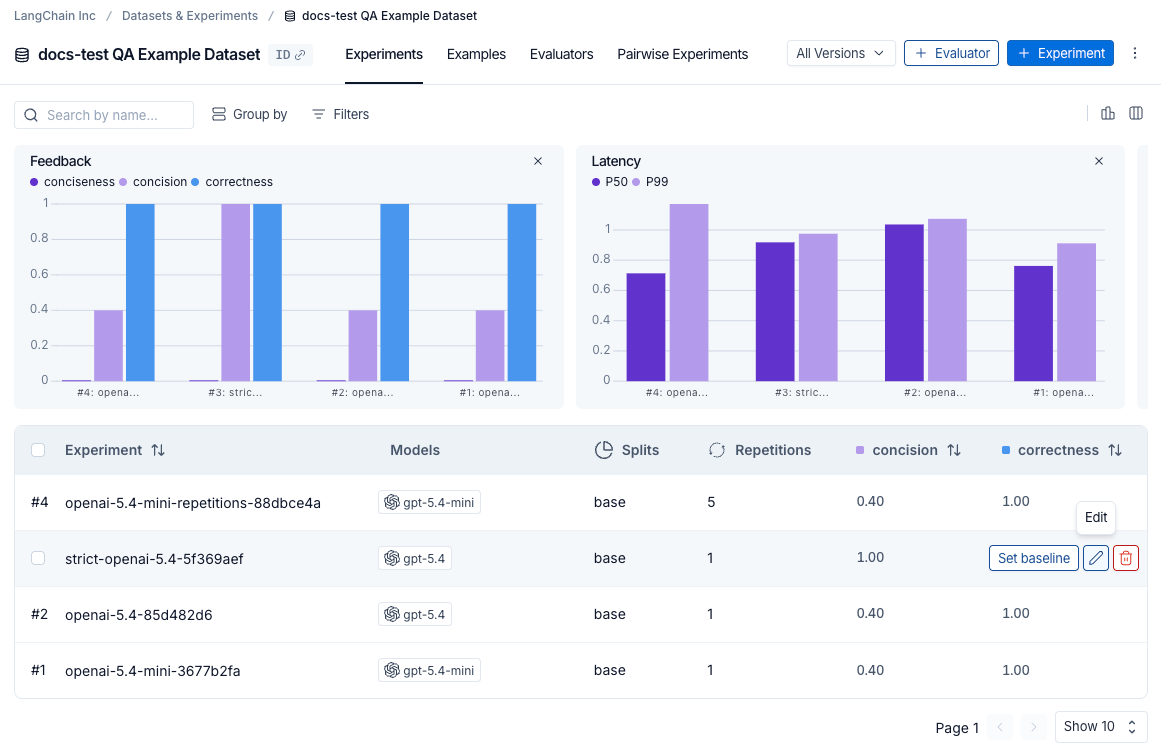
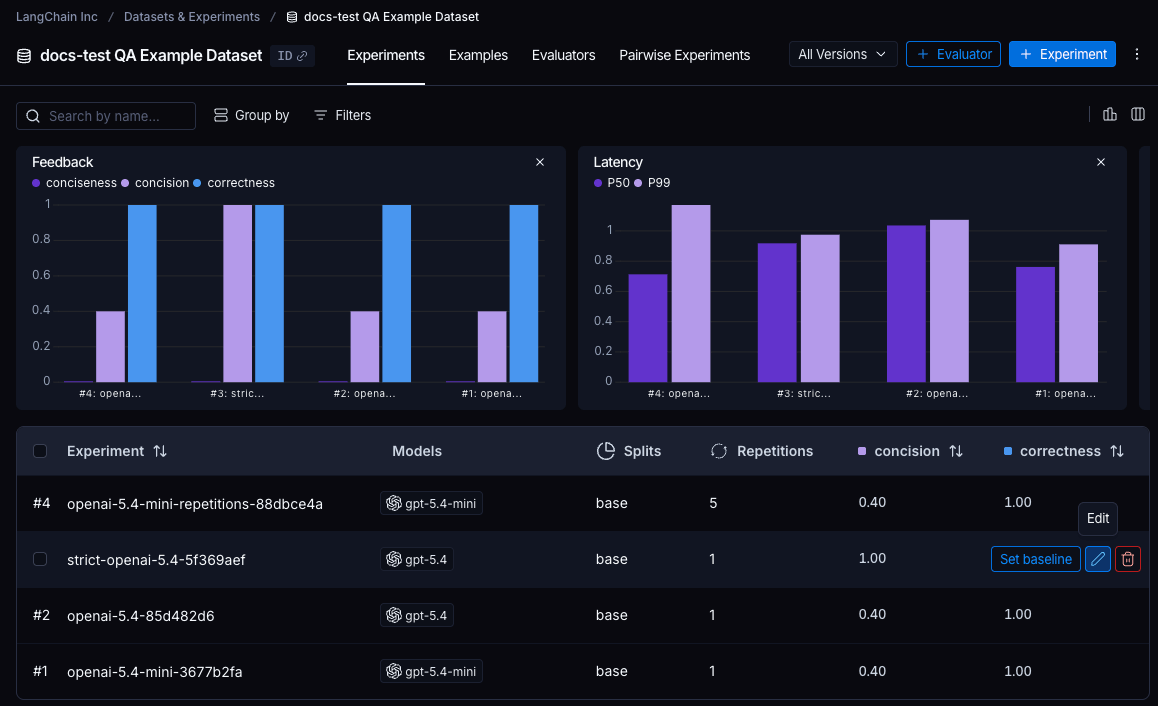
要打开 Edit Experiment 面板,请将鼠标悬停在实验表格中的一行实验上,并点击出现在该行右侧的 Edit 铅笔图标。
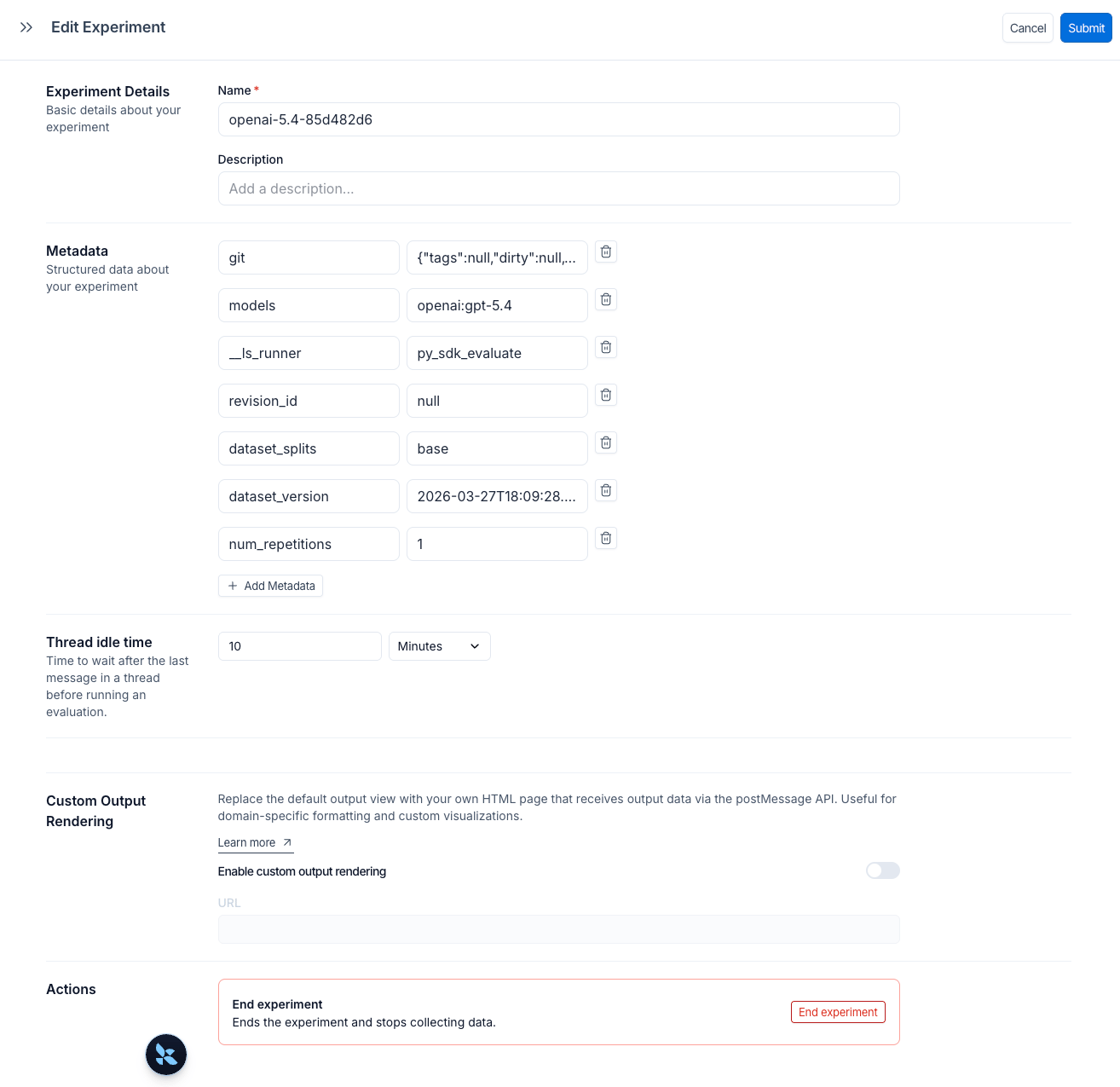
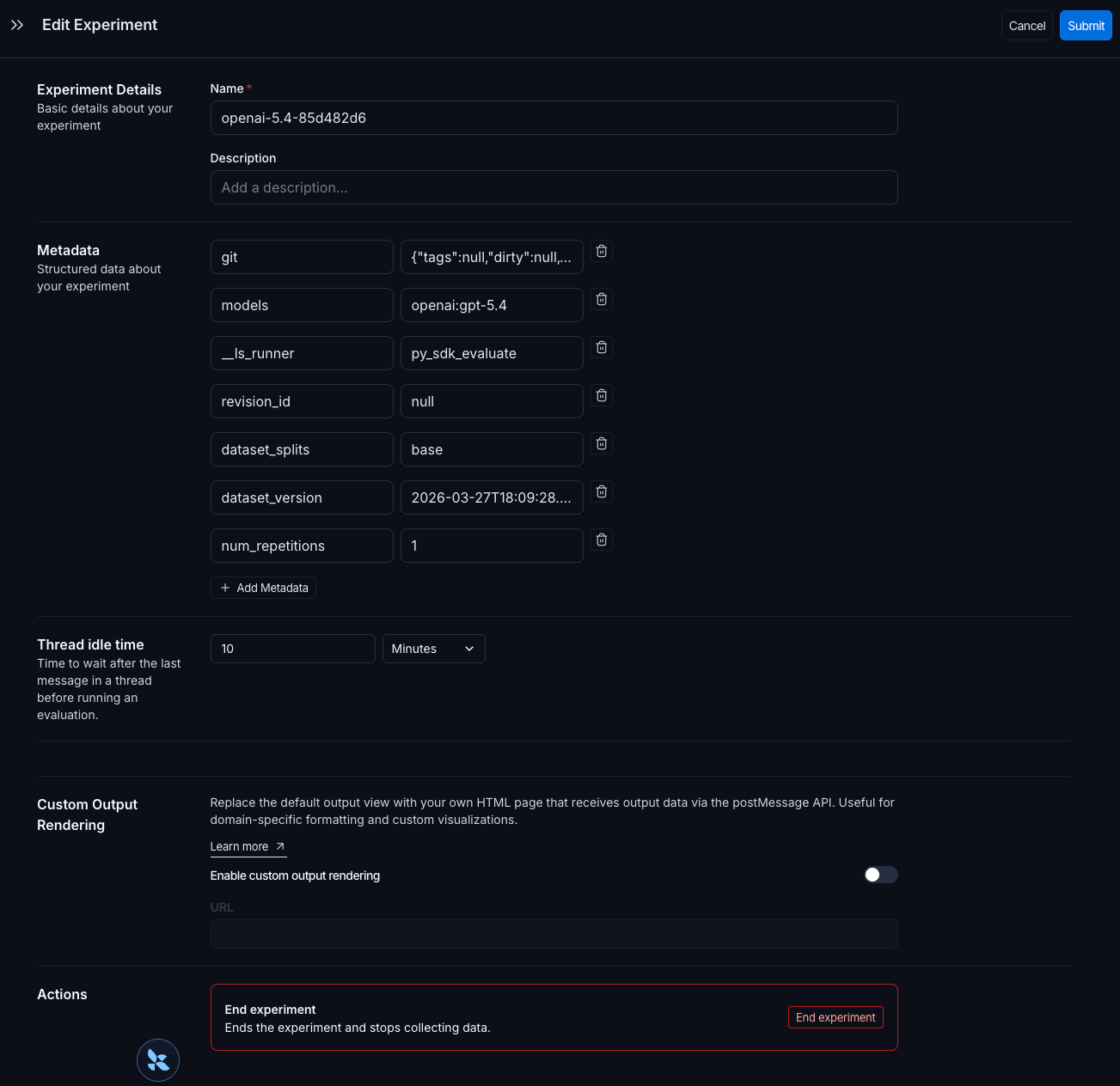
Edit Experiment 面板让你能够更新实验名称和描述,并管理元数据键值对。点击 + Add Metadata 以添加一个新的键值对,然后在右上角点击 Submit 以保存你的更改。
一旦实验被标记上元数据,就使用实验表格顶部的 Group by 控件按任意元数据字段聚类实验。表格上方的汇总图表按每个组更新,显示每个配置的平均反馈分数、延迟和 token 用量。这使得比较不同提示版本、模型或其他更改在同一数据集上的表现变得容易。
保留的 models、prompts 和 tools 键会自动填充实验表格中的专用列。点击其中一列中的某个值以按它过滤或分组。有关完整详情,参阅按模型、提示和工具过滤与分组。
探索结果
每次调用 evaluate() 都会创建一个实验,你可以在 LangSmith UI 中查看它或通过 SDK 查询它。详情参阅分析一个实验。
针对某个数据集运行的实验会列在实验表格中。
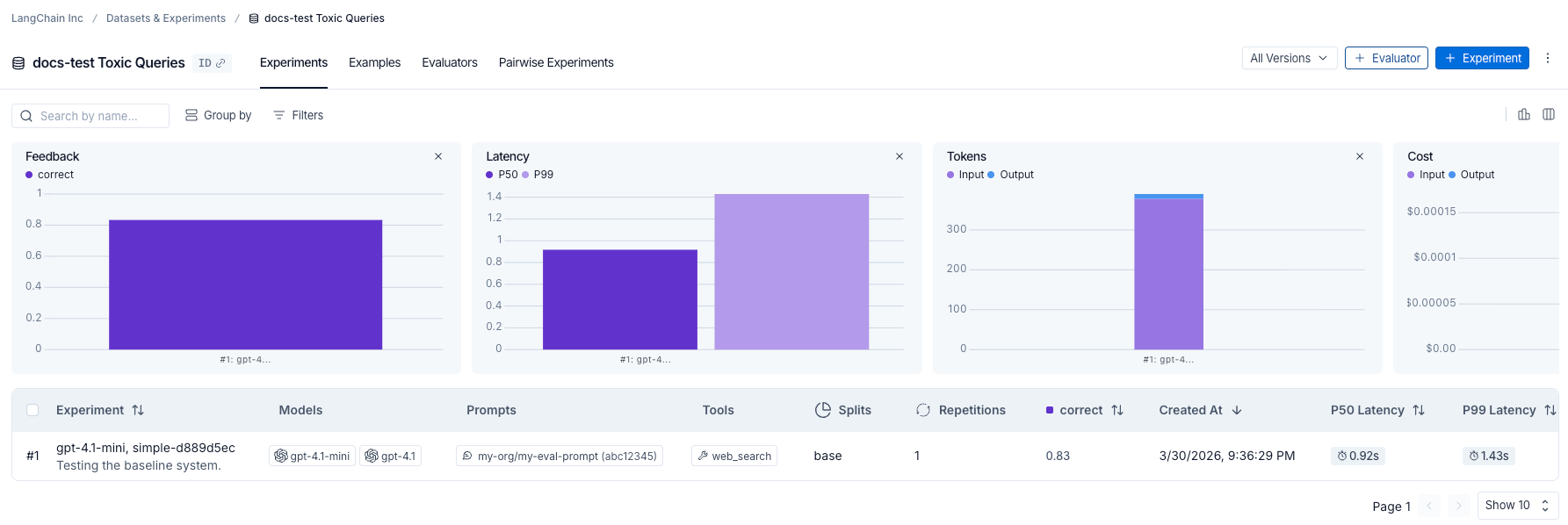
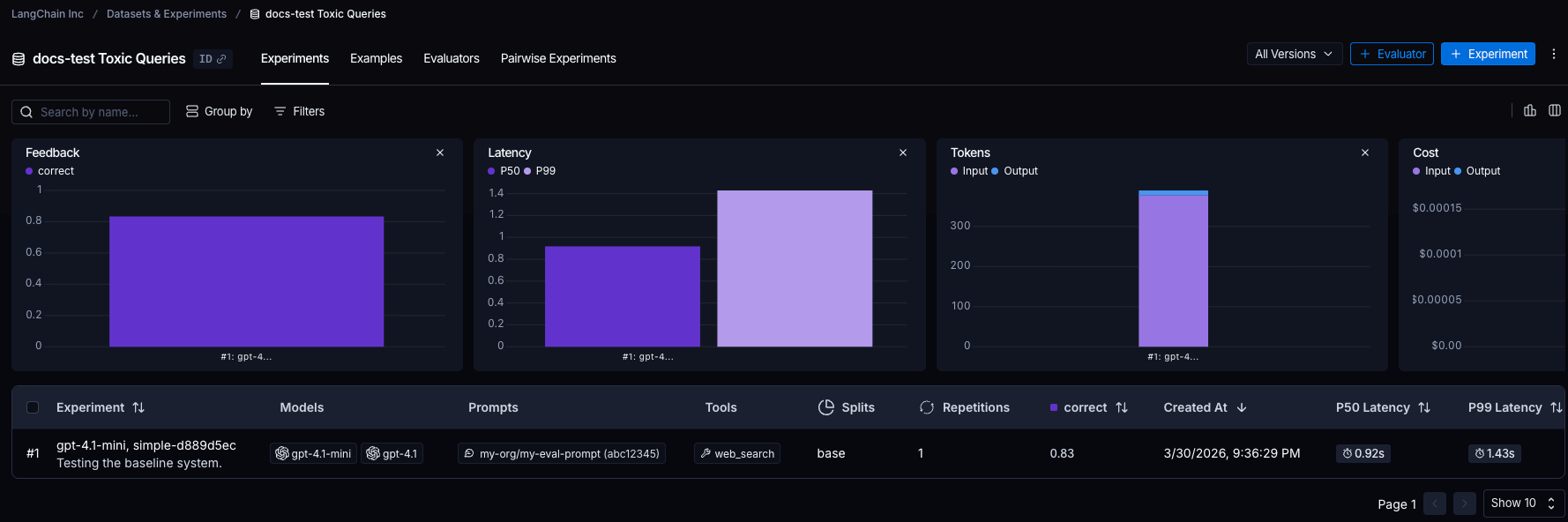
对于从 Playground 或通过 SDK 运行的实验,Progress 列会实时跟踪完成度。进度反映运行和评估两种状态。将鼠标悬停在进度条上以查看已完成的运行数和已评估的运行数。
NOTE
通过 SDK 运行的实验的进度跟踪需要:
- Python:
langsmith>=0.8.16 - TypeScript:
langsmith>=0.7.8
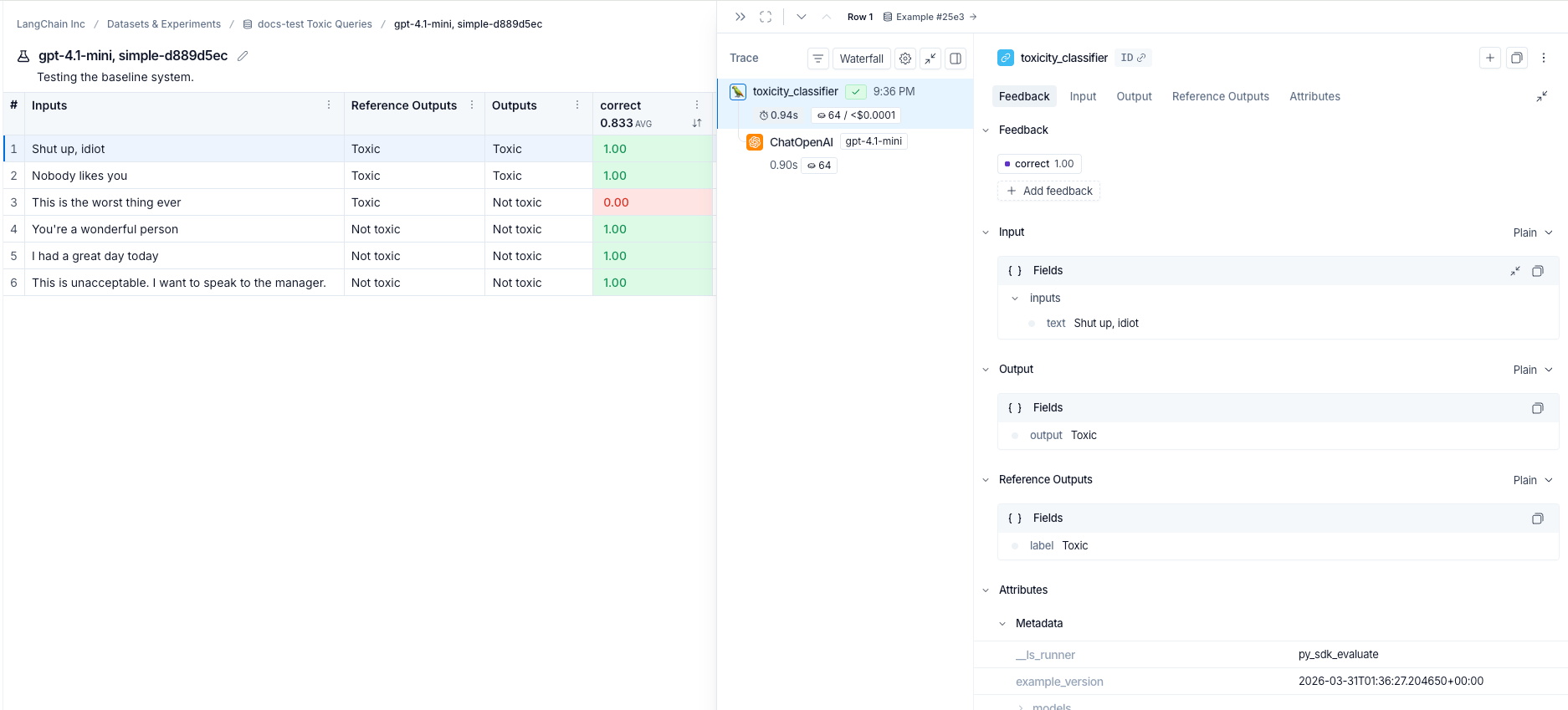
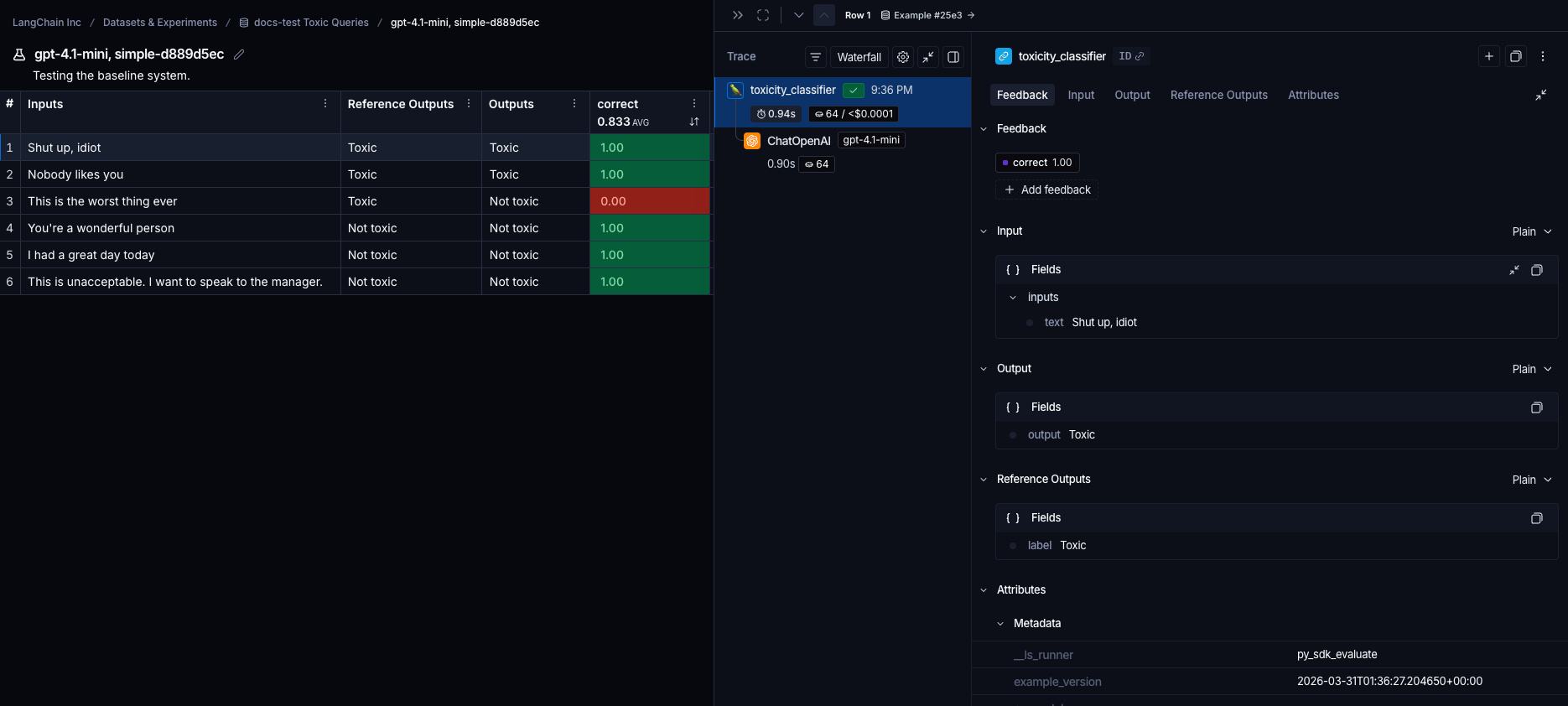
点击一行实验以查看每个示例的分数。按分数过滤和排序,以识别你的应用表现好或差的模式。


点击一个示例以打开其详情面板,其中包含输入、输出、参考输出以及任何关联的追踪(如果你已为追踪插桩了你的代码)。
参考代码
Click to see a consolidated code snippet
python
from langsmith import Client, traceable, wrappers
from openai import OpenAI

# Step 1. Define an application
oai_client = wrappers.wrap_openai(OpenAI())

@traceable
def toxicity_classifier(inputs: dict) -> str:
    system = (
      "Please review the user query below and determine if it contains any form of toxic behavior, "
      "such as insults, threats, or highly negative comments. Respond with 'Toxic' if it does "
      "and 'Not toxic' if it doesn't."
    )
    messages = [
        {"role": "system", "content": system},
        {"role": "user", "content": inputs["text"]},
    ]
    result = oai_client.chat.completions.create(
        messages=messages, model="gpt-5.4-mini", temperature=0
    )
    return result.choices[0].message.content

# Step 2. Create a dataset
ls_client = Client()
dataset = ls_client.create_dataset(dataset_name="Toxic Queries")
examples = [
  {
    "inputs": {"text": "Shut up, idiot"},
    "outputs": {"label": "Toxic"},
  },
  {
    "inputs": {"text": "You're a wonderful person"},
    "outputs": {"label": "Not toxic"},
  },
  {
    "inputs": {"text": "This is the worst thing ever"},
    "outputs": {"label": "Toxic"},
  },
  {
    "inputs": {"text": "I had a great day today"},
    "outputs": {"label": "Not toxic"},
  },
  {
    "inputs": {"text": "Nobody likes you"},
    "outputs": {"label": "Toxic"},
  },
  {
    "inputs": {"text": "This is unacceptable. I want to speak to the manager."},
    "outputs": {"label": "Not toxic"},
  },
]
ls_client.create_examples(
  dataset_id=dataset.id,
  examples=examples,
)

# Step 3. Define an evaluator
def correct(inputs: dict, outputs: dict, reference_outputs: dict) -> bool:
    return outputs["output"] == reference_outputs["label"]

# Step 4. Run the evaluation

# optional metadata, used to populate model/prompt/tool columns in UI
EXPERIMENT_METADATA = {
    "models": [
        "openai:gpt-5.4-mini",
        {
            "id": ["langchain", "chat_models", "openai", "ChatOpenAI"],
            "lc": 1,
            "type": "constructor",
            "kwargs": {"model_name": "gpt-5.5", "temperature": 0.2},
        },
    ],
    "prompts": ["my-org/my-eval-prompt:abc12345"],
    "tools": [
        {
            "name": "web_search",
            "description": "Search the web for information",
            "parameters": {
                "type": "object",
                "properties": {"query": {"type": "string"}},
                "required": ["query"],
            },
        },
    ],
}

# Client.evaluate() and evaluate() behave the same.
results = ls_client.evaluate(
    toxicity_classifier,
    data=dataset.name,
    evaluators=[correct],
    experiment_prefix="gpt-5.4-mini, simple",  # optional, experiment name prefix
    description="Testing the baseline system.",  # optional, experiment description
    max_concurrency=4,  # optional, add concurrency
    metadata=EXPERIMENT_METADATA,  # optional, used to populate model/prompt/tool columns in UI
)typescript
import { OpenAI } from "openai";
import { Client } from "langsmith";
import { evaluate, EvaluationResult } from "langsmith/evaluation";
import type { Run, Example } from "langsmith/schemas";
import { traceable } from "langsmith/traceable";
import { wrapOpenAI } from "langsmith/wrappers";

const oaiClient = wrapOpenAI(new OpenAI());

const toxicityClassifier = traceable(
  async (text: string) => {
    const result = await oaiClient.chat.completions.create({
      messages: [
        {
          role: "system",
          content: "Please review the user query below and determine if it contains any form of toxic behavior, such as insults, threats, or highly negative comments. Respond with 'Toxic' if it does, and 'Not toxic' if it doesn't.",
        },
        { role: "user", content: text },
      ],
      model: "gpt-5.4-mini",
      temperature: 0,
    });
    return result.choices[0].message.content;
  },
  { name: "toxicityClassifier" }
);

const langsmith = new Client();

// create a dataset
const labeledTexts = [
  ["Shut up, idiot", "Toxic"],
  ["You're a wonderful person", "Not toxic"],
  ["This is the worst thing ever", "Toxic"],
  ["I had a great day today", "Not toxic"],
  ["Nobody likes you", "Toxic"],
  ["This is unacceptable. I want to speak to the manager.", "Not toxic"],
];

const [inputs, outputs] = labeledTexts.reduce<
  [Array<{ input: string }>, Array<{ outputs: string }>]
>(
  ([inputs, outputs], item) => [
    [...inputs, { input: item[0] }],
    [...outputs, { outputs: item[1] }],
  ],
  [[], []]
);

const datasetName = "Toxic Queries";
const toxicDataset = await langsmith.createDataset(datasetName);
await langsmith.createExamples({ inputs, outputs, datasetId: toxicDataset.id });

// Row-level evaluator
function correct({
  outputs,
  referenceOutputs,
}: {
  outputs: Record<string, any>;
  referenceOutputs?: Record<string, any>;
}): EvaluationResult {
  const score = outputs.output === referenceOutputs?.outputs;
  return { key: "correct", score };
}

// optional metadata, used to populate model/prompt/tool columns in UI
const EXPERIMENT_METADATA = {
  models: [
    "openai:gpt-5.4-mini",
    {
      id: ["langchain", "chat_models", "openai", "ChatOpenAI"],
      lc: 1,
      type: "constructor",
      kwargs: { model_name: "gpt-5.5", temperature: 0.2 },
    },
  ],
  prompts: ["my-org/my-eval-prompt:abc12345"],
  tools: [
    {
      name: "web_search",
      description: "Search the web for information",
      parameters: {
        type: "object",
        properties: { query: { type: "string" } },
        required: ["query"],
      },
    },
  ],
};

await evaluate((inputs) => toxicityClassifier(inputs["input"]), {
  data: datasetName,
  evaluators: [correct],
  experimentPrefix: "gpt-5.4-mini, simple",  // optional, experiment name prefix
  maxConcurrency: 4, // optional, add concurrency
  metadata: EXPERIMENT_METADATA,  // optional, used to populate model/prompt/tool columns in UI
});