
主题
设置指南(遗留)
遗留的混合部署模型,使用 LangChain 托管的控制平面和自管理的数据平面。
WARNING
本页描述遗留的混合部署模型,它使用 LangChain 托管的控制平面来在你的云端编排 Agent Servers。有关当前的混合模型,请参阅 Hybrid。
INFO
混合选项需要 Enterprise 方案。获取演示以了解更多。
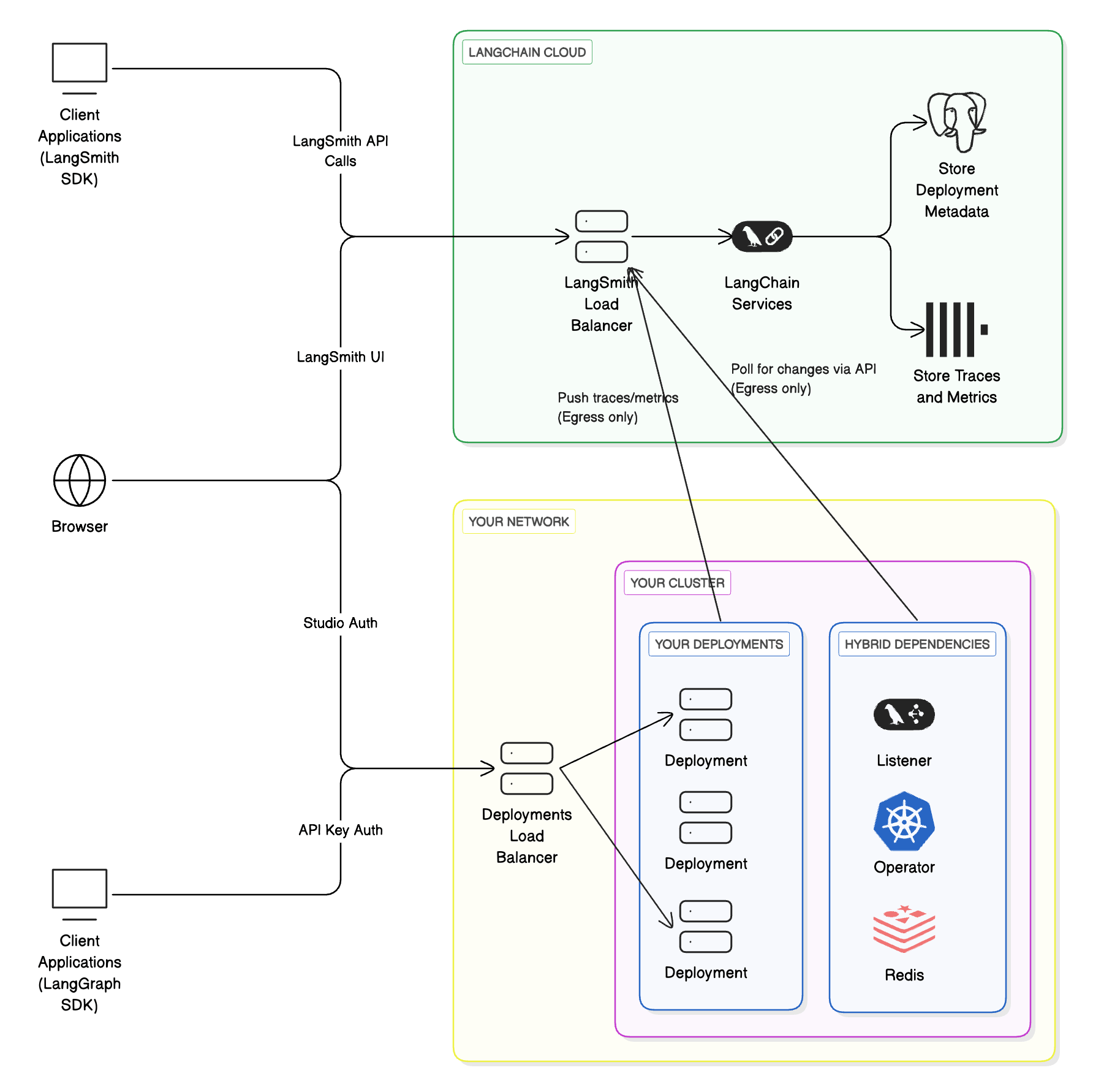
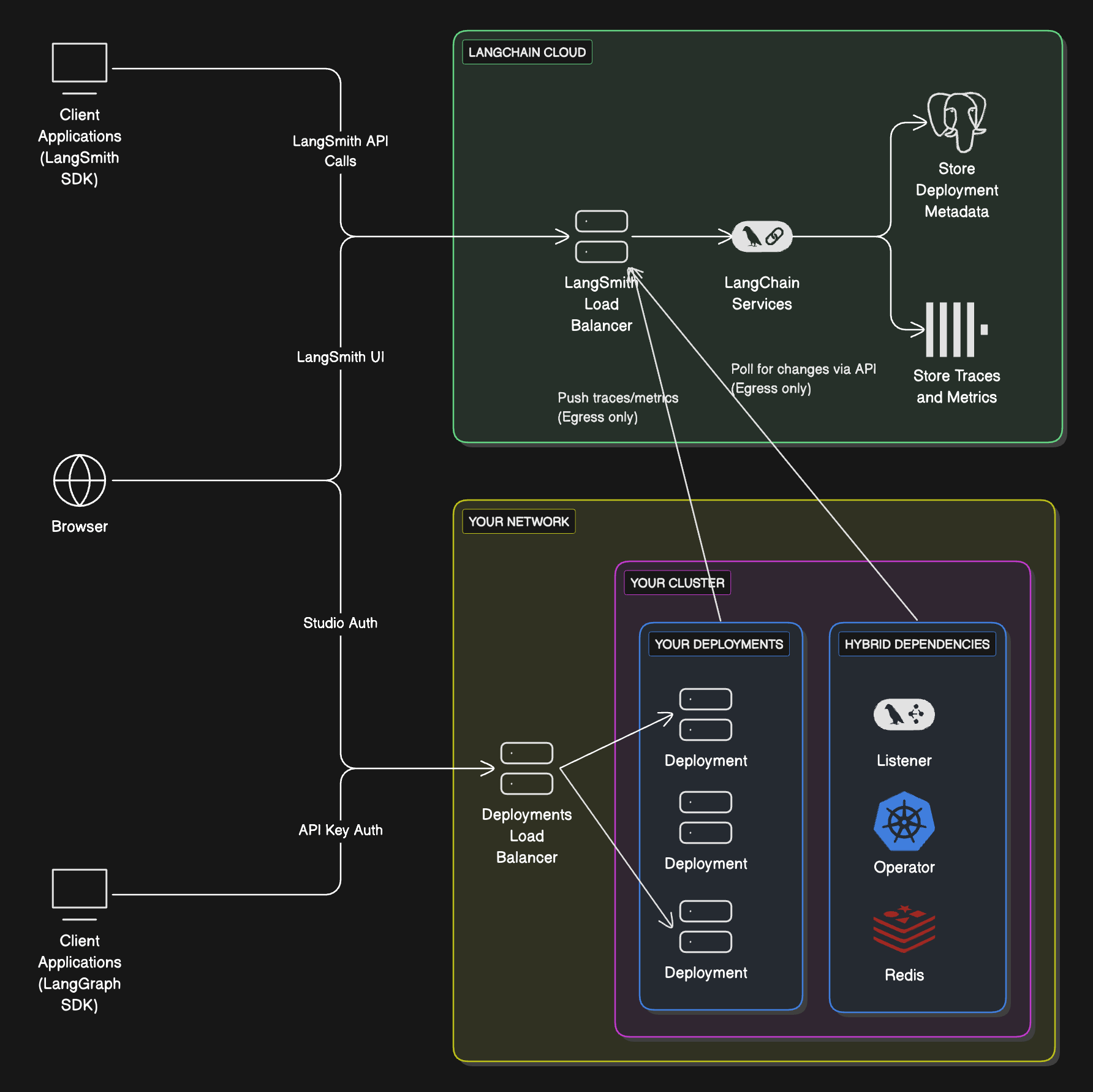
混合模型将 LangSmith 基础设施划分在 LangChain 的云和你的云之间:
- 控制平面(LangSmith UI、API 和编排)运行在 LangChain 的云端,由 LangChain 管理。
- 数据平面(你的
Agent Server
和 agent 工作负载)运行在你的云端,由你管理。
这将托管接口的便利性与在你自己的环境中运行工作负载的灵活性结合起来。
NOTE
进一步了解控制平面、数据平面和 Agent Server 架构概念。
| 组件 | 职责 | 运行位置 | 管理者 |
|---|---|---|---|
控制平面
|
- 用于创建部署和修订版的 UI
- 用于管理部署的 API
- 可观测性数据存储
数据平面
|
- 用于协调部署的 operator/listener
- Agent Servers(agents/graphs)
- 后端服务(Postgres、Redis 等)
在以混合模型运行 LangSmith 时,你使用 LangSmith API 密钥进行身份验证。
工作流
NOTE
支持的 Compute 平台:Kubernetes。请参阅下方的 Kubernetes 设置。
架构
Compute 平台
- Kubernetes:混合支持在任意 Kubernetes 集群上运行数据平面。
TIP
有关在 Kubernetes 中的设置,请参阅下方的 Kubernetes 设置。
到 LangSmith 和控制平面的出口
在混合部署模型中,你的自托管数据平面会向控制平面发送网络请求,以轮询需要在数据平面中实施的变更。数据平面部署产生的追踪也会被发送到与控制平面集成的 LangSmith 实例。到控制平面的这些流量经过加密,通过 HTTPS 传输。数据平面使用 LangSmith API 密钥向控制平面进行身份验证。
为了启用此出口,你可能需要更新内部防火墙规则或云资源(例如 Security Groups),以允许特定 IP 地址。
WARNING
目前不支持 AWS/Azure PrivateLink 或 GCP Private Service Connect。这些流量将通过互联网传输。
Kubernetes 设置
以下步骤描述如何将你的自托管数据平面连接到托管的 LangSmith 控制平面。
前提条件
KEDA已安装在你的集群上。bashhelm repo add kedacore https://kedacore.github.io/charts helm install keda kedacore/keda --namespace keda --create-namespace
INFO
KEDA 用于根据队列大小自动扩展部署系统。
你的集群上安装了一个有效的
Ingress控制器。有关为你的部署配置 ingress 的更多信息,请参阅为安装创建 ingress。我们强烈建议在生产设置中使用现代的 Gateway API。如果你打算让 listener 监视多个命名空间,你必须使用 Gateway API 或 Istio Gateway,而不是标准 ingress资源。标准 ingress 资源只能将流量路由到同一命名空间中的服务,而 Gateway 或 Istio Gateway 可以将流量路由到跨多个命名空间的服务。
你的集群中有足够的空闲空间用于多个部署。建议使用
Cluster-Autoscaler来自动预配新节点。你需要启用通向两个控制平面 URL 的出口。listener 轮询这些端点以获取部署。请使用与你 LangSmith 区域匹配的那一对。
LangSmith Deployment 控制平面:
| 区域 | 主机 / URL |
|---|---|
| GCP US | {`$ / https://${prefix_0 || "api.smith"}.langchain.com${suffix_0 || ""}`} |
| GCP EU | {`$ / https://eu.${prefix_0 || "api.smith"}.langchain.com${suffix_0 || ""}`} |
| GCP APAC | {`$ / https://apac.${prefix_0 || "api.smith"}.langchain.com${suffix_0 || ""}`} |
| AWS US | {`$ / https://aws.${prefix_0 || "api.smith"}.langchain.com${suffix_0 || ""}`} |
LangSmith API:
| 区域 | 主机 / URL |
|---|---|
| GCP US | {`$ / https://${prefix_1 || "api.smith"}.langchain.com${suffix_1 || ""}`} |
| GCP EU | {`$ / https://eu.${prefix_1 || "api.smith"}.langchain.com${suffix_1 || ""}`} |
| GCP APAC | {`$ / https://apac.${prefix_1 || "api.smith"}.langchain.com${suffix_1 || ""}`} |
| AWS US | {`$ / https://aws.${prefix_1 || "api.smith"}.langchain.com${suffix_1 || ""}`} |
准备
- 向我们提供你的 LangSmith 组织 ID。你的 LangSmith 组织将被配置为在你的云端部署数据平面。
- 从 LangSmith UI 创建一个 listener。
Listener数据模型是为实际的「listener」应用配置的。- 在左侧导航中,选择
Deployments>Listeners。 - 在页面右上角,选择
+ Create Listener。 - 为 listener 输入一个唯一的
Compute ID。Compute ID是一个用户定义的标识符,在当前 LangSmith 工作区中的所有 listener 之间应当唯一。Compute ID会在最终用户创建新部署时展示给他们。确保Compute ID能为最终用户提供关于其 Agent Server 部署将部署到何处的上下文。例如,Compute ID可以设置为k8s-cluster-name-dev-01。在这个例子中,Kubernetes 集群的名称是k8s-cluster-name,dev表示该集群专用于「开发」工作负载,01是用于减少命名冲突的数字后缀。 - 输入一个或多个 Kubernetes 命名空间。之后,「listener」应用将被配置为部署到这些命名空间中的每一个。
- 在页面右上角,选择
Submit。 - listener 创建后,复制 listener ID。你稍后在 Kubernetes 集群中安装实际的「listener」应用时(步骤 5)会用到它。
- 在左侧导航中,选择
INFO
重要 从 LangSmith UI 创建 listener 并不会在 Kubernetes 集群中安装「listener」应用。
提供一个 Helm chart,用于在你的 Kubernetes 集群中安装必要的组件。
langgraph-dataplane-listener:这是一个服务,用于监听 LangChain 的控制平面以获取你的部署变更,并创建/更新下游 CRD。这就是"listener" 应用。LangGraphPlatform CRD:用于 LangSmith Deployment 的 CRD。它包含管理 LangSmith Deployment 实例的 spec。langgraph-dataplane-operator:此 operator 处理对你 LangSmith CRD 的变更。langgraph-dataplane-redis:langgraph-dataplane-listener使用一个 Redis 实例来管理各种任务(主要是创建和删除部署)。
配置你的
langgraph-dataplane-values.yaml文件。bashconfig: langsmithApiKey: "" # API Key of your Workspace langsmithWorkspaceId: "" # Workspace ID hostBackendUrl: "https://api.host.langchain.com" # Use the matching regional LangSmith Deployment control plane URL from the table above smithBackendUrl: "https://api.smith.langchain.com" # Use the matching regional LangSmith API URL from the table above langgraphListenerId: "" # Listener ID from Step 2f watchNamespaces: "" # comma-separated list of Kubernetes namespaces that the listener and operator will deploy to enableLGPDeploymentHealthCheck: true # enable/disable health check step for deployments ingress: hostname: "" # specify a hostname that will be configured for all deployments operator: enabled: true createCRDs: true # set this to `false` if the CRD has been previously installed in the current Kubernetes clusterconfig.langsmithApiKey: Thelanggraph-listenerdeployment authenticates with LangChain's LangGraph control plane API with thelangsmithApiKey.config.langsmithWorkspaceId: Thelanggraph-listenerdeployment is coupled to Agent Server deployments in the LangSmith workspace. In other words, thelanggraph-listenerdeployment can only manage Agent Server deployments in the specified LangSmith workspace ID.config.langgraphListenerId: In addition to being coupled with a LangSmith workspace, thelanggraph-listenerdeployment is also coupled to a listener. When a new Agent Server deployment is created, it is automatically coupled to alanggraphListenerId. SpecifyinglanggraphListenerIdensures that thelanggraph-listenerdeployment can only manage Agent Server deployments that are coupled tolanggraphListenerId.config.watchNamespaces: A comma-separated list of Kubernetes namespaces that thelanggraph-listenerdeployment will deploy to. This list should match the list of namespaces specified in step 2d.config.enableLGPDeploymentHealthCheck: To disable the Agent Server health check, set this tofalse.ingress.hostname: As part of the deployment workflow, thelanggraph-listenerdeployment attempts to call the Agent Server health check endpoint (GET /ok) to verify that the application has started up correctly. A typical setup involves creating a shared DNS record or domain for Agent Server deployments. This is not managed by LangSmith. Once created, setingress.hostnameto the domain, which will be used to complete the health check.operator.createCRDs: Set this value tofalseif the Kubernetes cluster already has theLangGraphPlatform CRDinstalled. During installation, an error will occur if the CRD is already installed. This situation may occur if multiple listeners are deployed on the same Kubernetes cluster.
Deploy
langgraph-dataplaneHelm chart.bashhelm repo add langchain https://langchain-ai.github.io/helm/ helm repo update helm upgrade -i langgraph-dataplane langchain/langgraph-dataplane --values langgraph-dataplane-values.yaml --wait --debugIf successful, you will see three services start up in your namespace.
bashNAME READY STATUS RESTARTS AGE langgraph-dataplane-listener-6dd4749445-zjmr4 0/1 ContainerCreating 0 26s langgraph-dataplane-operator-6b88879f9b-t76gk 1/1 Running 0 26s langgraph-dataplane-redis-0 1/1 Running 0 25sYour hybrid infrastructure is now ready to create deployments.
Configuring additional data planes in the same cluster
To create a data plane in a different namespace in the same cluster, repeat the above steps and pass a -n option to helm upgrade to specify a different namespace.
When installing multiple data planes in the same cluster, it is very important to follow the rules below:
- The
config.watchNamespaceslist should never intersect with other installationsconfig.watchNamespaces. For example, if installation A is watching namespacesfoo,bar, installation B cannot watch eitherfooorbar. Multiple operators or listeners watching the same namespace will lead to unexpected behavior. This means that multiple LangSmith workspaces cannot deploy to the same namespace! Please review the cluster organization section to understand this better. - It is required to use the Gateway API or an Istio Gateway. Relying on the standard ingress resource can cause conflicts with Ingress objects created by other data planes in the same cluster. Because behavior in these cases depends on the specific ingress controller, this may result in unpredictable or undesired outcomes.
Listeners
In the hybrid option, one or more "listener" applications can run depending on how your LangSmith workspaces and Kubernetes clusters are organized.
Kubernetes cluster organization
- One or more listeners can run in a Kubernetes cluster.
- A listener can deploy into one or more namespaces in that cluster.
- Multiple listeners cannot deploy to the same namespace.
- Cluster owners are responsible for planning listener layout and Agent Server deployments.
LangSmith workspace organization
- A workspace can be associated with one or more listeners.
- A listener can only be associated with one workspace. LangSmith workspace to listener is a one-to-many relationship.
- A workspace can only deploy to Kubernetes clusters where all of its listeners are deployed.
Use cases
Here are some common listener configurations (not strict requirements):
Each LangSmith workspace → separate Kubernetes cluster
- Cluster
alpharuns workspaceA - Cluster
betaruns workspaceB
One cluster, one namespace per workspace
- Cluster
alpha, namespace1runs workspaceA - Cluster
alpha, namespace2runs workspaceB
Separate clusters, with shared “dev” cluster
- Cluster
alpharuns workspaceA - Cluster
betaruns workspaceB - Cluster
devruns workspacesAandB - Both workspaces have two listeners; cluster
devhas two listener deployments