
主题
连接到兼容 OpenAI 的模型提供商/代理
Playground 允许你使用任何兼容 OpenAI API 的模型。你可以在 Playground 中通过设置 Proxy Provider 来使用你的模型。
部署兼容 OpenAI 的模型
许多提供商都提供兼容 OpenAI 的模型或代理服务。一些示例包括:
你可以用这些提供商部署你的模型,并得到一个兼容 OpenAI API 的 API 端点。
查看完整的规范以了解更多信息。
在 Playground 中使用模型
部署好模型服务器后,你可以在 Playground 中使用它。
要访问 Prompt Settings 菜单:
- 在 Prompts 标题下,选择模型名称旁的齿轮
图标。 2. 在 Model Configuration 标签页中,在下拉框中选择要编辑的模型。 3. 在 Provider 下拉框中,选择 OpenAI Compatible Endpoint。 4. 将你的 OpenAI Compatible Endpoint 添加到 Base URL 输入框。示例见 Base URL 格式。
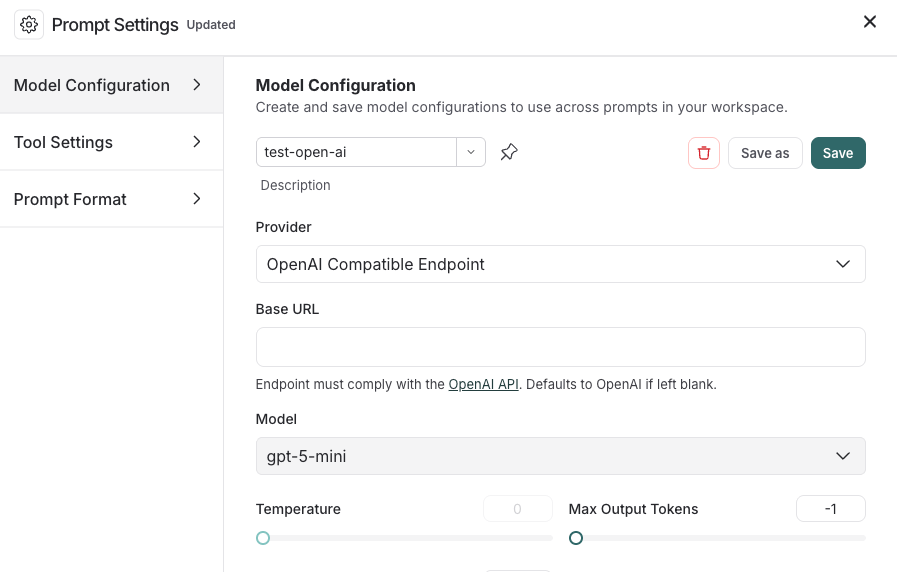
<img src="/langsmith-img/5bd6a944395a.png" alt="Model Configuration window in the LangSmith UI with a model selected and the Provider dropdown with OpenAI Compatible Endpoint selected." width="896" height="552" />
如果一切设置正确,你应该会在 Playground 中看到模型的响应。你也可以用此功能调用下游流水线。
关于如何存储模型配置,请参阅配置提示词设置。
如果你的 OpenAI 兼容端点位于 OAuth2 网关之后,请将 OAuth 的 client_credentials 存储在模型配置上,而不是作为工作区密钥分发静态 API key。参见 OAuth client credentials。
Base URL 格式
Base URL 应指向你的 OpenAI 兼容 API 服务器的根地址。 LangSmith 会自动追加 /chat/completions——不要在 Base URL 中包含它。
示例 Base URL
| 提供商 | 示例 Base URL |
|---|---|
| Ollama(本地) | http://localhost:11434/v1 |
| LiteLLM Proxy(本地) | http://localhost:4000 |
| vLLM(本地) | http://localhost:8000/v1 |
| 自托管(远程) | https://my-model-server.example.com/v1 |
支持自定义路径前缀。如果你的服务器在 /api/v2/chat/completions 暴露补全接口, 请将 Base URL 设置为 https://my-server.example.com/api/v2。