
主题
GCP Terraform 架构
在 GKE 上自托管 LangSmith 的平台层、服务、Workload Identity、网络,以及模块依赖。
了解 GCP Terraform 模块预配什么以及各部分如何组合,以便你在运行 make apply 之前为你的 LangSmith 部署做容量规划、加固和定制。
把本页当作规划一次推行或排查现有推行时的参考。它涵盖:
- 平台层和部署层级(light 与 production)。
- 模块描述与依赖。
- 网络、Workload Identity 和流量走向。
- 附加组件:LangSmith Deployment、Fleet、Insights 和 Polly。
- GCP 托管服务与 Secret Manager 集成。
如果你已准备好安装,从部署演练开始。
平台层
LangSmith 在 GCP 上分最多五个阶段部署。每个阶段在前一层之上增加一个能力层。所有层共享同一个 GKE 集群和 langsmith 命名空间。
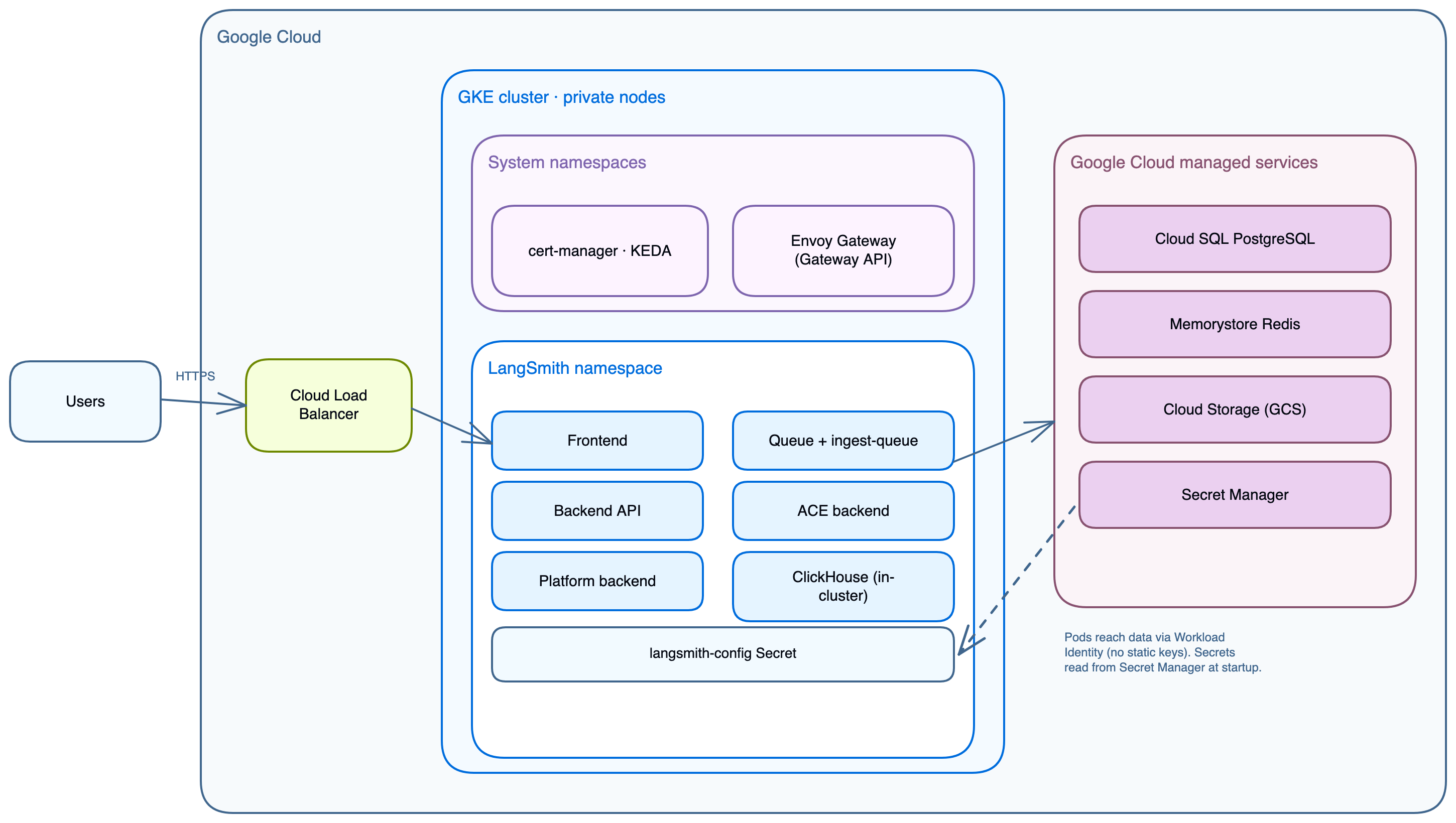
| 阶段 | 层 | 它增加什么 |
|---|---|---|
| 1 | GCP 基础设施 | VPC、GKE、Cloud SQL、Memorystore、GCS、K8s bootstrap、cert-manager、KEDA、Envoy Gateway |
| 2 | LangSmith 基础 | frontend、backend、platform-backend、queue、ace-backend、clickhouse、playground |
| 3 | LangSmith Deployment | host-backend、listener、operator + 每个部署的 pod |
| 4 | Fleet | standalone-fleet-api-server、standalone-fleet-tool-server、standalone-fleet-trigger-server、standalone-fleet-queue |
| 5 | Insights + Polly | Clio 分析(ClickHouse 支撑)、Polly 评估 agent |
NOTE
Fleet(chart v0.15+)是曾被称为 Agent Builder 的功能的当前形态。用 enable_fleet 启用它。与被弃用的 enable_agent_builder 路径不同,它不需要 LangSmith Deployment 层。这两个标志互斥并共享同一个加密密钥。参阅部署指南中的启用附加组件。
模块描述
| 模块 | 路径 | 目的 |
|---|---|---|
networking | infra/modules/networking/ | VPC、带次级范围的子网、Cloud Router、Cloud NAT、为 Cloud SQL 和 Memorystore 的私有服务连接 |
k8s-cluster | infra/modules/k8s-cluster/ | GKE Standard 或 Autopilot 集群、私有节点、带自动伸缩的节点池、启用 Workload Identity |
postgres | infra/modules/postgres/ | Cloud SQL PostgreSQL 实例、区域 HA 备库、私有 IP、删除保护 |
redis | infra/modules/redis/ | Memorystore Redis STANDARD_HA 层级、VPC 内的私有 IP |
storage | infra/modules/storage/ | 带版本管理和 ttl_s/(14 天)、ttl_l/(400 天)前缀生命周期规则的 GCS 存储桶 |
k8s-bootstrap | infra/modules/k8s-bootstrap/ | langsmith 命名空间、Postgres 和 Redis URL 的 Kubernetes Secrets、cert-manager 和 KEDA Helm release |
ingress | infra/modules/ingress/ | Envoy Gateway Helm release、GatewayClass、HTTPRoute、可选的 HTTPS Gateway 监听器 |
iam | infra/modules/iam/ | 用于 GCS 访问的 GCP 服务账户和 Workload Identity 绑定(默认接线) |
dns | infra/modules/dns/ | Cloud DNS 托管区和托管证书(可选,用 enable_dns_module 启用) |
secrets | infra/modules/secrets/ | Secret Manager 密钥包(可选,用 enable_secret_manager_module 启用) |
部署层级
Light 部署(全部在集群内)
txt
VPC
└── subnet (10.0.0.0/20, GKE nodes only)
    No Cloud SQL or Memorystore; chart pods handle both

GKE Cluster
├── langsmith namespace
│   ├── frontend, backend, platform-backend, queue, ace-backend, playground
│   ├── clickhouse (in-cluster)
│   ├── postgres   (in-cluster)
│   └── redis      (in-cluster)
├── cert-manager
├── keda
└── envoy-gateway-system

GCS Bucket (trace payloads, always external)在 terraform.tfvars 中设置:
hcl
postgres_source   = "in-cluster"
redis_source      = "in-cluster"
clickhouse_source = "in-cluster"Production(外部托管服务)
txt
VPC
├── subnet (10.0.0.0/20, GKE nodes, pods, services)
│   └── Secondary ranges: pods 10.4.0.0/14, services 10.8.0.0/20
└── Private service connection (VPC peering to Google managed network)
    ├── Cloud SQL PostgreSQL  (private IP, regional standby)
    └── Memorystore Redis     (private IP, STANDARD_HA tier)

GKE Cluster
├── langsmith namespace
│   ├── frontend, backend, platform-backend, queue, ace-backend, playground
│   └── clickhouse (in-cluster; use LangChain Managed for production scale)
├── cert-manager
├── keda
└── envoy-gateway-system

GCS Bucket (Workload Identity, no static keys)应用核心服务
| 服务 | 目的 | 端口 | HPA | Workload Identity | 依赖于 |
|---|---|---|---|---|---|
langsmith-frontend | React UI | 3000 | 1 到 10 | 否 | backend、platform-backend |
langsmith-backend | 主 API(追踪、运行、项目、API 密钥、反馈) | 1984 | 3 到 10 | 是(GCS) | Postgres、Redis、ClickHouse、GCS |
langsmith-platform-backend | 组织与用户管理、身份验证、计费、设置 | 1986 | 1 到 10 | 是(GCS) | Postgres、Redis、GCS |
langsmith-playground | LLM 提示 playground UI | 3001 | 1 到 10 | 否 | backend |
langsmith-queue | 追踪摄取 worker(Redis 到 ClickHouse + GCS) | — | 3 到 10 + KEDA | 是 | Redis、ClickHouse、GCS |
langsmith-ingest-queue | 专用高吞吐摄取 worker | — | 3 到 10 + KEDA | 是 | Redis、GCS |
langsmith-ace-backend | 异步计算(数据集运行、评估、后台作业) | — | 1 到 5 | 否 | Postgres、Redis |
langsmith-clickhouse | 列式存储(追踪 span、运行元数据、评估结果) | — | StatefulSet,单副本 | 否 | 500Gi premium-rwo PVC |
WARNING
集群内 ClickHouse 仅供开发/POC(单 pod,无复制,无备份)。对于生产,使用 LangChain Managed ClickHouse 或一个自管理的外部集群。
NOTE
SmithDB 是 LangSmith 专为其构建的可观测性后端,自托管版本 0.16.0 起可用于自托管(参见自托管支持)。这些 Terraform 模块预配 ClickHouse,因此前面各节中的指引适用于当前的部署。
一次性作业
| 作业 | 目的 |
|---|---|
langsmith-backend-migrations | PostgreSQL schema 迁移 |
langsmith-backend-ch-migrations | ClickHouse schema 迁移 |
langsmith-backend-auth-bootstrap | 创建初始组织和 admin 账户 |
LangSmith Deployment 附加组件
| 服务 | 目的 | Workload Identity |
|---|---|---|
langsmith-host-backend | LangGraph 控制平面 API。管理部署生命周期,服务部署元数据。 | 是(GCS) |
langsmith-listener | 监视 host-backend 的状态变化,创建并更新 LangGraphPlatform CRD。 | 是(GCS) |
langsmith-operator | Kubernetes operator。协调 LangGraphPlatform CRD,创建和删除 Deployment 与 Service。 | Deployments 与 Services 的 RBAC |
在 UI 中创建的每个 LangGraph 部署都会在 langsmith 命名空间中产生一个 Kubernetes Deployment,其 pod 以 langsmith-ksa ServiceAccount 运行。该 ServiceAccount 必须携带 iam.gke.io/gcp-service-account 注解,deploy.sh 会幂等地应用它。
GCP 托管服务
当 postgres_source = "external" 且 redis_source = "external"(推荐的生产设置)时,Terraform 预配:
Cloud SQL PostgreSQL
- 默认大小
db-custom-2-8192(2 vCPU、8 GB),私有 IP,端口 5432。 - 带有自动故障转移的 REGIONAL 可用性。
- 存放组织、用户、项目、API 密钥、设置。
- Terraform 把连接 URL 直接写入
langsmith-postgres-credentialsKubernetes Secret。
Memorystore Redis
- 默认 5 GB,STANDARD_HA 层级,私有 IP,端口 6379。
- 追踪摄取队列、pub/sub、短期缓存。
- 不需要身份验证令牌。访问仅通过 VPC 私有 IP 控制。
- Terraform 把连接 URL 直接写入
langsmith-redis-credentialsKubernetes Secret。
Cloud Storage 存储桶
- 追踪负载:大的输入和输出、附件。
- 随附的 Helm values 使用原生 GCS 模式(
engine: GCS、apiURL: https://storage.googleapis.com),通过 Workload Identity 认证,无需 HMAC 密钥。 - 也支持一种 S3 兼容模式(
engine: S3),展示在helm/values/examples/langsmith-values.yaml中。它需要 HMAC 密钥:在 Cloud Storage → Settings → Interoperability 下创建一个,并通过config.blobStorage.accessKey和config.blobStorage.accessKeySecret传给 Helm。 - 生命周期规则:
ttl_s/前缀(默认 14 天)、ttl_l/前缀(默认 400 天)。 - 无论哪一层级,GCS 存储桶始终是必需的。
Secret Manager(可选模块)
- 当
enable_secret_manager_module = true时,存储一个单一的 JSON 密钥包(生成的 LangSmith secret key、Postgres 密码、Redis 密码)。 - 核心 secrets(
langsmith-postgres-credentials、langsmith-redis-credentials)无论此模块如何,都由k8s-bootstrap始终存储在 Kubernetes Secrets 中。Secret Manager 为那些必须在集群重建后仍存续的密钥提供一个额外的持久存储。
集群基础设施
| 服务 | 命名空间 | 由谁安装 | 为谁所需 |
|---|---|---|---|
| Envoy Gateway | envoy-gateway-system | ingress 模块(install_ingress = true,默认) | 所有 ingress |
| KEDA | keda | k8s-bootstrap 模块,当 enable_langsmith_deployment = true 时 | LangSmith Deployment 附加组件及之后 |
| cert-manager | cert-manager | k8s-bootstrap 模块,当 tls_certificate_source = "letsencrypt" 或 install_cert_manager = true 时 | Let's Encrypt TLS |
NOTE
Gateway 资源由 Terraform 管理;HTTPRoute 由 Helm 管理。不要手动删除 Gateway 资源。当 Gateway 被删除时,GCP 会释放外部 IP,然后在重建时签发一个新 IP。
Workload Identity
GKE pod 通过 Workload Identity 访问 GCS。Kubernetes ServiceAccount 通过一个 IAM 绑定绑定到 GCP 服务账户;pod 获得临时凭据,Secrets 或环境变量中没有静态密钥。
txt
GKE pod
  └── Kubernetes ServiceAccount (annotated with iam.gke.io/gcp-service-account)
        └── IAM binding: roles/iam.workloadIdentityUser
              └── GCP Service Account
└── roles/storage.objectAdmin on the GCS bucket| 组件 | 注解 | 权限 |
|---|---|---|
langsmith-backend | iam.gke.io/gcp-service-account: <gsa> | 在 LangSmith 存储桶上的 GCS storage.objectAdmin |
langsmith-platform-backend | 同上 | GCS storage.objectAdmin |
langsmith-queue | 同上 | GCS storage.objectAdmin |
langsmith-ingest-queue | 同上 | GCS storage.objectAdmin |
langsmith-host-backend | 同上 | GCS storage.objectAdmin |
langsmith-listener | 同上 | GCS storage.objectAdmin |
langsmith-ksa(operator pod) | 同上 | GCS storage.objectAdmin |
该 GSA 由 iam 模块定义并作为 workload_identity_annotation 输出。init-values.sh 会自动把这些注解写入 values-overrides.yaml。
在原生 GCS 模式(随附的默认)下,上面的 GSA 绑定已足够。可选的 S3 兼容模式(engine: S3)还需要 HMAC 密钥:在 Cloud Storage → Settings → Interoperability 下创建一个并传给 Helm。
网络拓扑
| 范围 | CIDR | 被谁使用 |
|---|---|---|
| 子网 | 10.0.0.0/20 | GKE 节点 |
| Pod | 10.4.0.0/14 | GKE pod IP(次级范围) |
| 服务 | 10.8.0.0/20 | GKE ClusterIP 服务(次级范围) |
| 私有服务连接 | 由 Google 分配的 /16 | Cloud SQL、Memorystore 私有 IP |
Cloud SQL 和 Memorystore 仅通过私有 IP 访问。每当 postgres_source = "external" 或 redis_source = "external" 时,networking 模块都会建立一个私有服务连接(到 Google 托管网络的 VPC peering)。
流量走向
txt
Internet (HTTPS :443)
  ↓
Envoy Gateway  (envoy-gateway-system, external LoadBalancer IP)
  TLS terminated: cert-manager + Let's Encrypt or existing certificate
  │
  ├── /                     → frontend:80
  ├── /api/*                → backend:1984
  └── /api/v1/deployments/* → host-backend:1985  (LangSmith Deployment add-on)

Internal traffic (private IPs, never leaving VPC):
  backend       → Cloud SQL:5432    via private IP
  backend       → Memorystore:6379  via private IP
  backend       → GCS               via Workload Identity (native GCS mode)
  host-backend  → K8s API           reads deployment pod status
  listener      → K8s API           reconciles Deployment CRDs
operator → K8s API creates and manages deployment pods组件到存储的映射
| 组件 | PostgreSQL | Redis | ClickHouse | GCS |
|---|---|---|---|---|
backend | 组织配置、运行元数据 | 摄取队列 | — | 追踪对象 |
platform-backend | — | — | — | Blob 路由 |
queue | — | 弹出作业 | — | 写入追踪 blob |
clickhouse | — | — | 追踪搜索索引 | — |
host-backend | 部署生命周期状态 | — | — | — |
Secret Manager 集成
没有 Secret Manager 时:
txt
terraform.tfvars → terraform apply → kubernetes_secret (postgres, redis)有 Secret Manager 时:
txt
terraform.tfvars → terraform apply ─┬─→ kubernetes_secret (postgres, redis)
└─→ Secret Manager (durable copy, survives cluster recreation)两种情况下 Terraform 都直接写入 Kubernetes Secrets。启用 Secret Manager 会在集群之外增加一份 Postgres 密码、Redis 密码和生成密钥的持久副本。没有任何东西把 Secret Manager 同步回集群,因此 GCP 上不会安装 External Secrets Operator(不同于 AWS 模块,后者用它从 SSM Parameter Store 同步)。
Terraform 模块图
txt
google_project_service (APIs enabled)
  └── module.networking
        ├── module.gke_cluster
        │     └── time_sleep.wait_for_cluster
        │           ├── module.cloudsql      (count = postgres_source == "external")
        │           ├── module.redis         (count = redis_source    == "external")
        │           ├── module.storage
        │           ├── module.iam           (count = enable_gcp_iam_module)
        │           ├── module.secrets       (count = enable_secret_manager_module)
        │           ├── module.dns           (count = enable_dns_module)
        │           ├── module.k8s_bootstrap
        │           └── module.ingress       (count = install_ingress)
└── (private_service_connection when external services)infra 层不安装 LangSmith chart。应用层以两种方式之一安装它,两者都消费 helm/values/ 下同样的分层 values 文件:
- 部署脚本:
make init-values && make deploy运行helm upgrade --install。 - Terraform
app层:make init-values && make init-app && make apply-app将 chart 作为helm_release资源管理。make init-app把infra输出(集群、存储桶、Workload Identity 注解)拉入app/infra.auto.tfvars.json,因此app层无需远程状态数据源即可读取它们。
验证命令
bash
# Cluster connectivity
gcloud container clusters get-credentials <cluster-name> --region <region> --project <project-id>
kubectl cluster-info
kubectl get nodes -o wide

# All LangSmith pods
kubectl get pods -n langsmith

# Envoy Gateway
kubectl get pods -n envoy-gateway-system
kubectl get svc -n envoy-gateway-system

# cert-manager
kubectl get pods -n cert-manager
kubectl get certificate -n langsmith

# KEDA (LangSmith Deployment add-on)
kubectl get pods -n keda

# Cloud SQL connectivity test
kubectl run psql-test --rm -it --image=postgres:15 -n langsmith -- \
  psql "postgresql://langsmith:<password>@<cloud-sql-private-ip>:5432/langsmith" -c "SELECT version();"

# Memorystore connectivity test
kubectl run redis-test --rm -it --image=redis:7 -n langsmith -- \
  redis-cli -h <redis-private-ip> ping

# GCS connectivity test
kubectl run gcs-test --rm -it --image=google/cloud-sdk -n langsmith -- \
  gsutil ls gs://<bucket-name>