
主题
Tonic Validate 是什么
Tonic Validate 面向开发检索增强生成(RAG)系统的人,用来评估系统表现。你可以用它对 LlamaIndex 配置的性能做一次性抽查,也可以把它放进 Github Actions 这样的 CI/CD 体系里使用。Tonic Validate 分为两部分
- 开源 SDK
- Web UI
如果你愿意,可以只用 SDK 而不用 Web UI。SDK 包含了评估 RAG 系统所需的全部工具。Web UI 的作用是在 SDK 之上再加一层,用来可视化你的结果——相比只看一堆原始数字,它能让你更好地把握系统的表现。
想使用 Web UI,可以到这里注册一个免费账号。
如何使用 Tonic Validate
配置 Tonic Validate
可以用以下命令安装 Tonic Validate
pip install tonic-validate使用 Tonic Validate 时需要提供一个 OpenAI key,因为分数计算在后台会用到 LLM。你可以通过把 OPENAI_API_KEY 环境变量设为你的 OpenAI API key 来完成。
import os

os.environ["OPENAI_API_KEY"] = "put-your-openai-api-key-here"如果你要把结果上传到 UI,还要记得设置你在 Web UI 账号配置过程中拿到的 Tonic Validate API key。如果还没在 Web UI 上完成账号设置,可以在这里进行。拿到 API Key 后,通过 TONIC_VALIDATE_API_KEY 环境变量设置即可。
import os

os.environ["TONIC_VALIDATE_API_KEY"] = "put-your-validate-api-key-here"单个问题的用法示例
在这个例子里,我们有一个问题,其参考正确答案与 LLM 的回答并不一致。检索到两个上下文块,其中只有一个含有正确答案。
question = "What makes Sam Altman a good founder?"
reference_answer = "He is smart and has a great force of will."
llm_answer = "He is a good founder because he is smart."
retrieved_context_list = [
    "Sam Altman is a good founder. He is very smart.",
    "What makes Sam Altman such a good founder is his great force of will.",
]答案相似度(answer similarity)是 0 到 5 之间的分数,衡量 LLM 回答与参考答案的匹配程度。这里两者并不完全匹配,所以答案相似度不是满分的 5。
answer_similarity_evaluator = AnswerSimilarityEvaluator()
score = await answer_similarity_evaluator.aevaluate(
    question,
    llm_answer,
    retrieved_context_list,
    reference_response=reference_answer,
)
print(score)
# >> EvaluationResult(query='What makes Sam Altman a good founder?', contexts=['Sam Altman is a good founder. He is very smart.', 'What makes Sam Altman such a good founder is his great force of will.'], response='He is a good founder because he is smart.', passing=None, feedback=None, score=4.0, pairwise_source=None, invalid_result=False, invalid_reason=None)答案一致性(answer consistency)在 0.0 到 1.0 之间,衡量回答里是否出现了检索上下文中没有的信息。这里回答的内容确实存在于检索上下文中,所以分数是 1。
answer_consistency_evaluator = AnswerConsistencyEvaluator()

score = await answer_consistency_evaluator.aevaluate(
    question, llm_answer, retrieved_context_list
)
print(score)
# >> EvaluationResult(query='What makes Sam Altman a good founder?', contexts=['Sam Altman is a good founder. He is very smart.', 'What makes Sam Altman such a good founder is his great force of will.'], response='He is a good founder because he is smart.', passing=None, feedback=None, score=1.0, pairwise_source=None, invalid_result=False, invalid_reason=None)增强准确度(augmentation accuracy)衡量检索到的上下文中有多少被用进了回答。这里两个检索上下文中有一个出现在回答里,所以该分数是 0.5。
augmentation_accuracy_evaluator = AugmentationAccuracyEvaluator()

score = await augmentation_accuracy_evaluator.aevaluate(
    question, llm_answer, retrieved_context_list
)
print(score)
# >> EvaluationResult(query='What makes Sam Altman a good founder?', contexts=['Sam Altman is a good founder. He is very smart.', 'What makes Sam Altman such a good founder is his great force of will.'], response='He is a good founder because he is smart.', passing=None, feedback=None, score=0.5, pairwise_source=None, invalid_result=False, invalid_reason=None)增强精确度(augmentation precision)衡量相关的检索上下文是否进入了回答。两个检索上下文都相关,但只有一个进入了回答,因此该分数是 0.5。
augmentation_precision_evaluator = AugmentationPrecisionEvaluator()

score = await augmentation_precision_evaluator.aevaluate(
    question, llm_answer, retrieved_context_list
)
print(score)
# >> EvaluationResult(query='What makes Sam Altman a good founder?', contexts=['Sam Altman is a good founder. He is very smart.', 'What makes Sam Altman such a good founder is his great force of will.'], response='He is a good founder because he is smart.', passing=None, feedback=None, score=0.5, pairwise_source=None, invalid_result=False, invalid_reason=None)检索精确度(retrieval precision)衡量检索到的上下文中有多少与回答问题相关。这里两个检索上下文都与问题相关,所以分数是 1.0。
retrieval_precision_evaluator = RetrievalPrecisionEvaluator()

score = await retrieval_precision_evaluator.aevaluate(
    question, llm_answer, retrieved_context_list
)
print(score)
# >> EvaluationResult(query='What makes Sam Altman a good founder?', contexts=['Sam Altman is a good founder. He is very smart.', 'What makes Sam Altman such a good founder is his great force of will.'], response='He is a good founder because he is smart.', passing=None, feedback=None, score=1.0, pairwise_source=None, invalid_result=False, invalid_reason=None)TonicValidateEvaluator 可以一次性计算出 Tonic Validate 的全部指标。
tonic_validate_evaluator = TonicValidateEvaluator()

scores = await tonic_validate_evaluator.aevaluate(
    question,
    llm_answer,
    retrieved_context_list,
    reference_response=reference_answer,
)
print(scores.score_dict)
# >> {
#     'answer_consistency': 1.0,
#     'answer_similarity': 4.0,
#     'augmentation_accuracy': 0.5,
#     'augmentation_precision': 0.5,
#     'retrieval_precision': 1.0
# }一次评估多个问题
你也可以用 TonicValidateEvaluator 一次评估多组查询与回答,并返回一个 tonic_validate 的 Run 对象,它可以被记录到 Tonic Validate UI。
做法是把问题、LLM 回答、检索上下文列表与参考答案放进列表,然后调用 evaluate_run。
questions = ["What is the capital of France?", "What is the capital of Spain?"]
reference_answers = ["Paris", "Madrid"]
llm_answer = ["Paris", "Madrid"]
retrieved_context_lists = [
    [
        "Paris is the capital and most populous city of France.",
        "Paris, France's capital, is a major European city and a global center for art, fashion, gastronomy and culture.",
    ],
    [
        "Madrid is the capital and largest city of Spain.",
        "Madrid, Spain's central capital, is a city of elegant boulevards and expansive, manicured parks such as the Buen Retiro.",
    ],
]

tonic_validate_evaluator = TonicValidateEvaluator()

scores = await tonic_validate_evaluator.aevaluate_run(
    [questions], [llm_answers], [retrieved_context_lists], [reference_answers]
)
print(scores.run_data[0].scores)
# >> {
#     'answer_consistency': 1.0,
#     'answer_similarity': 3.0,
#     'augmentation_accuracy': 0.5,
#     'augmentation_precision': 0.5,
#     'retrieval_precision': 1.0
# }把结果上传到 UI
要把分数上传到 UI,可以使用 Tonic Validate API。在此之前,请按配置 Tonic Validate一节的说明确保已设置 TONIC_VALIDATE_API_KEY。你还需要在 Tonic Validate UI 里创建一个项目并复制其 project id。API Key 与项目都就绪后,就可以初始化 Validate API 并上传结果。
validate_api = ValidateApi()
project_id = "your-project-id"
validate_api.upload_run(project_id, scores)现在你就能在 Tonic Validate UI 中看到你的结果了!
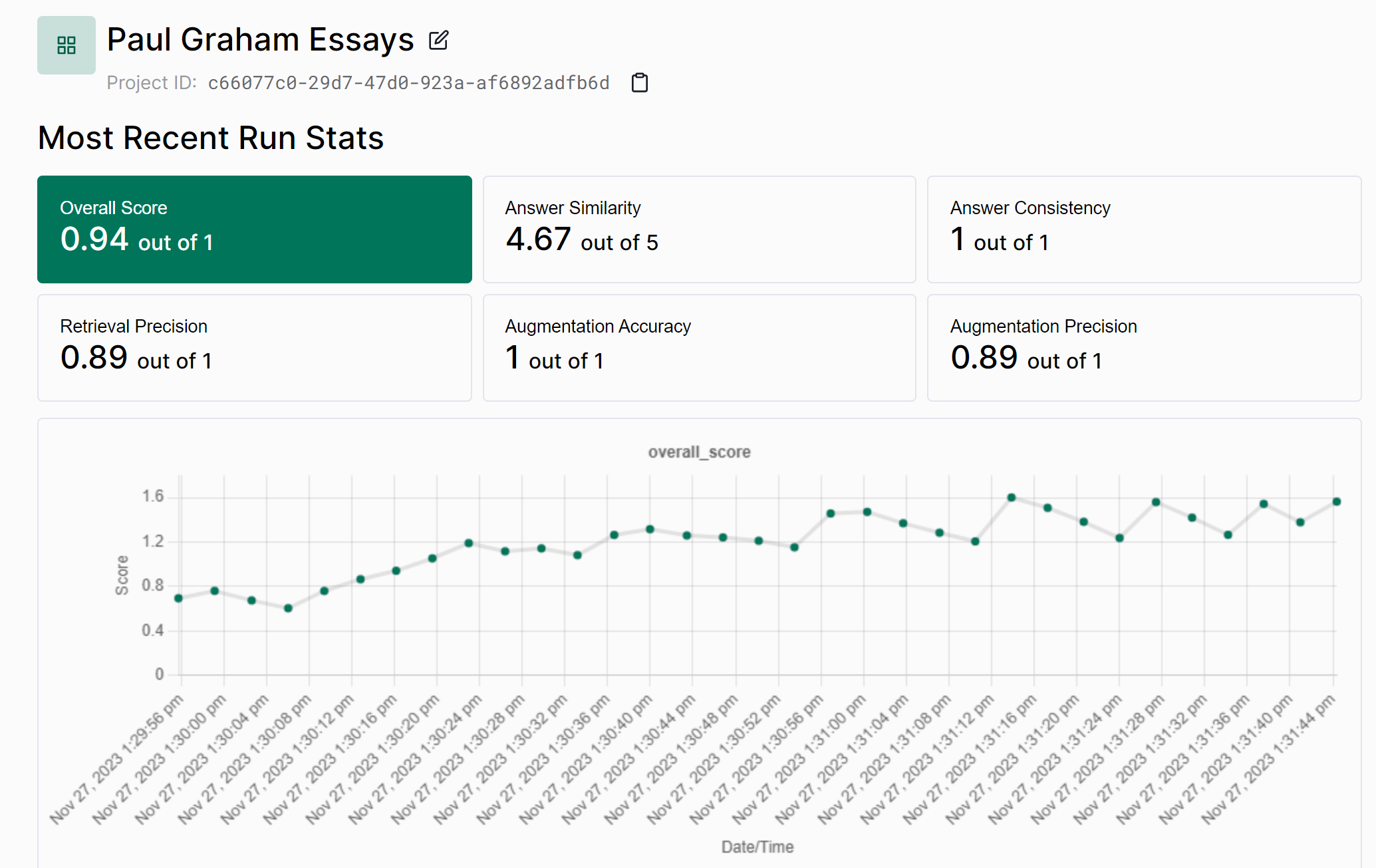
端到端示例
这里演示如何把 Tonic Validate 端到端地与 Llama Index 一起使用。首先,用 Llama Index CLI 下载一份供 Llama Index 处理的数据集。
终端窗口
llamaindex-cli download-llamadataset EvaluatingLlmSurveyPaperDataset --download-dir ./data现在我们可以创建一个名为 llama.py 的 Python 文件,并把下面这段代码放进去。
from llama_index.core import SimpleDirectoryReader
from llama_index.core import VectorStoreIndex

documents = SimpleDirectoryReader(input_dir="./data/source_files").load_data()
index = VectorStoreIndex.from_documents(documents=documents)
query_engine = index.as_query_engine()这段代码的作用其实就是加载数据集文件,然后初始化 Llama Index。
Llama Index 的 CLI 还会下载一份可用于测试的问题与答案列表(针对它的示例数据集)。如果你想用这些问题和答案,可以用下面的代码。
from llama_index.core.llama_dataset import LabelledRagDataset

rag_dataset = LabelledRagDataset.from_json("./data/rag_dataset.json")

# We are only going to do 10 questions as running through the full data set takes too long
questions = [item.query for item in rag_dataset.examples][:10]
reference_answers = [item.reference_answer for item in rag_dataset.examples][
    :10
]现在就可以向 Llama Index 发起查询以获取回答。
llm_answers = []
retrieved_context_lists = []
for question in questions:
    response = query_engine.query(question)
    context_list = [x.text for x in response.source_nodes]
    retrieved_context_lists.append(context_list)
llm_answers.append(response.response)接下来为结果打分,可以这样做
from tonic_validate.metrics import AnswerSimilarityMetric
from llama_index.evaluation.tonic_validate import TonicValidateEvaluator

tonic_validate_evaluator = TonicValidateEvaluator(
    metrics=[AnswerSimilarityMetric()], model_evaluator="gpt-4-1106-preview"
)

scores = tonic_validate_evaluator.evaluate_run(
    questions, retrieved_context_lists, reference_answers, llm_answers
)
print(scores.overall_scores)要把分数上传到 UI,可以使用 Tonic Validate API。在此之前,请按配置 Tonic Validate一节的说明确保已设置 TONIC_VALIDATE_API_KEY。你还需要在 Tonic Validate UI 里创建一个项目并复制其 project id。API Key 与项目都就绪后,就可以初始化 Validate API 并上传结果。
validate_api = ValidateApi()
project_id = "your-project-id"
validate_api.upload_run(project_id, run)更多文档
除了本文,你还可以访问 Tonic Validate 的 Github 页面,了解如何调用其 API 上传结果的更多文档。