
主题
在用编码智能体?
给你的 AI 智能体开放这些文档的访问:claude mcp add llama-index-docs --transport http https://developers.llamaindex.ai/mcp —— 或者用 LlamaParse 的 MCP 工具与技能 给它加强能力。
一分钟之内跑通你的第一个解析任务 —— 无论你习惯用 Python、TypeScript、Go、Java、CLI、REST API 还是 Web 界面。
开始之前
你需要一把 LlamaCloud 的 API key。去取 API key →
把它设成环境变量,各 SDK 就能自动读取:
终端窗口
export LLAMA_CLOUD_API_KEY="llx-..."60 秒跑通第一个解析任务
先下载一份示例文档 —— Attention Is All You Need 论文:
终端窗口
curl -fL -o attention_is_all_you_need.pdf https://arxiv.org/pdf/1706.03762- Python
- TypeScript
- Go
- Java
- CLI
- REST API
- Web UI
安装 SDK:
终端窗口
pip install "llama-cloud>=2.8"解析一个文档:
from llama_cloud import LlamaCloud

client = LlamaCloud()  # reads LLAMA_CLOUD_API_KEY from the environment

# Upload and parse a document
file = client.files.create(file="./attention_is_all_you_need.pdf", purpose="parse")
result = client.parsing.parse(
    file_id=file.id,
    tier="agentic",
    version="latest",
    expand=["markdown"],
)

# Print the markdown for the first page
print(result.markdown.pages[0].markdown)就这么简单。SDK 替你处理了任务轮询 —— client.parsing.parse() 会阻塞到任务结束并返回完整结果。
更想用异步?把 LlamaCloud 换成 AsyncLlamaCloud,并在调用前加 await:
from llama_cloud import AsyncLlamaCloud
import asyncio

async def main():
    client = AsyncLlamaCloud()
    file = await client.files.create(file="./attention_is_all_you_need.pdf", purpose="parse")
    result = await client.parsing.parse(file_id=file.id, tier="agentic", version="latest", expand=["markdown"])
    print(result.markdown.pages[0].markdown)

asyncio.run(main())配置你的解析任务
上面的片段用的是默认值。等你要调输出时,加上 input_options、output_options 或 processing_options:
result = client.parsing.parse(
    file_id=file.id,
    tier="agentic",
    version="latest",
    output_options={
        "markdown": {"tables": {"output_tables_as_markdown": True}},
        "images_to_save": ["screenshot"],
    },
    processing_options={
        "ocr_parameters": {"languages": ["en"]},
    },
    expand=["text", "markdown", "items", "images_content_metadata"],
)每一组都有专门的参考页:
- 输入选项 —— 页范围、裁剪框、按文件类型的控件与缓存行为
- 输出选项 —— markdown 样式、空间文本、截图、表格转电子表格等
- 处理选项 —— OCR 语言、忽略规则、图表解析、成本优化器
- 取回结果 —— 所有
expand取值,以及如何控制返回什么
安装 SDK:
终端窗口
npm install @llamaindex/llama-cloud新建一个 parse.ts 文件:
import LlamaCloud from '@llamaindex/llama-cloud';
import fs from 'fs';

const client = new LlamaCloud(); // reads LLAMA_CLOUD_API_KEY from the environment

// Upload and parse a document
const file = await client.files.create({
  file: fs.createReadStream('./attention_is_all_you_need.pdf'),
  purpose: 'parse',
});

const result = await client.parsing.parse({
  file_id: file.id,
  tier: 'agentic',
  version: 'latest',
  expand: ['markdown'],
});

// Print the markdown for the first page
console.log(result.markdown.pages[0].markdown);运行它:
终端窗口
npx tsx parse.tsSDK 会替你处理任务轮询 —— client.parsing.parse() 会等待到任务结束并返回完整结果。
配置你的解析任务
传入 input_options、output_options 或 processing_options 来调整输出:
const result = await client.parsing.parse({
  file_id: file.id,
  tier: 'agentic',
  version: 'latest',
  output_options: {
    markdown: { tables: { output_tables_as_markdown: true } },
    images_to_save: ['screenshot'],
  },
  processing_options: {
    ocr_parameters: { languages: ['en'] },
  },
  expand: ['text', 'markdown', 'items', 'images_content_metadata'],
});选项的完整集合见各专门的参考页:
安装 SDK:
终端窗口
go get github.com/run-llama/llama-parse-go新建一个 main.go 文件:
package main

import (
  "context"
  "fmt"
  "log"
  "os"
  "time"

  llamacloud "github.com/run-llama/llama-parse-go"
)

func main() {
  ctx := context.Background()
  client := llamacloud.NewClient() // reads LLAMA_CLOUD_API_KEY from the environment

  f, err := os.Open("./attention_is_all_you_need.pdf")
  if err != nil {
    log.Fatal(err)
  }
  defer f.Close()

  // Upload and parse a document
  file, err := client.Files.New(ctx, llamacloud.FileNewParams{
    File:    f,
    Purpose: "parse",
  })
  if err != nil {
    log.Fatal(err)
  }

  job, err := client.Parsing.New(ctx, llamacloud.ParsingNewParams{
    FileID:  llamacloud.String(file.ID),
    Tier:    llamacloud.ParsingNewParamsTierAgentic,
    Version: llamacloud.ParsingNewParamsVersionLatest,
  })
  if err != nil {
    log.Fatal(err)
  }

  // Poll until the job reaches a terminal status
  getParams := llamacloud.ParsingGetParams{Expand: []string{"markdown"}}
  result, err := client.Parsing.Get(ctx, job.ID, getParams)
  if err != nil {
    log.Fatal(err)
  }
  for result.Job.Status != "COMPLETED" && result.Job.Status != "FAILED" && result.Job.Status != "CANCELLED" {
    time.Sleep(2 * time.Second)
    result, err = client.Parsing.Get(ctx, job.ID, getParams)
    if err != nil {
      log.Fatal(err)
    }
  }

  if result.Job.Status != "COMPLETED" {
    log.Fatalf("parse ended as %s", result.Job.Status)
  }
  if len(result.Markdown.Pages) == 0 {
    log.Fatal("parse completed with no markdown pages")
  }

  // Print the markdown for the first page
  fmt.Println(result.Markdown.Pages[0].Markdown)
}运行它:
终端窗口
go run main.go配置你的解析任务
上面的片段用的是默认值。等你要调输出时,加上 InputOptions、OutputOptions 或 ProcessingOptions:
job, err := client.Parsing.New(ctx, llamacloud.ParsingNewParams{
  FileID:  llamacloud.String(file.ID),
  Tier:    llamacloud.ParsingNewParamsTierAgentic,
  Version: llamacloud.ParsingNewParamsVersionLatest,
  OutputOptions: llamacloud.ParsingNewParamsOutputOptions{
    Markdown: llamacloud.ParsingNewParamsOutputOptionsMarkdown{
      Tables: llamacloud.ParsingNewParamsOutputOptionsMarkdownTables{
        OutputTablesAsMarkdown: llamacloud.Bool(true),
      },
    },
    ImagesToSave: []string{"screenshot"},
  },
  ProcessingOptions: llamacloud.ParsingNewParamsProcessingOptions{
    OcrParameters: llamacloud.ParsingNewParamsProcessingOptionsOcrParameters{
      Languages: []llamacloud.ParsingLanguages{llamacloud.ParsingLanguagesEn},
    },
  },
})在取结果时请求你希望返回的字段:
result, err := client.Parsing.Get(ctx, job.ID, llamacloud.ParsingGetParams{
  Expand: []string{"text", "markdown", "items", "images_content_metadata"},
})每一组都有专门的参考页:
- 输入选项 —— 页范围、裁剪框、按文件类型的控件与缓存行为
- 输出选项 —— markdown 样式、空间文本、截图、表格转电子表格等
- 处理选项 —— OCR 语言、忽略规则、图表解析、成本优化器
- 取回结果 —— 所有
expand取值,以及如何控制返回什么
把 SDK 加进你的构建:
implementation("ai.llamaindex:llama-cloud:1.3.0")解析一个文档:
import ai.llamaindex.llamacloud.client.LlamaCloudClient;
import ai.llamaindex.llamacloud.client.okhttp.LlamaCloudOkHttpClient;
import ai.llamaindex.llamacloud.models.files.FileCreateParams;
import ai.llamaindex.llamacloud.models.files.FileCreateResponse;
import ai.llamaindex.llamacloud.models.parsing.ParsingCreateParams;
import ai.llamaindex.llamacloud.models.parsing.ParsingCreateResponse;
import ai.llamaindex.llamacloud.models.parsing.ParsingGetParams;
import ai.llamaindex.llamacloud.models.parsing.ParsingGetResponse;
import java.nio.file.Paths;

public class ParseExample {
    public static void main(String[] args) throws Exception {
        // reads LLAMA_CLOUD_API_KEY from the environment
        LlamaCloudClient client = LlamaCloudOkHttpClient.fromEnv();

        // Upload and parse a document
        FileCreateResponse file = client.files().create(FileCreateParams.builder()
                .file(Paths.get("./attention_is_all_you_need.pdf"))
                .purpose("parse")
                .build());

        ParsingCreateResponse job = client.parsing().create(ParsingCreateParams.builder()
                .fileId(file.id())
                .tier(ParsingCreateParams.Tier.AGENTIC)
                .version(ParsingCreateParams.Version.LATEST)
                .build());

        // Poll until the job reaches a terminal status
        ParsingGetParams getParams = ParsingGetParams.builder()
                .jobId(job.id())
                .addExpand("markdown")
                .build();

        ParsingGetResponse result = client.parsing().get(getParams);
        while (!result.job().status().equals(ParsingGetResponse.Job.Status.COMPLETED)
                && !result.job().status().equals(ParsingGetResponse.Job.Status.FAILED)
                && !result.job().status().equals(ParsingGetResponse.Job.Status.CANCELLED)) {
            Thread.sleep(2000);
            result = client.parsing().get(getParams);
        }

        if (!result.job().status().equals(ParsingGetResponse.Job.Status.COMPLETED)) {
            throw new RuntimeException("parse ended as " + result.job().status());
        }

        // Print the markdown for the first page
        System.out.println(result.markdown().get().pages().get(0).asMarkdownResult().markdown());
    }
}配置你的解析任务
传入 inputOptions、outputOptions 或 processingOptions 来调整输出:
ParsingCreateResponse job = client.parsing().create(ParsingCreateParams.builder()
        .fileId(file.id())
        .tier(ParsingCreateParams.Tier.AGENTIC)
        .version(ParsingCreateParams.Version.LATEST)
        .outputOptions(ParsingCreateParams.OutputOptions.builder()
                .markdown(ParsingCreateParams.OutputOptions.Markdown.builder()
                        .tables(ParsingCreateParams.OutputOptions.Markdown.Tables.builder()
                                .outputTablesAsMarkdown(true)
                                .build())
                        .build())
                .addImagesToSave(ParsingCreateParams.OutputOptions.ImagesToSave.SCREENSHOT)
                .build())
        .processingOptions(ParsingCreateParams.ProcessingOptions.builder()
                .ocrParameters(ParsingCreateParams.ProcessingOptions.OcrParameters.builder()
                        .addLanguage(ParsingLanguages.EN)
                        .build())
                .build())
.build());在取结果时请求你希望返回的字段:
ParsingGetResponse result = client.parsing().get(ParsingGetParams.builder()
        .jobId(job.id())
        .addExpand("text")
        .addExpand("markdown")
        .addExpand("items")
        .addExpand("images_content_metadata")
.build());选项的完整集合见各专门的参考页:
安装 CLI:
终端窗口
go install github.com/run-llama/llama-parse-cli/cmd/llp@latestllp 会从环境里读 LLAMA_CLOUD_API_KEY(也可用 --api-key 传入)。解析一个文档:
终端窗口
# Upload the document
FILE_ID=$(llp files create \
  --file ./attention_is_all_you_need.pdf \
  --purpose parse | jq -r '.id')

# Start a parse job
JOB_ID=$(llp parsing create \
  --file-id "$FILE_ID" \
  --tier agentic \
  --version latest | jq -r '.id')

# Poll until the job reaches a terminal status
while true; do
  STATUS=$(llp parsing get --job-id "$JOB_ID" | jq -er '.job.status') || break
  case "$STATUS" in COMPLETED|FAILED|CANCELLED) break ;; esac
  sleep 2
done

# Print the markdown for the first page
llp parsing get --job-id "$JOB_ID" --expand markdown \
  | jq -r 'if .job.status == "COMPLETED" then .markdown.pages[0].markdown
else "Parse job failed: \(.job.error_message // .)" end'配置你的解析任务
每个请求体字段都有一个 kebab-case 的开关。嵌套对象接受一段 YAML 风格的块,既可以挂在顶层开关上,也可以挂在内层开关上:
终端窗口
llp parsing create \
  --file-id "$FILE_ID" \
  --tier agentic \
  --version latest \
  --output-options.markdown '{tables: {output_tables_as_markdown: true}}' \
  --output-options.images-to-save '[screenshot]' \
--processing-options.ocr-parameters '{languages: [en]}'重复使用 --expand 以在结果上请求更多字段:
终端窗口
llp parsing get --job-id "$JOB_ID" \
  --expand text \
  --expand markdown \
  --expand items \
--expand images_content_metadata选项的完整集合见各专门的参考页:
如果你想绕开 SDK,REST API 让你在任何环境里解析。与 SDK 不同,裸 API 是异步的:先上传文件,再启动解析任务,然后轮询结果。
1. 上传文件
终端窗口
curl -X POST \
  https://api.cloud.llamaindex.ai/api/v1/beta/files \
  -H 'Accept: application/json' \
  -H "Authorization: Bearer $LLAMA_CLOUD_API_KEY" \
  -F 'purpose=parse' \
-F 'file=@attention_is_all_you_need.pdf;type=application/pdf'从响应里拿到 id:
{
  "id": "cafe1337-e0dd-4762-b5f5-769fef112558"
}2. 启动一个解析任务
终端窗口
curl -X POST \
  'https://api.cloud.llamaindex.ai/api/v2/parse' \
  -H 'Accept: application/json' \
  -H 'Content-Type: application/json' \
  -H "Authorization: Bearer $LLAMA_CLOUD_API_KEY" \
  --data '{
    "file_id": "<file_id>",
    "tier": "agentic",
    "version": "latest"
}'你会拿到一个 job_id:
{
  "id": "c0defee1-76a0-42c3-bbed-094e4566b762",
  "status": "PENDING"
}3. 轮询结果
用你的 job_id 调结果端点。持续轮询直到看到 COMPLETED,之后用 expand 请求你要的字段:
在这个端点上 status 挪到了 job 之下
上面的任务创建响应把 status 放在顶层,而这个端点把同一字段嵌在 job 之下 —— 请读 job.status,不是 .status。在这里沿用创建响应的 .status 路径,永远只会读到 undefined。
终端窗口
curl -X GET \
  'https://api.cloud.llamaindex.ai/api/v2/parse/<job_id>?expand=markdown' \
  -H 'Accept: application/json' \
-H "Authorization: Bearer $LLAMA_CLOUD_API_KEY"所有可用的 expand 取值见取回结果。
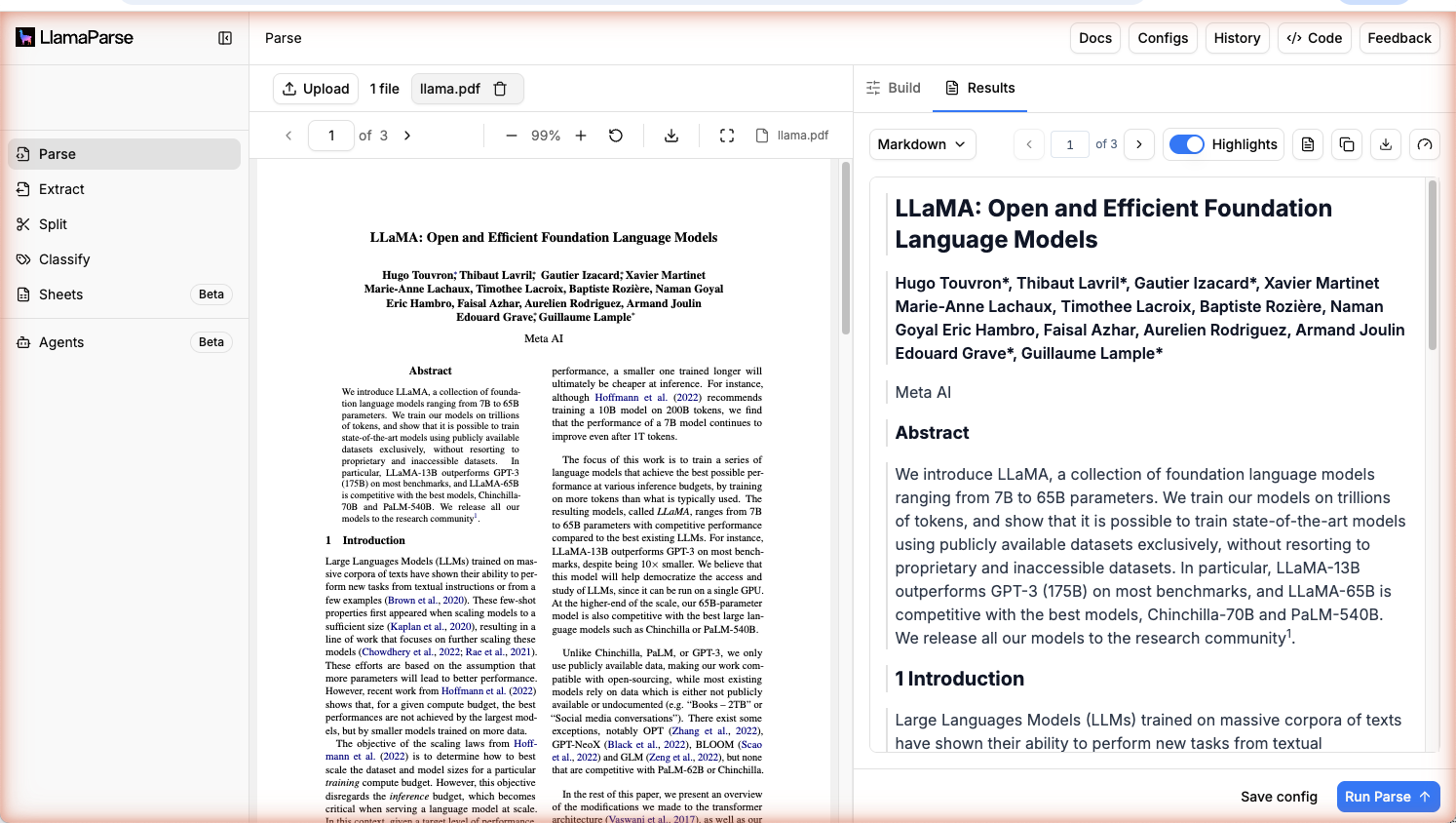
如果你不写代码,或想在动手前先用沙盒试一把 Parse,Web 界面是最快的路径。
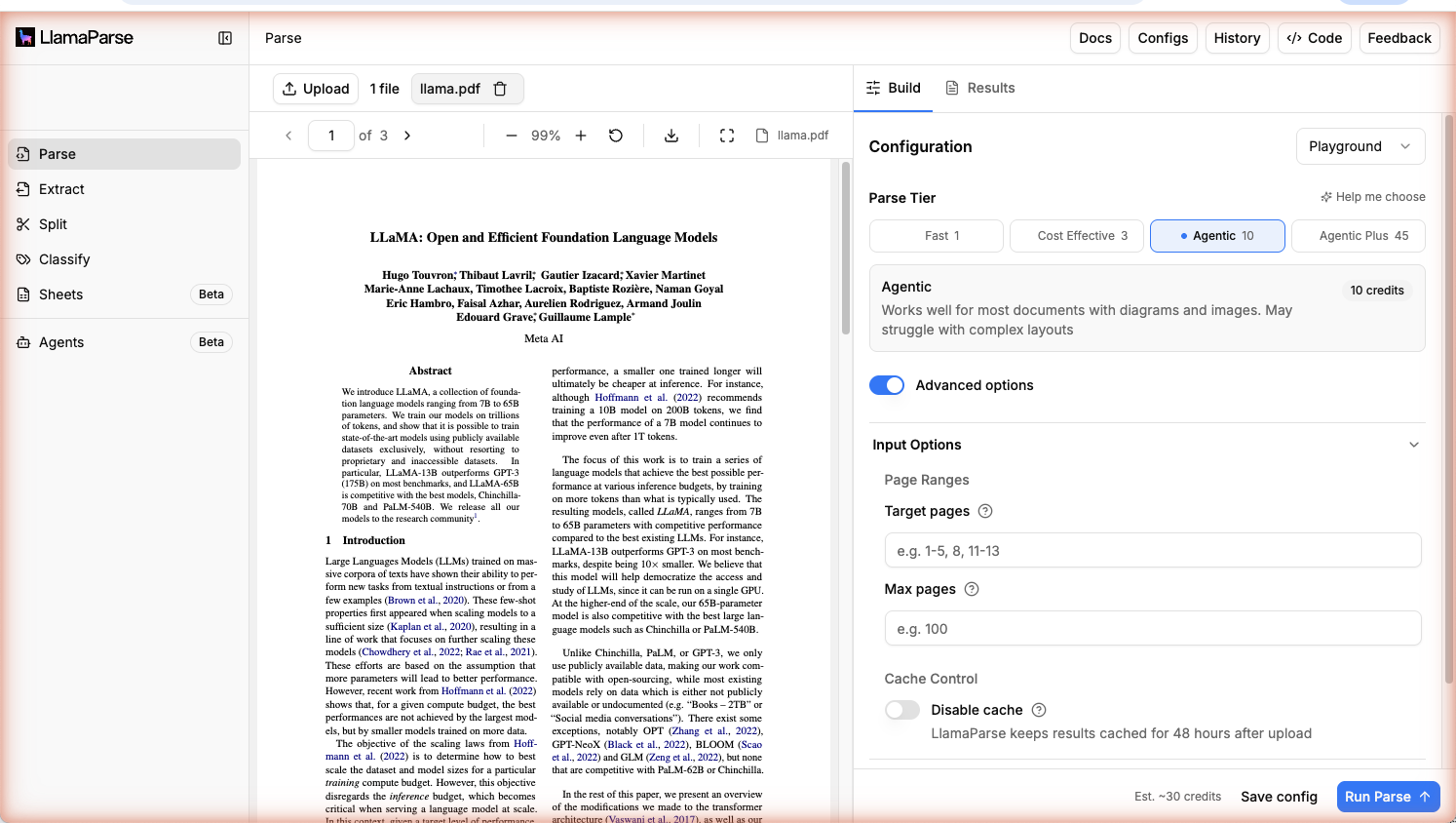
- 打开 cloud.llamaindex.ai/parse
- 在 Recommended Settings 里挑一个 Tier,或切到 Advanced Settings 自行定制
- 上传你的文档(也可以挑一个示例用例,什么都不上传先试试 Parse)
- 点击 Run Parse,直接在浏览器里查看结果
选一个档位
Parse 提供四个档位:
- Agentic Plus —— 用最先进的模型在最难的文档上追求最高准确度(复杂表格、密集图表、多栏版式)。
- Agentic —— 面向视觉丰富文档的进阶解析智能体,是多数工作负载的可靠默认选择。
- Cost Effective —— 在以文字为主、视觉结构很少的文档上平衡性能与成本。
- Fast —— 延迟最低、成本最小的档位,面向高量的纯文本文档。只返回 text 与 spatial text —— 不支持 markdown 输出。
另一种做法:用编码智能体
如果你已经在用 Claude Code、Cursor 或其他编码智能体,可以完全跳过 SDK。装上 Parse 的智能体技能,你的智能体就能随手解析文档:
终端窗口
npx skills add run-llama/llamaparse-agent-skills --skill llamaparse之后直接向智能体提要求即可,比如:
- “把这个 PDF 解析成 markdown 文本。”
- “把
./invoices里每张发票的所有表格抽出来,存成 CSV。” - “解析这份财务报告,并开启成本优化器。”
智能体会替你写出 SDK 调用:挑对档位、配好选项、保存输出 —— 你不用记住任何 API 细节。
前置要求: Node 18 以上、环境里有 LLAMA_CLOUD_API_KEY,以及一个支持 Vercel 风格的 skills 的编码智能体。
还有第二个技能 liteparse,它在本地运行、不需要 API key —— 最适合纯文本与简单版式。关于这两个技能、打包它们的智能体插件,以及 Codex 的配置,见技能与插件。
排障
如果智能体看不到这个技能:(1) 在项目根目录里执行安装,(2) 重启智能体会话,(3) 确认 LLAMA_CLOUD_API_KEY 设在智能体所在进程的环境里。
后续步骤
- 挑对档位 → 档位 讲清了 Agentic Plus、Agentic、Cost Effective 与 Fast 各自何时用。
- 学会配置选项 → 配置 Parse 覆盖每一个旋钮 —— 输入、输出与处理选项。
- 在长文档上省钱 → 成本优化器 会自动把每一页路由到合适的档位。
- 看真实示例 → Parse 示例 —— 常见用例的可运行教程。
资源
- 定价与 credit
- 需要的是结构化数据而不是 markdown?看看 LlamaExtract。