
主题
本例讲解如何在 Excel 电子表格上使用 Parse,并(可选地)以解析结果为基础搭一个能回答表格内数据的 RAG 应用。
我们用一个简单的 DCF 模板。先下载它并存为 dcf_template.xlsx:
终端窗口
curl -fL -o dcf_template.xlsx https://eqvista.com/wp-content/uploads/2020/09/Eqvista_DCF-Excel-Template.xlsx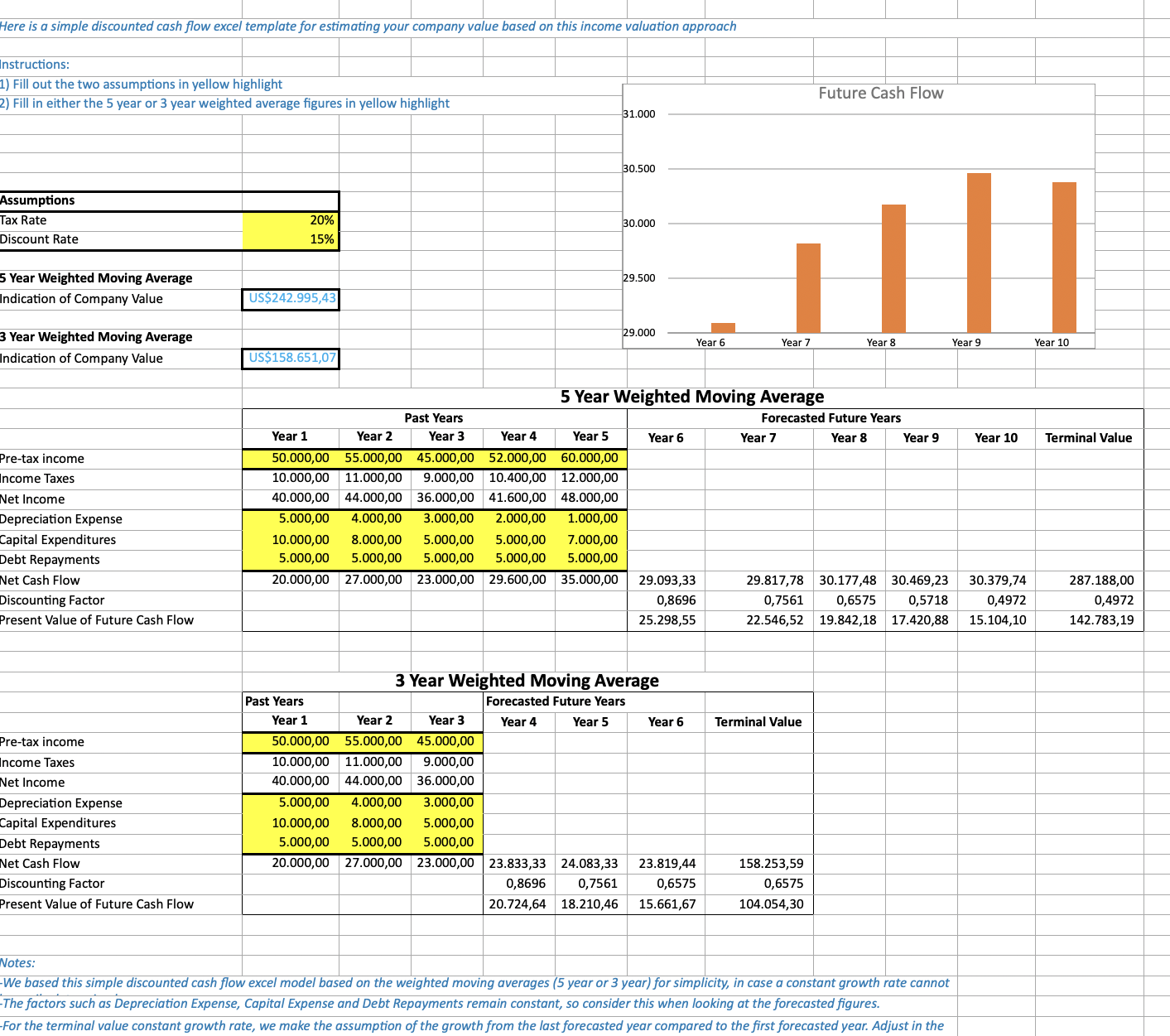
本例最后会用 LlamaIndex 框架 配 OpenAI 搭一个迷你 RAG 应用来回答问题。这一步可以跳过,也可以换用别的模型提供方。最后这一步只用 Python。
准备并连接 LlamaCloud
你需要一把 LlamaCloud API key。把它设成环境变量,SDK 会自动读取:
终端窗口
export LLAMA_CLOUD_API_KEY="llx-..."安装 SDK 并构造一个 client:
- Python
- TypeScript
- Go
- Java
- CLI
终端窗口
pip install "llama-cloud>=2.8"from llama_cloud import LlamaCloud
client = LlamaCloud() # reads LLAMA_CLOUD_API_KEY from the environment终端窗口
npm install @llamaindex/llama-cloudimport LlamaCloud from '@llamaindex/llama-cloud';
const client = new LlamaCloud(); // reads LLAMA_CLOUD_API_KEY from the environment终端窗口
go get github.com/run-llama/llama-parse-gopackage main
import (
"context"
llamacloud "github.com/run-llama/llama-parse-go"
)
func main() {
ctx := context.Background()
client := llamacloud.NewClient() // reads LLAMA_CLOUD_API_KEY from the environment
_ = ctx
_ = client
}implementation("ai.llamaindex:llama-cloud:1.3.0")import ai.llamaindex.llamacloud.client.LlamaCloudClient;
import ai.llamaindex.llamacloud.client.okhttp.LlamaCloudOkHttpClient;
// reads LLAMA_CLOUD_API_KEY from the environment
LlamaCloudClient client = LlamaCloudOkHttpClient.fromEnv();终端窗口
go install github.com/run-llama/llama-parse-cli/cmd/llp@latestllp 会从环境里读取 LLAMA_CLOUD_API_KEY(也可用 --api-key 传入)。
解析电子表格
上传电子表格、用 agentic 档解析(对表格密集的文档是很好的默认选择),并请求逐页 markdown。DCF 模板的主表在第二个工作表上,所以我们读取页索引 1。
- Python
- TypeScript
- Go
- Java
- CLI
file = client.files.create(file="dcf_template.xlsx", purpose="parse")

result = client.parsing.parse(
    file_id=file.id,
    tier="agentic",
    version="latest",
    expand=["markdown"],
)

# Print the markdown for the second sheet/page
print(result.markdown.pages[1].markdown)SDK 会替你处理任务轮询 —— client.parsing.parse() 会阻塞直到任务结束并返回完整结果。
import fs from 'fs';

const file = await client.files.create({
  file: fs.createReadStream('dcf_template.xlsx'),
  purpose: 'parse',
});

const result = await client.parsing.parse({
  file_id: file.id,
  tier: 'agentic',
  version: 'latest',
  expand: ['markdown'],
});

// Print the markdown for the second sheet/page
console.log(result.markdown.pages[1].markdown);SDK 会替你处理任务轮询 —— client.parsing.parse() 会等待到任务结束并返回完整结果。
f, err := os.Open("dcf_template.xlsx")
if err != nil {
  log.Fatal(err)
}
defer f.Close()

file, err := client.Files.New(ctx, llamacloud.FileNewParams{
  File:    f,
  Purpose: "parse",
})
if err != nil {
  log.Fatal(err)
}

job, err := client.Parsing.New(ctx, llamacloud.ParsingNewParams{
  FileID:  llamacloud.String(file.ID),
  Tier:    llamacloud.ParsingNewParamsTierAgentic,
  Version: llamacloud.ParsingNewParamsVersionLatest,
})
if err != nil {
  log.Fatal(err)
}

// expand is a GET parameter in Go, so poll for the result, then request markdown
getParams := llamacloud.ParsingGetParams{Expand: []string{"markdown"}}
result, err := client.Parsing.Get(ctx, job.ID, getParams)
if err != nil {
  log.Fatal(err)
}
for result.Job.Status != "COMPLETED" && result.Job.Status != "FAILED" && result.Job.Status != "CANCELLED" {
  time.Sleep(2 * time.Second)
  result, err = client.Parsing.Get(ctx, job.ID, getParams)
  if err != nil {
    log.Fatal(err)
  }
}
if result.Job.Status != "COMPLETED" {
  log.Fatalf("parse ended as %s", result.Job.Status)
}

// Print the markdown for the second sheet/page
fmt.Println(result.Markdown.Pages[1].Markdown)FileCreateResponse file = client.files().create(FileCreateParams.builder()
.file(Paths.get("dcf_template.xlsx"))
.purpose("parse")
.build());
ParsingCreateResponse job = client.parsing().create(ParsingCreateParams.builder()
.fileId(file.id())
.tier(ParsingCreateParams.Tier.AGENTIC)
.version(ParsingCreateParams.Version.LATEST)
.build());
// expand is a query parameter in Java, so poll for the result, then request markdown
ParsingGetParams getParams = ParsingGetParams.builder()
.jobId(job.id())
.addExpand("markdown")
.build();
ParsingGetResponse result = client.parsing().get(getParams);
while (!result.job().status().equals(ParsingGetResponse.Job.Status.COMPLETED)
&& !result.job().status().equals(ParsingGetResponse.Job.Status.FAILED)
&& !result.job().status().equals(ParsingGetResponse.Job.Status.CANCELLED)) {
Thread.sleep(2000);
result = client.parsing().get(getParams);
}
if (!result.job().status().equals(ParsingGetResponse.Job.Status.COMPLETED)) {
throw new RuntimeException("parse ended as " + result.job().status());
}
// Print the markdown for the second sheet/page
System.out.println(result.markdown().get().pages().get(1).asMarkdownResult().markdown());终端窗口
# Upload the spreadsheet
FILE_ID=$(llp files create \
  --file dcf_template.xlsx \
  --purpose parse | jq -r '.id')

# Start a parse job
JOB_ID=$(llp parsing create \
  --file-id "$FILE_ID" \
  --tier agentic \
  --version latest | jq -r '.id')

# Poll until the job reaches a terminal status
while true; do
  STATUS=$(llp parsing get --job-id "$JOB_ID" | jq -er '.job.status') || break
  case "$STATUS" in COMPLETED|FAILED|CANCELLED) break ;; esac
  sleep 2
done

# Print the markdown for the second sheet/page (index 1)
llp parsing get --job-id "$JOB_ID" --expand markdown \
  | jq -r 'if .job.status == "COMPLETED" then .markdown.pages[1].markdown
else "Parse job failed: \(.job.error_message // .)" end'预期输出:
| Discounted Cash Flow Excel Template | |||||||||||
|---|---|---|---|---|---|---|---|---|---|---|---|
| Here is a simple discounted cash flow excel template for estimating your company value based on this income valuation approach | |||||||||||
| Instructions: | |||||||||||
| 1) Fill out the two assumptions in yellow highlight | |||||||||||
| 2) Fill in either the 5 year or 3 year weighted average figures in yellow highlight | |||||||||||
| Assumptions | |||||||||||
| Tax Rate | 20% | ||||||||||
| Discount Rate | 15% | ||||||||||
| 5 Year Weighted Moving Average | |||||||||||
| Indication of Company Value | $242,995.43 | ||||||||||
| 3 Year Weighted Moving Average | |||||||||||
| Indication of Company Value | $158,651.07 | ||||||||||
| 5 Year Weighted Moving Average | |||||||||||
| Past Years | Forecasted Future Years | ||||||||||
| Year 1 | Year 2 | Year 3 | Year 4 | Year 5 | Year 6 | Year 7 | Year 8 | Year 9 | Year 10 | Terminal Value | |
| Pre-tax income | 50,000.00 | 55,000.00 | 45,000.00 | 52,000.00 | 60,000.00 | ||||||
| Income Taxes | 10,000.00 | 11,000.00 | 9,000.00 | 10,400.00 | 12,000.00 | ||||||
| Net Income | 40,000.00 | 44,000.00 | 36,000.00 | 41,600.00 | 48,000.00 | ||||||
| Depreciation Expense | 5,000.00 | 4,000.00 | 3,000.00 | 2,000.00 | 1,000.00 | ||||||
| Capital Expenditures | 10,000.00 | 8,000.00 | 5,000.00 | 5,000.00 | 7,000.00 | ||||||
| Debt Repayments | 5,000.00 | 5,000.00 | 5,000.00 | 5,000.00 | 5,000.00 | ||||||
| Net Cash Flow | 20,000.00 | 27,000.00 | 23,000.00 | 29,600.00 | 35,000.00 | 29,093.33 | 29,817.78 | 30,177.48 | 30,469.23 | 30,379.74 | 287,188.00 |
| Discounting Factor | 0.8696 | 0.7561 | 0.6575 | 0.5718 | 0.4972 | 0.4972 | |||||
| Present Value of Future Cash Flow | 25,298.55 | 22,546.52 | 19,842.18 | 17,420.88 | 15,104.10 | 142,783.19 | |||||
| 3 Year Weighted Moving Average | |||||||||||
| Past Years | Forecasted Future Years | ||||||||||
| Year 1 | Year 2 | Year 3 | Year 4 | Year 5 | Year 6 | Terminal Value | |||||
| Pre-tax income | 50,000.00 | 55,000.00 | 45,000.00 | ||||||||
| Income Taxes | 10,000.00 | 11,000.00 | 9,000.00 | ||||||||
| Net Income | 40,000.00 | 44,000.00 | 36,000.00 | ||||||||
| Depreciation Expense | 5,000.00 | 4,000.00 | 3,000.00 | ||||||||
| Capital Expenditures | 10,000.00 | 8,000.00 | 5,000.00 | ||||||||
| Debt Repayments | 5,000.00 | 5,000.00 | 5,000.00 | ||||||||
| Net Cash Flow | 20,000.00 | 27,000.00 | 23,000.00 | 23,833.33 | 24,083.33 | 23,819.44 | 158,253.59 | ||||
| Discounting Factor | 0.8696 | 0.7561 | 0.6575 | 0.6575 | |||||||
| Present Value of Future Cash Flow | 20,724.64 | 18,210.46 | 15,661.67 | 104,054.30 | |||||||
| Notes: | |||||||||||
| -We based this simple discounted cash flow excel model based on the weighted moving averages (5 year or 3 year) for simplicity, in case a constant growth rate cannot be easily determined. | |||||||||||
| -The factors such as Depreciation Expense, Capital Expense and Debt Repayments remain constant, so consider this when looking at the forecasted figures. | |||||||||||
| -For the terminal value constant growth rate, we make the assumption of the growth from the last forecasted year compared to the first forecasted year. Adjust in the formula as needed. |
(可选)就着数据提问
上面的步骤在任何 SDK 上都适用。下面这段可选的 RAG 走查用 Python,配合 LlamaIndex 与 OpenAI,基于解析出的电子表格内容回答问题。
安装这个额外交互依赖并设置你的 OpenAI key:
终端窗口
pip install llama-index-llms-openai
export OPENAI_API_KEY="sk-..."配置一个 LLM。这里用的是 gpt-5-mini:
from llama_index.llms.openai import OpenAI

llm = OpenAI(model="gpt-5-mini")最简单的做法是把解析出的电子表格内容拼进提示词:
from llama_index.core.llms import ChatMessage

llama_parse_documents = result.markdown.pages

query_str = "Tell me about the income taxes in the past years (year 3-5) for the 5 year WMA table"
context = "\n\n".join([doc.markdown for doc in llama_parse_documents])
messages = [
    ChatMessage(
        role="user",
        content=f"Here is some context\n<context>{context}</context>\n\nAnswer the following question: {query_str}",
    )
]

response = llm.chat(messages)
print(response.message.content)预期输出:
In the 5‑year WMA table the income tax amounts for past years 3–5 are:
- Year 3: $9,000.00
- Year 4: $10,400.00
- Year 5: $12,000.00

These equal 20% of the respective pre‑tax incomes (45,000; 52,000; 60,000), consistent with the 20% tax rate assumption. The taxes rise each year as pre‑tax income increases.