
主题
工作流可以根据运行时用于校验的同一套类型注解来可视化。这让图示在两个时机都有用:运行之前,看到所有可能的路径;运行之后,看到实际发生了什么。
可视化工作流主要有两种方式。
生成图示文件
先安装:
终端窗口
pip install llama-index-utils-workflow然后导入并使用:
from llama_index.utils.workflow import (
    draw_all_possible_flows,
    draw_all_possible_flows_mermaid,
    draw_most_recent_execution,
    draw_most_recent_execution_mermaid,
)

# Draw every statically possible path as HTML
draw_all_possible_flows(MyWorkflow, filename="all_paths.html")

# Draw the same static graph as Mermaid
mermaid = draw_all_possible_flows_mermaid(MyWorkflow)

# Draw one completed execution as HTML
w = MyWorkflow()
handler = w.run(topic="Pirates")
await handler
draw_most_recent_execution(handler, filename="most_recent.html")

# Draw the same completed execution as Mermaid
execution_mermaid = draw_most_recent_execution_mermaid(handler)draw_all_possible_flows 接受工作流类或工作流实例。而执行相关的函数需要一个 WorkflowHandler,因此你得先把工作流跑起来。
过长的事件名会让图示难以阅读。传入 max_label_length=... 可以截断节点标签:
draw_all_possible_flows(MyWorkflow, filename="all_paths.html", max_label_length=24)默认情况下,静态图示会包含子工作流。如果只想要父工作流的关系图,请传入 include_child_workflows=False。
使用调试器 UI
WorkflowServer 会在 / 提供调试器 UI。当你想在浏览器里运行工作流、查看事件并给出人在环路的回复时,就用它。
借助这个服务端应用,你可以可视化并运行自己的工作流:
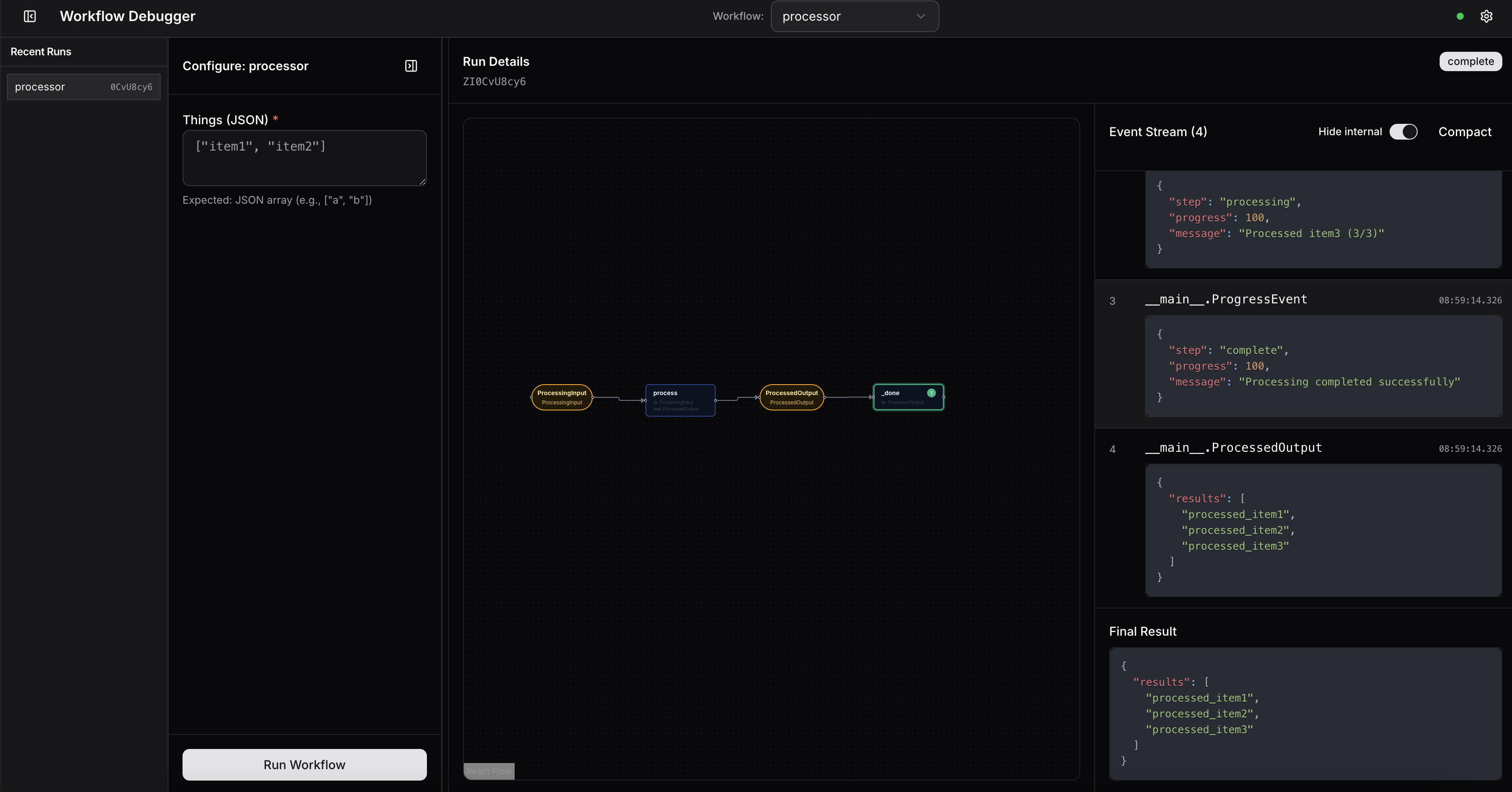
搭建这个服务很简单:
import asyncio
from workflows import Workflow, step
from workflows.events import StartEvent, StopEvent
from llama_agents.server import WorkflowServer

class MyWorkflow(Workflow):
    @step
    async def my_step(self, ev: StartEvent) -> StopEvent:
        return StopEvent(result="Done!")

async def main():
    server = WorkflowServer()
    server.add_workflow("my_workflow", MyWorkflow())
    await server.serve("0.0.0.0", 8080)

if __name__ == "__main__":
    asyncio.run(main())