
主题
工具也可以定义成「把人拉进回路」的形式。这对于需要人工输入的任务很有用,比如确认一次工具调用或给出反馈。
正如我们在 Workflows 教程 里将看到的,AgentWorkflow 底层的 Workflows 运行机制是执行一系列步骤,每个步骤既发出事件也接收事件。下面这张图展示了构成 AgentWorkflow 的步骤(蓝色)以及在它们之间传递数据的事件(绿色)。这些事件你会觉得眼熟——它们正是我们之前在输出流里处理的那些。
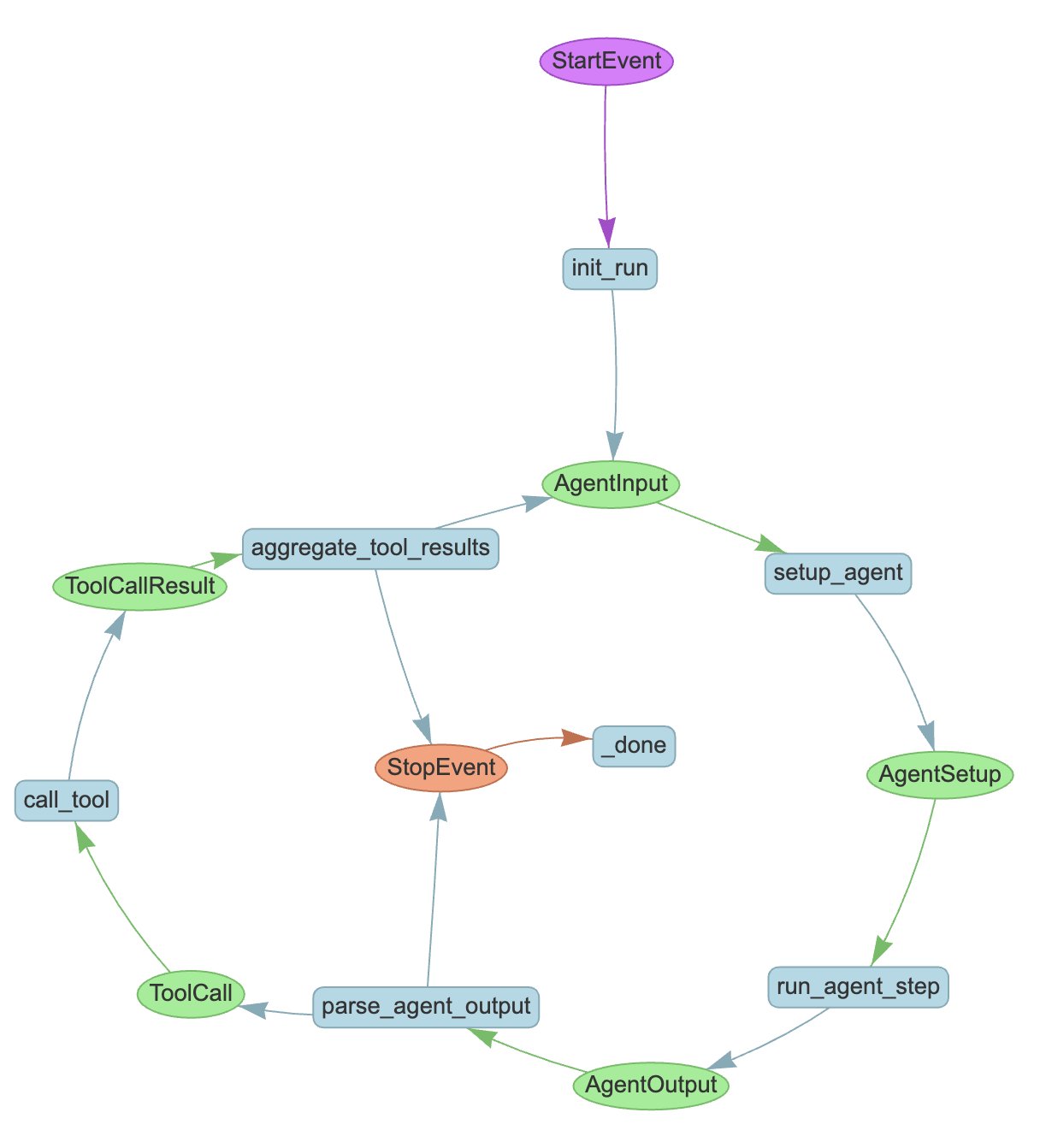
要把人拉进回路,我们让工具发出一个工作流里其他步骤都不会接收的事件,然后告诉这个工具一直等到它收到指定的「回复」事件为止。
我们内置了 InputRequiredEvent 和 HumanResponseEvent 两个事件用于这个目的。如果你想采集其他形式的人工输入,可以继承这些事件按自己的需要扩展。先把它们导入:
from llama_index.core.workflow import (
    InputRequiredEvent,
    HumanResponseEvent,
)接下来创建一个执行假想中危险任务的工具。这里有几个新东西:
wait_for_event用来等待一个 HumanResponseEvent。waiter_event是写入事件流的事件,用来告诉调用方我们正在等待回复。waiter_id是这次等待调用的唯一标识。它确保每个waiter_id只会发出一个waiter_event。requirements参数用来指定我们要等待一个带有特定user_name的 HumanResponseEvent。
from llama_index.core.workflow import Context

async def dangerous_task(ctx: Context) -> str:
    """A dangerous task that requires human confirmation."""

    # emit a waiter event (InputRequiredEvent here)
    # and wait until we see a HumanResponseEvent
    question = "Are you sure you want to proceed? "
    response = await ctx.wait_for_event(
        HumanResponseEvent,
        waiter_id=question,
        waiter_event=InputRequiredEvent(
            prefix=question,
            user_name="Laurie",
        ),
        requirements={"user_name": "Laurie"},
    )

    # act on the input from the event
    if response.response.strip().lower() == "yes":
        return "Dangerous task completed successfully."
    else:
return "Dangerous task aborted."我们照常创建 agent,把刚定义好的工具传给它:
workflow = FunctionAgent(
    tools=[dangerous_task],
    llm=llm,
    system_prompt="You are a helpful assistant that can perform dangerous tasks.",
)现在就可以运行这个工作流了:像处理其他流式事件一样处理 InputRequiredEvent,并通过 send_event 方法回传一个 HumanResponseEvent:
handler = workflow.run(user_msg="I want to proceed with the dangerous task.")

async for event in handler.stream_events():
    if isinstance(event, InputRequiredEvent):
        # capture keyboard input
        response = input(event.prefix)
        # send our response back
        handler.ctx.send_event(
            HumanResponseEvent(
                response=response,
                user_name=event.user_name,
            )
        )

response = await handler
print(str(response))照例,你可以在这里看到这个示例的完整代码。
采集输入的方式可以随心所欲:用图形界面、用语音输入,甚至引入另一个独立的 agent。如果输入要等上很久,或者发生在另一个进程里,你可能需要把上下文序列化并存到数据库或文件里,以便稍后恢复这个工作流。
说到让其他 agent 参与进来,我们就进入了下一节:讲几种构建多智能体系统的方式。