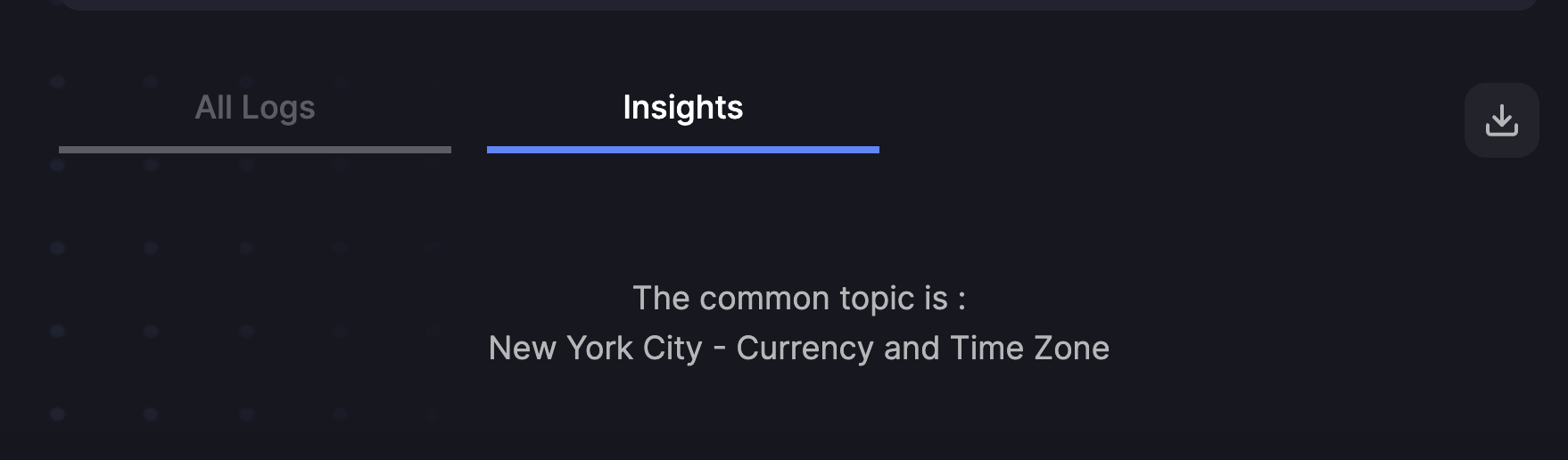
主题
概览:本例演示如何把 UpTrain 与 LlamaIndex 一起使用。UpTrain(github || 官网 || 文档)是一个用于评估和改进生成式 AI 应用的开源平台。它为 20+ 项预置检查(覆盖语言、代码、嵌入等用例)打分,对失败案例做根因分析,并给出如何解决的洞察。更多 UpTrain 评估的说明见这里。
问题:随着越来越多公司把 LLM 原型推进到可生产的应用,它们的 RAG 流水线也变得更复杂。开发者在用 QueryRewrite、Context ReRank 这类模块来提升 RAG 系统的准确度。
而复杂度上升,故障点也随之增多。
- 需要进阶评估来衡量这些较新模块的质量,判断它们是否真的提升了系统准确度。
- 需要一个稳健的实验框架,系统地测试不同模块,并做出数据驱动的决策。
解决方案:UpTrain 能同时解决这两点:
- UpTrain 提供一连串检查,评估生成回答、检索到的上下文以及各中间步骤的质量。相关的检查有 ContextRelevance、SubQueryCompleteness、ContextReranking、ContextConciseness、FactualAccuracy、ContextUtilization、ResponseCompleteness、ResponseConciseness 等。
- UpTrain 还支持你试验不同的嵌入模型,并提供
evaluate\_experiments方法来比较各种 RAG 配置。
该怎么做?
把 UpTrain 与 LlamaIndex 一起使用有两种方式:
使用 UpTrain 回调处理器:这种方式可以把 UpTrain 无缝集成进 LlamaIndex。只需在你现有的 LlamaIndex 流水线中加入 UpTrainCallbackHandler,它就会评估 RAG 流水线的各个组件。这是推荐的做法——最容易上手,且几乎不费力就能拿到仪表盘与洞察。
使用 UpTrain 的 EvalLlamaIndex:这种方式可以用 UpTrain 对生成的回答做评估。你用 EvalLlamaIndex 对象为查询生成回答,再对这些回答做评估。具体做法见下文的详细教程。它在评估上更灵活、更可控,但搭建和使用都需要更多精力。
1. 使用 UpTrain 回调处理器 
下面三个演示说明如何用 UpTrain 回调处理器评估 RAG 流水线的不同组件。
1. RAG 查询引擎评估:
RAG 查询引擎在检索上下文与生成回答中起着关键作用。为确保其性能与回答质量,我们做以下评估:
2. 子问题查询生成评估:
SubQuestionQueryGeneration 算子会把一个问题分解为若干子问题,并用 RAG 查询引擎为每个子问题生成回答。为衡量其准确度,我们使用:
- 子查询完整性:确保这些子问题准确且完整地覆盖了原始查询。
3. 重排评估:
重排是根据与查询的相关性对节点重新排序并挑选靠前的节点。依据重排后返回的节点数量不同,会做不同的评估。
a. 节点数量相同
- 上下文重排:检查重排后的节点顺序是否比原顺序更贴合查询。
b. 节点数量不同:
- 上下文精简度:考察减少后的节点数量是否仍提供了全部所需信息。
这些评估共同保障了 RAG 查询引擎、SubQuestionQueryGeneration 算子,以及 LlamaIndex 流水线中重排过程的稳健性与有效性。
注:
- 我们是用基础 RAG 查询引擎做的评估;同样的评估也可以用在进阶 RAG 查询引擎上。
- 重排评估同理:我们用的是 SentenceTransformerRerank,同样的评估也可以用其他重排器来做。
安装依赖并导入库
安装 notebook 所需依赖。
终端窗口
%pip install llama-index-readers-web
%pip install llama-index-callbacks-uptrain
%pip install -q html2text llama-index pandas tqdm uptrain torch sentence-transformers导入库。
from getpass import getpass

from llama_index.core import Settings, VectorStoreIndex
from llama_index.core.node_parser import SentenceSplitter
from llama_index.readers.web import SimpleWebPageReader
from llama_index.core.callbacks import CallbackManager
from llama_index.callbacks.uptrain.base import UpTrainCallbackHandler
from llama_index.core.query_engine import SubQuestionQueryEngine
from llama_index.core.tools import QueryEngineTool, ToolMetadata
from llama_index.core.postprocessor import SentenceTransformerRerank
from llama_index.llms.openai import OpenAI

import os设置
UpTrain 为你提供:
- 带进阶下钻与筛选功能的仪表盘
- 洞察与失败案例中的共性主题
- 生产数据的可观测性与实时监控
- 通过与 CI/CD 流水线的无缝集成做回归测试
使用 UpTrain 做评估时,你可以在以下方案中选择:
1. UpTrain 的开源软件(OSS):
你可以使用开源评估服务来评估你的模型。这种方式需要你提供一个 OpenAI API key,可在这里获取。
要在 UpTrain 仪表盘中查看你的评估结果,需要在终端里运行以下命令完成搭建:
终端窗口
git clone https://github.com/uptrain-ai/uptrain
cd uptrain
bash run_uptrain.sh这会在你的本机启动 UpTrain 仪表盘,访问地址是 http://localhost:3000/dashboard。
参数:
- key_type=“openai”
- api_key=“OPENAI_API_KEY”
- project_name=“PROJECT_NAME”
2. UpTrain 托管服务与仪表盘:
或者,你可以使用 UpTrain 的托管服务来评估模型。可以在这里创建免费的 UpTrain 账号并获得试用额度;如果需要更多试用额度,可以在这里与 UpTrain 的维护者预约通话。
使用托管服务的好处是:
- 无需在本机搭建 UpTrain 仪表盘。
- 无需各家的 API key 就能使用多种 LLM。
完成评估后,你可以在 https://dashboard.uptrain.ai/dashboard 查看 UpTrain 仪表盘中的结果
参数:
- key_type=“uptrain”
- api_key=“UPTRAIN_API_KEY”
- project_name=“PROJECT_NAME”
注:project_name 指定项目名称,所做的评估在 UpTrain 仪表盘中会归在该名称下。
创建 UpTrain 回调处理器
os.environ["OPENAI_API_KEY"] = getpass()

callback_handler = UpTrainCallbackHandler(
    key_type="openai",
    api_key=os.environ["OPENAI_API_KEY"],
    project_name="uptrain_llamaindex",
)

Settings.callback_manager = CallbackManager([callback_handler])加载并解析文档
从 Paul Graham 的文章《What I Worked On》加载文档。
documents = SimpleWebPageReader().load_data(
    [
        "https://raw.githubusercontent.com/run-llama/llama_index/main/docs/examples/data/paul_graham/paul_graham_essay.txt"
    ]
)把文档解析成节点。
parser = SentenceSplitter()
nodes = parser.get_nodes_from_documents(documents)1. RAG 查询引擎评估
UpTrain 回调处理器会在查询、上下文与回答生成后自动捕获它们,并对回答运行以下三项评估*(按 0 到 1 打分)*:
index = VectorStoreIndex.from_documents(
    documents,
)
query_engine = index.as_query_engine()

max_characters_per_line = 80
queries = [
    "What did Paul Graham do growing up?",
    "When and how did Paul Graham's mother die?",
    "What, in Paul Graham's opinion, is the most distinctive thing about YC?",
    "When and how did Paul Graham meet Jessica Livingston?",
    "What is Bel, and when and where was it written?",
]
for query in queries:
response = query_engine.query(query)Question: What did Paul Graham do growing up?
Response: Paul Graham wrote short stories and started programming on the IBM 1401 in 9th grade using an early version of Fortran. Later, he convinced his father to buy a TRS-80, where he wrote simple games, a program to predict rocket heights, and a word processor.
Context Relevance Score: 0.0
Factual Accuracy Score: 1.0
Response Completeness Score: 1.0
Question: When and how did Paul Graham's mother die?
Response: Paul Graham's mother died when he was 18 years old, from a brain tumor.
Context Relevance Score: 0.0
Factual Accuracy Score: 0.0
Response Completeness Score: 1.0
Question: What, in Paul Graham's opinion, is the most distinctive thing about YC?
Response: The most distinctive thing about Y Combinator, according to Paul Graham, is that instead of deciding for himself what to work on, the problems come to him. Every 6 months, a new batch of startups brings their problems, which then become the focus of YC's work.
Context Relevance Score: 0.0
Factual Accuracy Score: 0.5
Response Completeness Score: 1.0
Question: When and how did Paul Graham meet Jessica Livingston?
Response: Paul Graham met Jessica Livingston at a big party at his house in October 2003.
Context Relevance Score: 1.0
Factual Accuracy Score: 0.5
Response Completeness Score: 1.0
Question: What is Bel, and when and where was it written?
Response: Bel is a new Lisp that was written in Arc. It was developed over a period of 4 years, from March 26, 2015 to October 12, 2019. Most of the work on Bel was done in England, where the author had moved to in the summer of 2016.
Context Relevance Score: 1.0
Factual Accuracy Score: 1.0
Response Completeness Score: 1.0这是仪表盘的一个例子,展示如何筛选并下钻到失败案例、获得关于这些案例的洞察: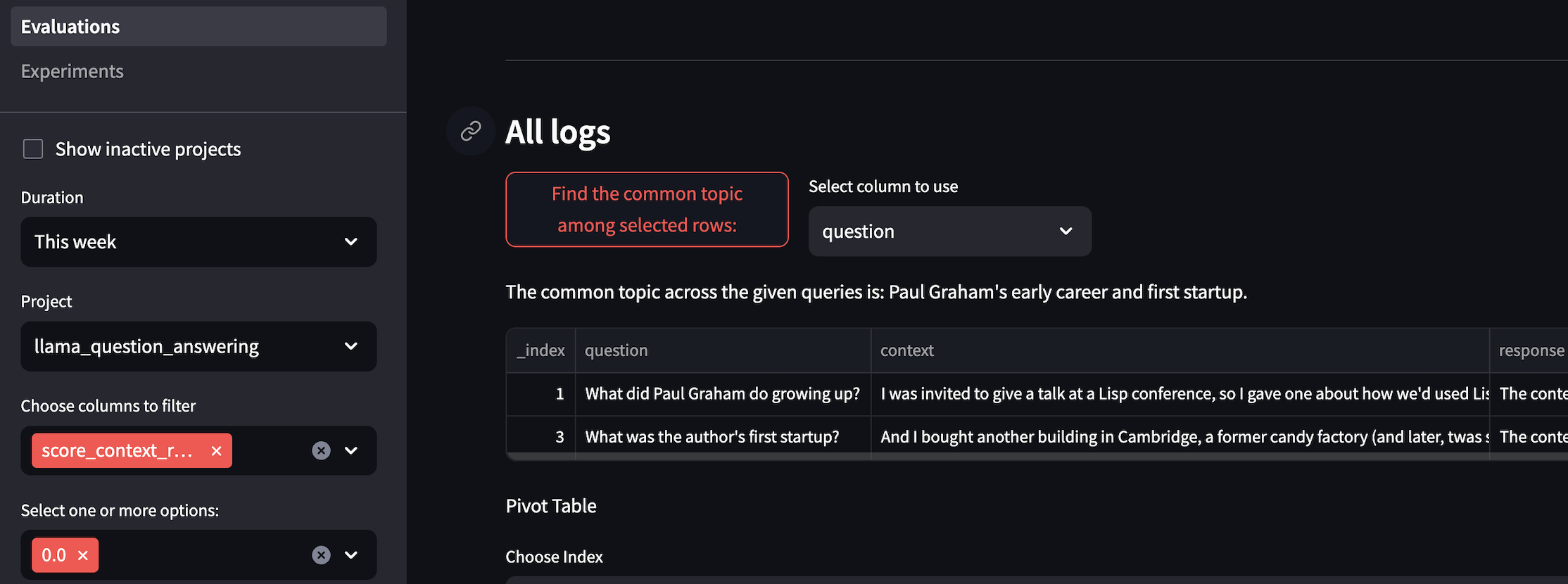
2. 子问题查询引擎评估
子问题查询引擎用于解决「借助多个数据源回答一个复杂查询」的问题。它会先把复杂查询拆成针对各个相关数据源的子问题,再收集所有中间回答并合成最终回答。
UpTrain 回调处理器会在子问题及其各自的回答生成后自动捕获它们,并对回答运行以下三项评估*(按 0 到 1 打分)*:
除上述评估之外,回调处理器还会运行以下评估:
- 子查询完整性:确保这些子问题准确且完整地覆盖了原始查询。
# build index and query engine
vector_query_engine = VectorStoreIndex.from_documents(
    documents=documents,
    use_async=True,
).as_query_engine()

query_engine_tools = [
    QueryEngineTool(
        query_engine=vector_query_engine,
        metadata=ToolMetadata(
            name="documents",
            description="Paul Graham essay on What I Worked On",
        ),
    ),
]

query_engine = SubQuestionQueryEngine.from_defaults(
    query_engine_tools=query_engine_tools,
    use_async=True,
)

response = query_engine.query(
    "How was Paul Grahams life different before, during, and after YC?"
)Generated 3 sub questions.
[1;3;38;2;237;90;200m[documents] Q: What did Paul Graham work on before Y Combinator?
[0m[1;3;38;2;90;149;237m[documents] Q: What did Paul Graham work on during Y Combinator?
[0m[1;3;38;2;11;159;203m[documents] Q: What did Paul Graham work on after Y Combinator?
[0m[1;3;38;2;11;159;203m[documents] A: Paul Graham worked on a project with Robert and Trevor after Y Combinator.
[0m[1;3;38;2;237;90;200m[documents] A: Paul Graham worked on projects with his colleagues Robert and Trevor before Y Combinator.
[0m[1;3;38;2;90;149;237m[documents] A: Paul Graham worked on writing essays and working on Y Combinator during his time at Y Combinator.
[0m
Question: What did Paul Graham work on after Y Combinator?
Response: Paul Graham worked on a project with Robert and Trevor after Y Combinator.
Context Relevance Score: 0.0
Factual Accuracy Score: 1.0
Response Completeness Score: 0.5
Question: What did Paul Graham work on before Y Combinator?
Response: Paul Graham worked on projects with his colleagues Robert and Trevor before Y Combinator.
Context Relevance Score: 0.0
Factual Accuracy Score: 1.0
Response Completeness Score: 0.5
Question: What did Paul Graham work on during Y Combinator?
Response: Paul Graham worked on writing essays and working on Y Combinator during his time at Y Combinator.
Context Relevance Score: 0.0
Factual Accuracy Score: 0.5
Response Completeness Score: 0.5
Question: How was Paul Grahams life different before, during, and after YC?
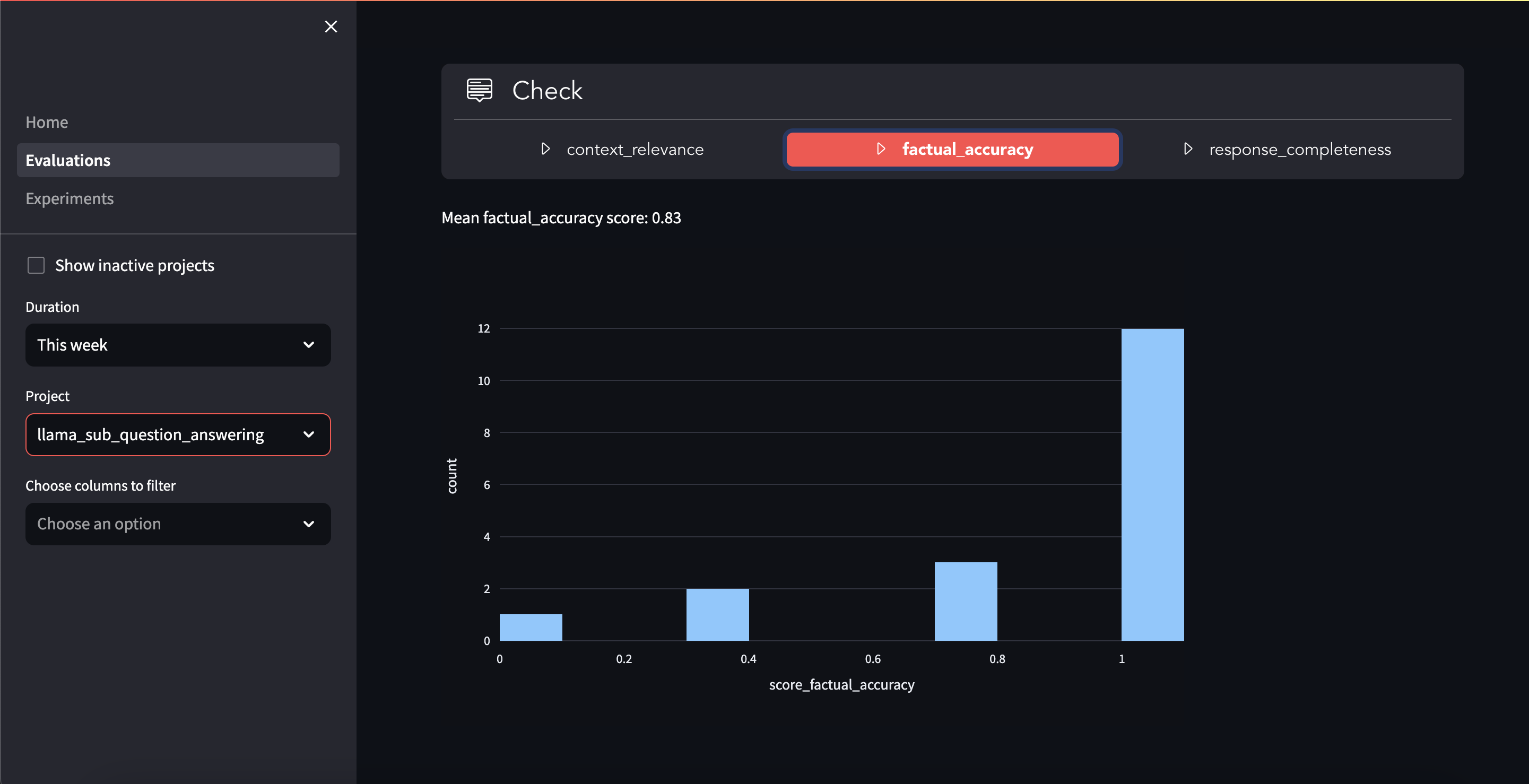
Sub Query Completeness Score: 1.0这是仪表盘的一个例子,它以柱状图的形式呈现各子问题的分数:
3. 重排
重排是依据节点与查询的相关性对节点重新排序的过程。LlamaIndex 提供了多类重排算法。本例使用的是 LLMRerank。
重排器允许你指定重排后返回的 top n 节点数。若该值与原本的节点数相同,重排器就只重排节点、不改变节点数量;否则它会重排并只返回前 n 个节点。
我们会根据重排后返回的节点数量执行不同的评估。
3a. 重排(节点数量不变)
如果重排后返回的节点数与原本的节点数相同,就会执行以下评估:
- 上下文重排:检查重排后的节点顺序是否比原顺序更贴合查询。
callback_handler = UpTrainCallbackHandler(
    key_type="openai",
    api_key=os.environ["OPENAI_API_KEY"],
    project_name_prefix="llama",
)
Settings.callback_manager = CallbackManager([callback_handler])

rerank_postprocessor = SentenceTransformerRerank(
    top_n=3,  # number of nodes after reranking
    keep_retrieval_score=True,
)

index = VectorStoreIndex.from_documents(
    documents=documents,
)

query_engine = index.as_query_engine(
    similarity_top_k=3,  # number of nodes before reranking
    node_postprocessors=[rerank_postprocessor],
)

response = query_engine.query(
    "What did Sam Altman do in this essay?",
)Question: What did Sam Altman do in this essay?
Context Reranking Score: 0.0
Question: What did Sam Altman do in this essay?
Response: Sam Altman was asked to become the president of Y Combinator after the original founders decided to step back and reorganize the company for long-term sustainability.
Context Relevance Score: 1.0
Factual Accuracy Score: 1.0
Response Completeness Score: 0.53b. 重排(节点数量改变)
如果重排后返回的节点数少于原本的节点数,就会执行以下评估:
- 上下文精简度:考察减少后的节点数量是否仍提供了全部所需信息。
callback_handler = UpTrainCallbackHandler(
    key_type="openai",
    api_key=os.environ["OPENAI_API_KEY"],
    project_name_prefix="llama",
)
Settings.callback_manager = CallbackManager([callback_handler])

rerank_postprocessor = SentenceTransformerRerank(
    top_n=2,  # Number of nodes after re-ranking
    keep_retrieval_score=True,
)

index = VectorStoreIndex.from_documents(
    documents=documents,
)
query_engine = index.as_query_engine(
    similarity_top_k=5,  # Number of nodes before re-ranking
    node_postprocessors=[rerank_postprocessor],
)

# Use your advanced RAG
response = query_engine.query(
    "What did Sam Altman do in this essay?",
)Question: What did Sam Altman do in this essay?
Context Conciseness Score: 0.0
Question: What did Sam Altman do in this essay?
Response: Sam Altman offered unsolicited advice to the author during a visit to California for interviews.
Context Relevance Score: 1.0
Factual Accuracy Score: 1.0
Response Completeness Score: 0.5UpTrain 托管服务的仪表盘与洞察
要通过 UpTrain 回调处理器使用其托管服务,唯一需要改动的就是设置 key_type 与 api_key 两个参数。其余代码保持不变。
callback_handler = UpTrainCallbackHandler(
    key_type="uptrain",
    api_key="up-******************************",
    project_name_prefix="llama",
)下面这段简短的 GIF 展示了托管服务的仪表盘,以及你能从中获得的洞察:

2. 使用 UpTrain 的 EvalLlamaIndex
安装 UpTrain 与 LlamaIndex
终端窗口
pip install uptrain llama_index导入所需的库
import httpx
import os
import openai
import pandas as pd

from llama_index.core import VectorStoreIndex, SimpleDirectoryReader, Settings
from uptrain import Evals, EvalLlamaIndex, Settings as UpTrainSettings为查询引擎创建数据集目录
你可以用手里任意文档来做这件事。本教程使用从维基百科抽取的纽约市资料。我们只往目录里放一份文档,但你可以按需加入更多。
url = "https://uptrain-assets.s3.ap-south-1.amazonaws.com/data/nyc_text.txt"
if not os.path.exists("nyc_wikipedia"):
    os.makedirs("nyc_wikipedia")
dataset_path = os.path.join("./nyc_wikipedia", "nyc_text.txt")

if not os.path.exists(dataset_path):
    r = httpx.get(url)
    with open(dataset_path, "wb") as f:
f.write(r.content)准备查询列表
在生成回答之前,需要先创建一份查询列表。由于查询引擎是用纽约市的数据构建的,我们就准备一批与纽约市相关的查询。
data = [
    {"question": "What is the population of New York City?"},
    {"question": "What is the area of New York City?"},
    {"question": "What is the largest borough in New York City?"},
    {"question": "What is the average temperature in New York City?"},
    {"question": "What is the main airport in New York City?"},
    {"question": "What is the famous landmark in New York City?"},
    {"question": "What is the official language of New York City?"},
    {"question": "What is the currency used in New York City?"},
    {"question": "What is the time zone of New York City?"},
    {"question": "What is the famous sports team in New York City?"},
]本 notebook 会用 OpenAI API 为提示词生成文本,也会用它来创建 Vector Store Index。因此请把 openai.api_key 设为你的 OpenAI API key。
openai.api_key = "sk-************************" # your OpenAI API key用 LlamaIndex 创建查询引擎
我们先用 LlamaIndex 创建一个向量存储索引,再把它作为查询引擎,从文档中检索相关章节。
Settings.chunk_size = 512

documents = SimpleDirectoryReader("./nyc_wikipedia/").load_data()

vector_index = VectorStoreIndex.from_documents(
    documents,
)

query_engine = vector_index.as_query_engine()设置
UpTrain 为你提供:
- 带进阶下钻与筛选功能的仪表盘
- 洞察与失败案例中的共性主题
- 生产数据的可观测性与实时监控
- 通过与 CI/CD 流水线的无缝集成做回归测试
使用 UpTrain 做评估时,你可以在以下两种方案中选择:
方案一:用 UpTrain 的开源软件(OSS)评估
你可以使用开源评估服务来评估你的模型。这种方式需要你提供一个 OpenAI API key,可在这里获取。
要在 UpTrain 仪表盘中查看你的评估结果,需要在终端里运行以下命令完成搭建:
终端窗口
git clone https://github.com/uptrain-ai/uptrain
cd uptrain
bash run_uptrain.sh这会在你的本机启动 UpTrain 仪表盘,访问地址是 http://localhost:3000/dashboard。
注:project_name 指定项目名称,所做的评估在 UpTrain 仪表盘中会归在该名称下。
settings = UpTrainSettings(
    openai_api_key=openai.api_key,
)创建 EvalLlamaIndex 对象
查询引擎建好之后,就可以用它创建一个 EvalLlamaIndex 对象。该对象将用于为这些查询生成回答。
llamaindex_object = EvalLlamaIndex(
    settings=settings, query_engine=query_engine
)运行评估
现在查询列表已就绪,我们可以用 EvalLlamaIndex 对象为查询生成回答,再对这些回答做评估。UpTrain 提供的评估有一大长串,见这里。我们挑了两个与本教程最相关的:
上下文相关性:该评估检查检索到的上下文是否与查询相关。这一点很重要,因为回答正是用检索到的上下文生成的;若上下文与查询不相关,回答也不会相关。
回答精简度:该评估检查回答是否简洁。这一点很重要,因为回答应当简明,不应包含多余信息。
results = llamaindex_object.evaluate(
    project_name="uptrain-llama-index",
    evaluation_name="nyc_wikipedia",  # adding project and evaluation names allow you to track the results in the UpTrain dashboard
    data=data,
    checks=[Evals.CONTEXT_RELEVANCE, Evals.RESPONSE_CONCISENESS],
)pd.DataFrame(results)方案二:用 UpTrain 的托管服务与仪表盘评估
或者,你可以使用 UpTrain 的托管服务来评估模型。可以在这里创建免费的 UpTrain 账号并获得试用额度;如果需要更多试用额度,可以在这里与 UpTrain 的维护者预约通话。
使用托管服务的好处是:
- 无需在本机搭建 UpTrain 仪表盘。
- 无需各家的 API key 就能使用多种 LLM。
完成评估后,你可以在 https://dashboard.uptrain.ai/dashboard 查看 UpTrain 仪表盘中的结果
注:project_name 指定项目名称,所做的评估在 UpTrain 仪表盘中会归在该名称下。
UPTRAIN_API_KEY = "up-**********************"  # your UpTrain API key

# We use `uptrain_access_token` parameter instead of 'openai_api_key' in settings in this case
settings = UpTrainSettings(
    uptrain_access_token=UPTRAIN_API_KEY,
)创建 EvalLlamaIndex 对象
查询引擎建好之后,就可以用它创建一个 EvalLlamaIndex 对象。该对象将用于为这些查询生成回答。
llamaindex_object = EvalLlamaIndex(
    settings=settings, query_engine=query_engine
)运行评估
现在查询列表已就绪,我们可以用 EvalLlamaIndex 对象为查询生成回答,再对这些回答做评估。UpTrain 提供的评估有一大长串,见这里。我们挑了两个与本教程最相关的:
上下文相关性:该评估检查检索到的上下文是否与查询相关。这一点很重要,因为回答正是用检索到的上下文生成的;若上下文与查询不相关,回答也不会相关。
回答精简度:该评估检查回答是否简洁。这一点很重要,因为回答应当简明,不应包含多余信息。
results = llamaindex_object.evaluate(
    project_name="uptrain-llama-index",
    evaluation_name="nyc_wikipedia",  # adding project and evaluation names allow you to track the results in the UpTrain dashboard
    data=data,
    checks=[Evals.CONTEXT_RELEVANCE, Evals.RESPONSE_CONCISENESS],
)pd.DataFrame(results)仪表盘:
分数与其对应案例数的直方图
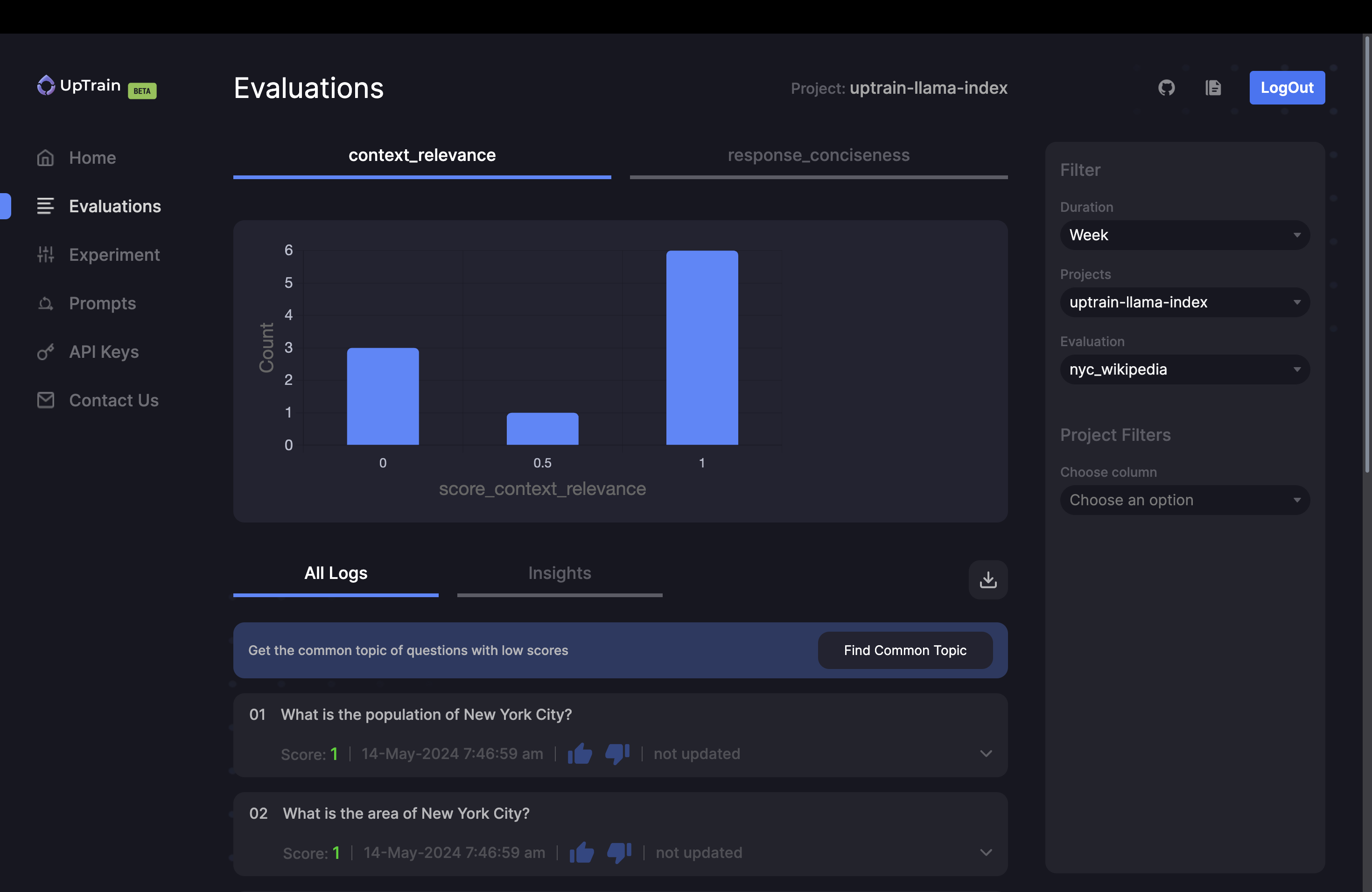
你可以筛选失败案例,并生成它们之间的共性主题。这有助于定位核心问题并推动修复