
主题
conn = connect() coll = conn.create_collection( name=“VideoDB Retrievers”, description=“VideoDB Retrievers” )
将视频上传到 VideoDB 中的默认集合
print(“正在上传视频”) video = coll.upload(url=“https://www.youtube.com/watch?v=aRgP3n0XiMc”) print(f”视频已上传,ID:{video.id}“)
video = coll.get_video(“m-b6230808-307d-468a-af84-863b2c321f05”)
    Uploading Video
    Video uploaded with ID: m-a758f9bb-f769-484a-9d54-02417ccfe7e6

> * `coll = conn.get_collection()` : Returns default collection object.
> * `coll.get_videos()` : Returns list of all the videos in a collections.
> * `coll.get_video(video_id)`: Returns Video object from given`video_id`.

### 🗣️ Step 2: Indexing & Search from Spoken Content

Video can be viewed as data with different modalities. First, we will work with the `spoken content`.

#### 🗣️ Indexing Spoken Content

```python
print("Indexing spoken content in Video...")
video.index_spoken_words()Indexing spoken content in Video...
100%|████████████████████████████████████████████████████████████████████████████████████████████████████| 100/100 [00:48<00:00, 2.08it/s]🗣️ 从语音索引中检索相关节点
我们将使用 VideoDBRetriever 从已索引的内容中检索相关节点。视频 ID 应作为参数传入,并且 index_type 应设置为 IndexType.spoken_word。
经过实验后,你可以配置 score_threshold 和 result_threshold。
from llama_index.retrievers.videodb import VideoDBRetriever
from videodb import SearchType, IndexType

spoken_retriever = VideoDBRetriever(
    collection=coll.id,
    video=video.id,
    search_type=SearchType.semantic,
    index_type=IndexType.spoken_word,
    score_threshold=0.1,
)

spoken_query = "Nationwide exams"
nodes_spoken_index = spoken_retriever.retrieve(spoken_query)🗣️️️ 查看结果:💬 文本
我们将使用相关节点,并借助 llamaindex 合成响应
from llama_index.core import get_response_synthesizer

response_synthesizer = get_response_synthesizer()

response = response_synthesizer.synthesize(
    spoken_query, nodes=nodes_spoken_index
)
print(response)The results of the nationwide exams were eagerly awaited all day.🗣️ 查看结果:🎥 视频片段
对于每个与查询相关的检索节点,元数据中的 start 和 end 字段表示该节点覆盖的时间区间。
我们将使用 VideoDB 的 Programmable Stream,根据这些节点的时间戳生成相关视频片段的流。
from videodb import play_stream

results = [
    (node.metadata["start"], node.metadata["end"])
    for node in nodes_spoken_index
]

stream_link = video.generate_stream(results)
play_stream(stream_link)'https://console.videodb.io/player?url=https://dseetlpshk2tb.cloudfront.net/v3/published/manifests/3c108acd-e459-494a-bc17-b4768c78e5df.m3u8'📸️ 第 3 步:从视觉内容中进行索引与搜索
📸 索引视觉内容
要详细了解 Scene Index,请探索以下指南:
快速入门指南提供了对 Scene Index 的分步介绍。它非常适合快速上手并了解主要功能。
场景提取选项指南深入介绍了 Scene Index 中可用于场景提取的各种选项。它涵盖高级设置、自定义功能,以及根据不同需求和偏好优化场景提取的技巧。
from videodb import SceneExtractionType

print("Indexing Visual content in Video...")

# Index scene content
index_id = video.index_scenes(
    extraction_type=SceneExtractionType.shot_based,
    extraction_config=""frame_count": 3",
    prompt="Describe the scene in detail",
)
video.get_scene_index(index_id)

print(f"Scene Index successful with ID: {index_id}")Indexing Visual content in Video...
Scene Index successful with ID: 990733050d6fd4f5📸️ 从场景索引中检索相关节点
就像我们为语音索引使用 VideoDBRetriever 一样,我们也将为场景索引使用它。在这里,我们需要将 index_type 设置为 IndexType.scene,并传入 scene_index_id
from llama_index.retrievers.videodb import VideoDBRetriever
from videodb import SearchType, IndexType

scene_retriever = VideoDBRetriever(
    collection=coll.id,
    video=video.id,
    search_type=SearchType.semantic,
    index_type=IndexType.scene,
    scene_index_id=index_id,
    score_threshold=0.1,
)

scene_query = "accident scenes"
nodes_scene_index = scene_retriever.retrieve(scene_query)📸️️️ 查看结果:💬 文本
from llama_index.core import get_response_synthesizer

response_synthesizer = get_response_synthesizer()

response = response_synthesizer.synthesize(
    scene_query, nodes=nodes_scene_index
)
print(response)The scenes described do not depict accidents but rather dynamic and intense scenarios involving motion, urgency, and tension in urban settings at night.📸 ️ 查看结果:🎥 视频片段
from videodb import play_stream

results = [
    (node.metadata["start"], node.metadata["end"])
    for node in nodes_scene_index
]

stream_link = video.generate_stream(results)
play_stream(stream_link)'https://console.videodb.io/player?url=https://dseetlpshk2tb.cloudfront.net/v3/published/manifests/ae74e9da-13bf-4056-8cfa-0267087b74d7.m3u8'🛠️ 第 4 步:简单的多模态 RAG——结合两种模态的结果
我们希望在视频库中解锁这样的多模态查询:
📸🗣️ “给我看 1. 事故场景 2. 关于全国考试的讨论”
创建多模态 RAG 有很多方法,为了简单起见,我们选择一种简单的方法:
- 🧩 查询转换:将查询分为两部分,分别用于场景索引和语音索引。
- 🔎 为每种模态查找相关节点:使用
VideoDBRetriever从语音索引和场景索引中查找相关节点 - ✏️ 查看结果:文本:使用相关节点合成文本响应,整合两个索引的结果以精确识别视频片段。
- 🎥 查看结果:视频片段:整合两个索引的结果以精确识别视频片段。
要了解更多高级多模态技术,请查看高级多模态指南
🧩 查询转换
from llama_index.llms.openai import OpenAI

def split_spoken_visual_query(query):
    transformation_prompt = """
    Divide the following query into two distinct parts: one for spoken content and one for visual content. The spoken content should refer to any narration, dialogue, or verbal explanations and The visual content should refer to any images, videos, or graphical representations. Format the response strictly as:\nSpoken: `<spoken_query>`\nVisual: `<visual_query>`\n\nQuery: {query}
    """
    prompt = transformation_prompt.format(query=query)
    response = OpenAI(model="gpt-4").complete(prompt)
    divided_query = response.text.strip().split("\n")
    spoken_query = divided_query[0].replace("Spoken:", "").strip()
    scene_query = divided_query[1].replace("Visual:", "").strip()
    return spoken_query, scene_query

query = "Show me 1.Accident Scene 2.Discussion about nationwide exams "
spoken_query, scene_query = split_spoken_visual_query(query)
print("Query for Spoken retriever : ", spoken_query)
print("Query for Scene retriever : ", scene_query)Query for Spoken retriever : Discussion about nationwide exams
Query for Scene retriever : Accident Scene🔎 为每种模态查找相关节点
from videodb import SearchType, IndexType

# Retriever for Spoken Index
spoken_retriever = VideoDBRetriever(
    collection=coll.id,
    video=video.id,
    search_type=SearchType.semantic,
    index_type=IndexType.spoken_word,
    score_threshold=0.1,
)

# Retriever for Scene Index
scene_retriever = VideoDBRetriever(
    collection=coll.id,
    video=video.id,
    search_type=SearchType.semantic,
    index_type=IndexType.scene,
    scene_index_id=index_id,
    score_threshold=0.1,
)

# Fetch relevant nodes for Spoken index
nodes_spoken_index = spoken_retriever.retrieve(spoken_query)

# Fetch relevant nodes for Scene index
nodes_scene_index = scene_retriever.retrieve(scene_query)️💬️ 查看结果:文本
response_synthesizer = get_response_synthesizer()

response = response_synthesizer.synthesize(
    query, nodes=nodes_scene_index + nodes_spoken_index
)
print(response)The first scene depicts a dynamic and intense scenario in an urban setting at night, involving a motorcycle chase with a figure possibly dodging away. The second scene portrays a dramatic escape or rescue situation with characters in motion alongside a large truck. The discussion about nationwide exams involves a conversation between a character and their mother about exam results and studying.🎥 查看结果:视频片段
我们从每种模态中都检索到了在该特定模态(本例中为语义和场景/视觉)内与查询相关的结果。
每个节点的元数据中都有 start 和 end 字段,表示该节点覆盖的时间区间。
合成这些结果有很多方法,目前我们将使用一种简单的方法:
Union:此方法获取每个节点的所有时间戳,创建一个包含所有相关时间的完整列表,即使某些时间戳只出现在一种模态中。
另一种方法可以是 Intersection:
Intersection:此方法仅包含每个节点中都存在的时间戳,从而生成一个更小的列表,其中的时间在所有模态中都具有相关性。
from videodb import play_stream

def merge_intervals(intervals):
    if not intervals:
        return []
    intervals.sort(key=lambda x: x[0])
    merged = [intervals[0]]
    for interval in intervals[1:]:
        if interval[0] <= merged[-1][1]:
            merged[-1][1] = max(merged[-1][1], interval[1])
        else:
            merged.append(interval)
    return merged

# Extract timestamps from both relevant nodes
results = [
    [node.metadata["start"], node.metadata["end"]]
    for node in nodes_spoken_index + nodes_scene_index
]
merged_results = merge_intervals(results)

# Use Videodb to create a stream of relevant clips
stream_link = video.generate_stream(merged_results)
play_stream(stream_link)'https://console.videodb.io/player?url=https://dseetlpshk2tb.cloudfront.net/v3/published/manifests/91b08b39-c72f-4e33-ad1c-47a2ea11ac17.m3u8'🛠 使用 VideoDBRetriever 为视频集合构建 RAG
向我们的集合中添加更多视频
video_2 = coll.upload(url="https://www.youtube.com/watch?v=kMRX3EA68g4")🗣️ 索引语音内容
video_2.index_spoken_words()📸 索引场景
from videodb import SceneExtractionType

print("Indexing Visual content in Video...")

# Index scene content
index_id = video_2.index_scenes(
    extraction_type=SceneExtractionType.shot_based,
    extraction_config=""frame_count": 3",
    prompt="Describe the scene in detail",
)
video_2.get_scene_index(index_id)

print(f"Scene Index successful with ID: {index_id}")[Video(id=m-b6230808-307d-468a-af84-863b2c321f05, collection_id=c-4882e4a8-9812-4921-80ff-b77c9c4ab4e7, stream_url=https://dseetlpshk2tb.cloudfront.net/v3/published/manifests/528623c2-3a8e-4c84-8f05-4dd74f1a9977.m3u8, player_url=https://console.dev.videodb.io/player?url=https://dseetlpshk2tb.cloudfront.net/v3/published/manifests/528623c2-3a8e-4c84-8f05-4dd74f1a9977.m3u8, name=Death note - episode 1 (english dubbed) | HD, description=None, thumbnail_url=None, length=1366.006712),
Video(id=m-f5b86106-4c28-43f1-b753-fa9b3f839dfe, collection_id=c-4882e4a8-9812-4921-80ff-b77c9c4ab4e7, stream_url=https://dseetlpshk2tb.cloudfront.net/v3/published/manifests/4273851a-46f3-4d57-bc1b-9012ce330da8.m3u8, player_url=https://console.dev.videodb.io/player?url=https://dseetlpshk2tb.cloudfront.net/v3/published/manifests/4273851a-46f3-4d57-bc1b-9012ce330da8.m3u8, name=Death note - episode 5 (english dubbed) | HD, description=None, thumbnail_url=None, length=1366.099592)]🧩 查询转换
query = "Show me 1.Accident Scene 2.Kiara is speaking "
spoken_query, scene_query = split_spoken_visual_query(query)
print("Query for Spoken retriever : ", spoken_query)
print("Query for Scene retriever : ", scene_query)Query for Spoken retriever : Kiara is speaking
Query for Scene retriever : Show me Accident Scene🔎 查找相关节点
from videodb import SearchType, IndexType

# Retriever for Spoken Index
spoken_retriever = VideoDBRetriever(
    collection=coll.id,
    search_type=SearchType.semantic,
    index_type=IndexType.spoken_word,
    score_threshold=0.2,
)

# Retriever for Scene Index
scene_retriever = VideoDBRetriever(
    collection=coll.id,
    search_type=SearchType.semantic,
    index_type=IndexType.scene,
    score_threshold=0.2,
)

# Fetch relevant nodes for Spoken index
nodes_spoken_index = spoken_retriever.retrieve(spoken_query)

# Fetch relevant nodes for Scene index
nodes_scene_index = scene_retriever.retrieve(scene_query)️💬️ 查看结果:文本
response_synthesizer = get_response_synthesizer()

response = response_synthesizer.synthesize(
    "What is kaira speaking. And tell me about accident scene",
    nodes=nodes_scene_index + nodes_spoken_index,
)
print(response)Kira is speaking about his plans and intentions regarding the agent from the bus. The accident scene captures a distressing moment where an individual is urgently making a phone call near a damaged car, with a victim lying motionless on the ground. The chaotic scene includes a bus in the background, emphasizing the severity of the tragic incident.🎥 查看结果:视频片段
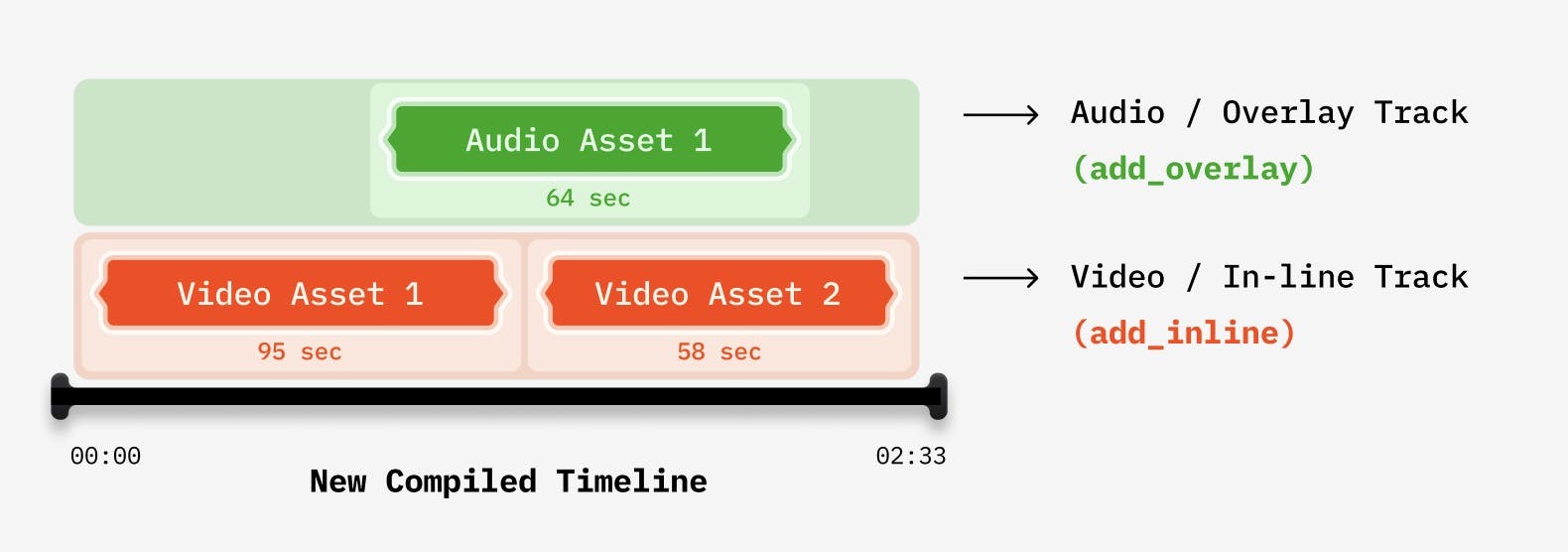
在涉及多个视频的编辑工作流中,我们需要创建由 VideoAsset 组成的 Timeline,然后编译它们。
from videodb import connect, play_stream
from videodb.timeline import Timeline
from videodb.asset import VideoAsset

# Create a new timeline Object
timeline = Timeline(conn)

for node_obj in nodes_scene_index + nodes_spoken_index:
    node = node_obj.node

    # Create a Video asset for each node
    node_asset = VideoAsset(
        asset_id=node.metadata["video_id"],
        start=node.metadata["start"],
        end=node.metadata["end"],
    )

    # Add the asset to timeline
    timeline.add_inline(node_asset)

# Generate stream for the compiled timeline
stream_url = timeline.generate_stream()
play_stream(stream_url)'https://console.videodb.io/player?url=https://dseetlpshk2tb.cloudfront.net/v3/published/manifests/2810827b-4d80-44af-a26b-ded2a7a586f6.m3u8'配置 VideoDBRetriever
⚙️ 仅针对单个视频的检索器
你可以传入视频对象的 id,仅在对应视频中搜索。
VideoDBRetriever(video="my_video.id")⚙️ 针对一组视频/集合的检索器
你可以传入 Collection 的 id,仅在该 Collection 中搜索。
VideoDBRetriever(collection="my_coll.id")⚙️ 针对不同类型索引的检索器
from videodb import IndexType
spoken_word = VideoDBRetriever(index_type=IndexType.spoken_word)

scene_retriever = VideoDBRetriever(index_type=IndexType.scene, scene_index_id="my_index_id")⚙️ 配置检索器的搜索类型
search_type 决定用于针对给定查询检索节点的搜索方法
from videodb import SearchType, IndexType

keyword_spoken_search = VideoDBRetriever(
    search_type=SearchType.keyword,
    index_type=IndexType.spoken_word
)

semantic_scene_search = VideoDBRetriever(
    search_type=SearchType.semantic,
    index_type=IndexType.spoken_word
)⚙️ 配置阈值参数
result_threshold:检索器返回结果数量的阈值;默认值为5score_threshold:只有分数高于score_threshold的节点才会被检索器返回;默认值为0.2
custom_retriever = VideoDBRetriever(result_threshold=2, score_threshold=0.5)✨ 配置索引与分块
在本示例中,我们利用 VideoDB 的索引功能进行视频检索。不过,你也可以灵活地加载 Transcript 和 Scene 数据,并使用 llamaindex 应用自己的索引技术。
如需更详细的指导,请参阅此指南。
🏃♂️ 后续步骤
在本指南中,我们使用 VideoDB、Llamaindex 和 OpenAI 构建了一个简单的视频多模态 RAG
你可以通过引入更先进的技术来优化流水线,例如
- 优化查询转换
- 采用更多方法来组合来自不同模态的检索节点
- 尝试不同的 RAG 流水线,例如知识图谱
要详细了解我们用于创建相关片段的 Programable Stream 功能,请查看动态视频流指南
要详细了解 Scene Index,请探索以下指南:
👨👩👧👦 支持与社区
如果你有任何问题或反馈,欢迎随时联系我们 🙌🏼