
主题
LlamaIndex 提供一键式可观测性 🔭,让你在生产环境中构建有章可循的 LLM 应用。
在你数据之上构建 LLM 应用(RAG 系统、智能体)时,有章可循的开发有一个关键要求,就是能够观测、调试并评估你的系统——既看整体,也看每个组件。
这项能力让你把 LlamaIndex 库与我们合作伙伴提供的强大可观测性/评估工具无缝对接。只需配置一个变量,你就能做到下面这些事:
- 查看 LLM/提示词的输入与输出
- 确认任一组件(LLM、嵌入)的输出是否符合预期
- 查看索引与查询两条路径的调用轨迹
各服务商之间有相似也有差异。完整指南见下文各家章节!
注意:
可观测性现在由 instrumentation 模块负责(v0.10.20 及之后版本可用。)
本页提到的许多工具与集成使用的是我们较早的 CallbackManager,或者不使用 set_global_handler。这类集成我们都已作出标记!
使用方式
要开启它,通常只需下面几步:
from llama_index.core import set_global_handler

# general usage
set_global_handler("<handler_name>", **kwargs)注意传给 set_global_handler 的所有 kwargs 都会交给底层的回调处理器。
就这样!执行过程会被无缝送到下游服务,你就能使用「查看应用执行轨迹」这类功能了。
集成
OpenTelemetry
OpenTelemetry 是一个被广泛使用的开源追踪与可观测性服务,拥有众多后端集成(如 Jaeger、Zipkin 或 Prometheus)。
我们的 OpenTelemetry 集成会追踪 LlamaIndex 代码产生的所有事件,包括 LLM、Agent、RAG 流水线组件等等:LlamaIndex 原生 instrumentation 能给你的,都可以导出为 OpenTelemetry 格式!
可以用下面命令安装该库:
终端窗口
pip install llama-index-observability-otel然后就能用默认设置在你的代码里使用它,比如这个 RAG 流水线的例子:
from llama_index.observability.otel import LlamaIndexOpenTelemetry
from llama_index.core import SimpleDirectoryReader, VectorStoreIndex
from llama_index.llms.openai import OpenAI
from llama_index.embeddings.openai import OpenAIEmbedding
from llama_index.core import Settings

# initialize the instrumentation object
instrumentor = LlamaIndexOpenTelemetry()

if __name__ == "__main__":
    embed_model = OpenAIEmbedding(model_name="text-embedding-3-small")
    llm = OpenAI(model="gpt-4.1-mini")

    # start listening!
    instrumentor.start_registering()

    # register events
    documents = SimpleDirectoryReader(
        input_dir="./data/paul_graham/"
    ).load_data()

    index = VectorStoreIndex.from_documents(documents, embed_model=embed_model)
    query_engine = index.as_query_engine(llm=llm)

    query_result_one = query_engine.query("Who is Paul?")
query_result_two = query_engine.query("What did Paul do?")也可以使用更复杂、更定制的配置,例如下面这个:
import json
from pydantic import BaseModel, Field
from typing import List

from llama_index.observability.otel import LlamaIndexOpenTelemetry
from opentelemetry.exporter.otlp.proto.http.trace_exporter import (
    OTLPSpanExporter,
)

# define a custom span exporter
span_exporter = OTLPSpanExporter("http://0.0.0.0:4318/v1/traces")

# initialize the instrumentation object
instrumentor = LlamaIndexOpenTelemetry(
    service_name_or_resource="my.test.service.1",
    span_exporter=span_exporter,
    debug=True,
)

if __name__ == "__main__":
    instrumentor.start_registering()
# ... your code here我们还准备了一个演示仓库,演示如何追踪智能体工作流,并把注册到的轨迹写入 Postgres 数据库。
LlamaTrace(托管版 Arize Phoenix)
我们与 Arize AI 合作推出了 LlamaTrace,一个托管的追踪、可观测性与评估平台,天然支持 LlamaIndex 开源用户,并与 LlamaParse(原 LlamaCloud)集成。
它构建于开源项目 Arize Phoenix 之上。Phoenix 为监控你的模型与 LLM 应用提供了以 notebook 为中心的体验,提供:
- LLM Traces —— 追踪你的 LLM 应用的执行过程,理解其内部运作,并排查检索、工具执行等方面的问题。
- LLM Evals —— 借助大语言模型来评估你的生成式模型或应用的相关性、毒性等指标。
对于需要托管云或企业自部署、面向生产 AI 系统的可观测性与评估的团队,Arize AX 也能接收 LlamaIndex 的 OpenInference 轨迹。
使用方式
安装集成包:pip install -U llama-index-callbacks-arize-phoenix。
然后在 LlamaTrace 上创建账号:https://llamatrace.com/login。创建一个 API key 并填入下面的 PHOENIX_API_KEY 变量。
接着运行以下代码:
# Phoenix can display in real time the traces automatically
# collected from your LlamaIndex application.
# Run all of your LlamaIndex applications as usual and traces
# will be collected and displayed in Phoenix.

# setup Arize Phoenix for logging/observability
import llama_index.core
import os

PHOENIX_API_KEY = "<PHOENIX_API_KEY>"
os.environ["OTEL_EXPORTER_OTLP_HEADERS"] = f"api_key={PHOENIX_API_KEY}"
llama_index.core.set_global_handler(
    "arize_phoenix", endpoint="https://llamatrace.com/v1/traces"
)

...指南
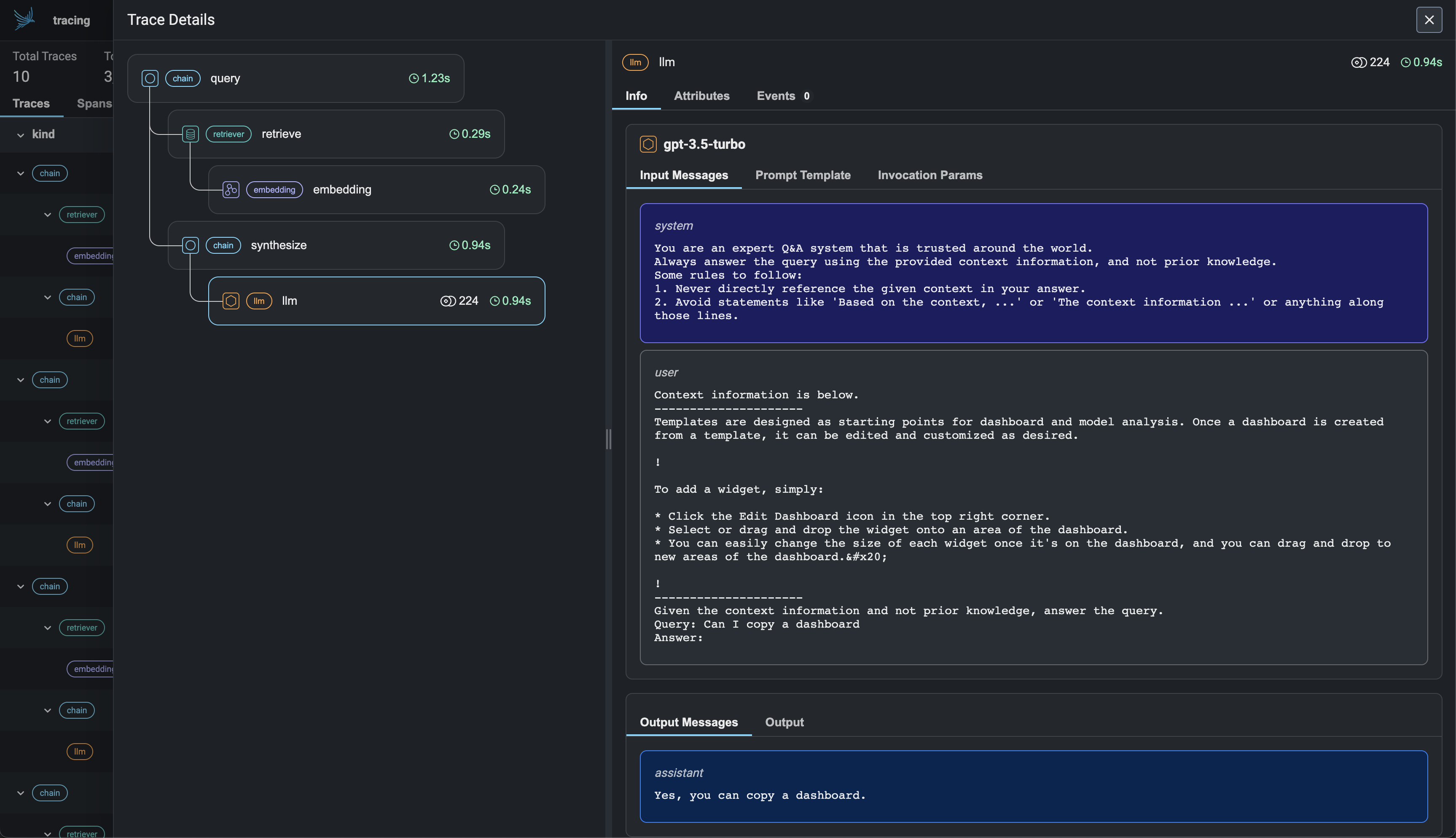
SigNoz
SigNoz 是一个开源可观测性框架。它原生构建在 OpenTelemetry 之上,把追踪、日志与指标集中在一个面板里,并提供自托管与云两种部署方式。把 SigNoz 与 LlamaIndex 一起使用,你可以查看 RAG 与 Agent 工作流的详细轨迹,同时掌握 token 用量、延迟、错误率、LLM 模型分布等关键指标。
使用方式
安装以下依赖:
终端窗口
pip install \
  opentelemetry-distro \
  opentelemetry-exporter-otlp \
  opentelemetry-instrumentation-httpx \
  opentelemetry-instrumentation-system-metrics \
  llama-index \
openinference-instrumentation-llama-index然后加上自动 instrumentation:
终端窗口
opentelemetry-bootstrap --action=install接着用 auto-instrumentation 运行你的 LlamaIndex 应用:
终端窗口
OTEL_RESOURCE_ATTRIBUTES="service.name=<service_name>" \
OTEL_EXPORTER_OTLP_ENDPOINT="https://ingest.<region>.signoz.cloud:443" \
OTEL_EXPORTER_OTLP_HEADERS="signoz-ingestion-key=<your_ingestion_key>" \
OTEL_EXPORTER_OTLP_PROTOCOL=grpc \
OTEL_TRACES_EXPORTER=otlp \
OTEL_METRICS_EXPORTER=otlp \
OTEL_LOGS_EXPORTER=otlp \
OTEL_PYTHON_LOG_CORRELATION=true \
OTEL_PYTHON_LOGGING_AUTO_INSTRUMENTATION_ENABLED=true \
opentelemetry-instrument <your_run_command><service_name>是你的服务名- 把
<region>设为与你 SigNoz Cloud 的区域一致 - 把
<your_ingestion_key>替换为你的 SigNoz ingestion key - 把
<your_run_command>替换成你实际用来运行应用的命令。例如:python main.py
📌 注:用的是自托管 SigNoz?大部分步骤相同。要照本指南调整,请按 Cloud → Self-Hosted 修改 endpoint 并去掉 ingestion key 头部。
现在你就能看到你使用 LlamaIndex 应用时自动或手动导出的轨迹、日志与指标。
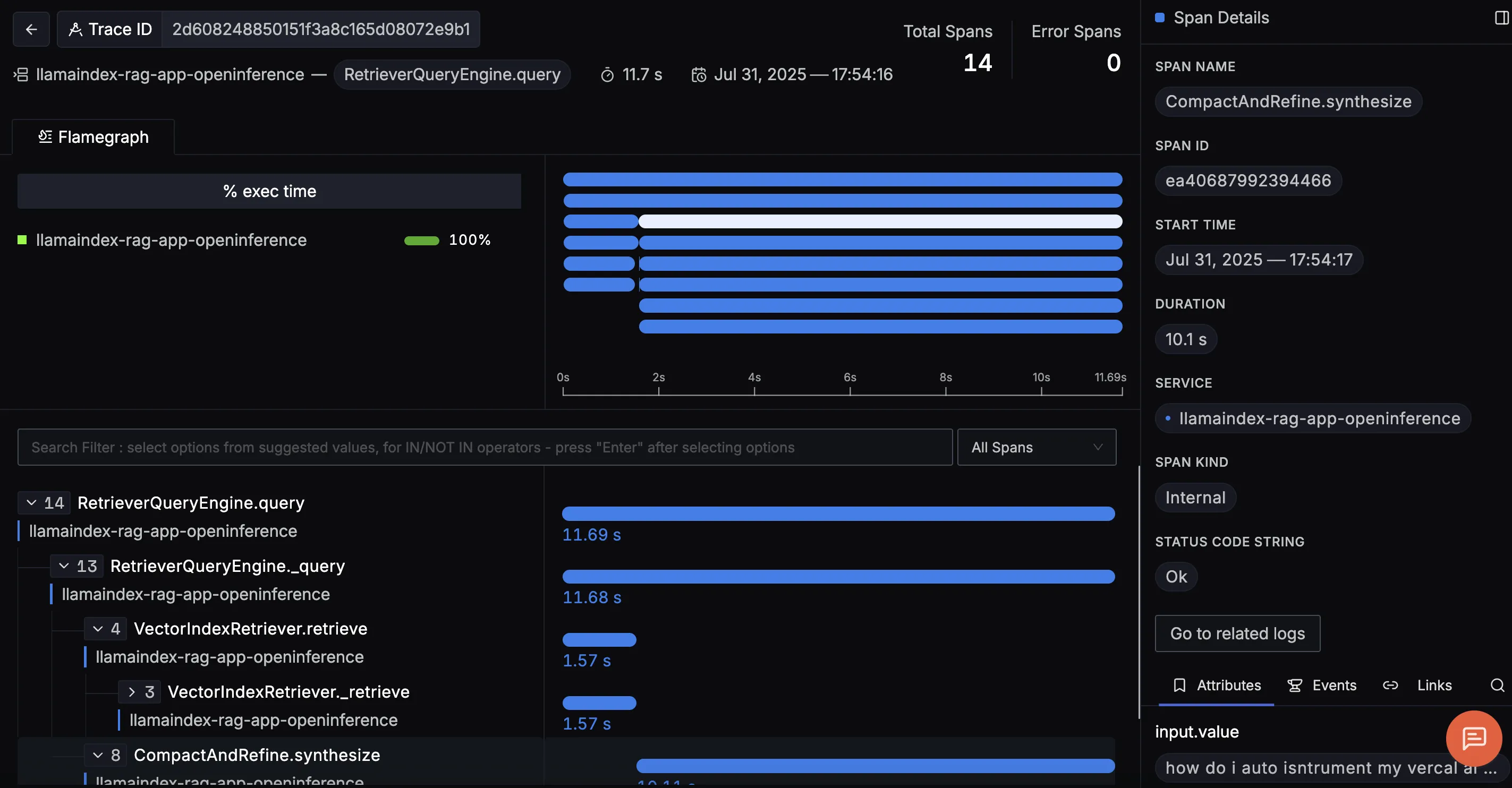
示例指南
Weights and Biases(W&B)Weave
W&B Weave 是一个用于跟踪、试验、评估、部署并改进 LLM 应用的框架。它为规模与灵活性而设计,覆盖应用开发工作流的每个阶段。
使用方式
该集成借助 LlamaIndex 的 instrumentation 模块,把 span/事件注册为 Weave 调用。默认情况下,Weave 会自动 patch 并跟踪对常见 LLM 库与框架的调用。
安装 weave 库:
终端窗口
pip install weave获取 W&B API Key:
如果你还没有 W&B 账号,访问 https://wandb.ai 创建一个,并从 https://wandb.ai/authorize 复制你的 API key。被要求认证时输入该 API key 即可。
import weave
from llama_index.llms.openai import OpenAI

# Initialize Weave with your project name
weave.init("llamaindex-demo")

# All LlamaIndex operations are now automatically traced
llm = OpenAI(model="gpt-4o-mini")
response = llm.complete("William Shakespeare is ")
print(response)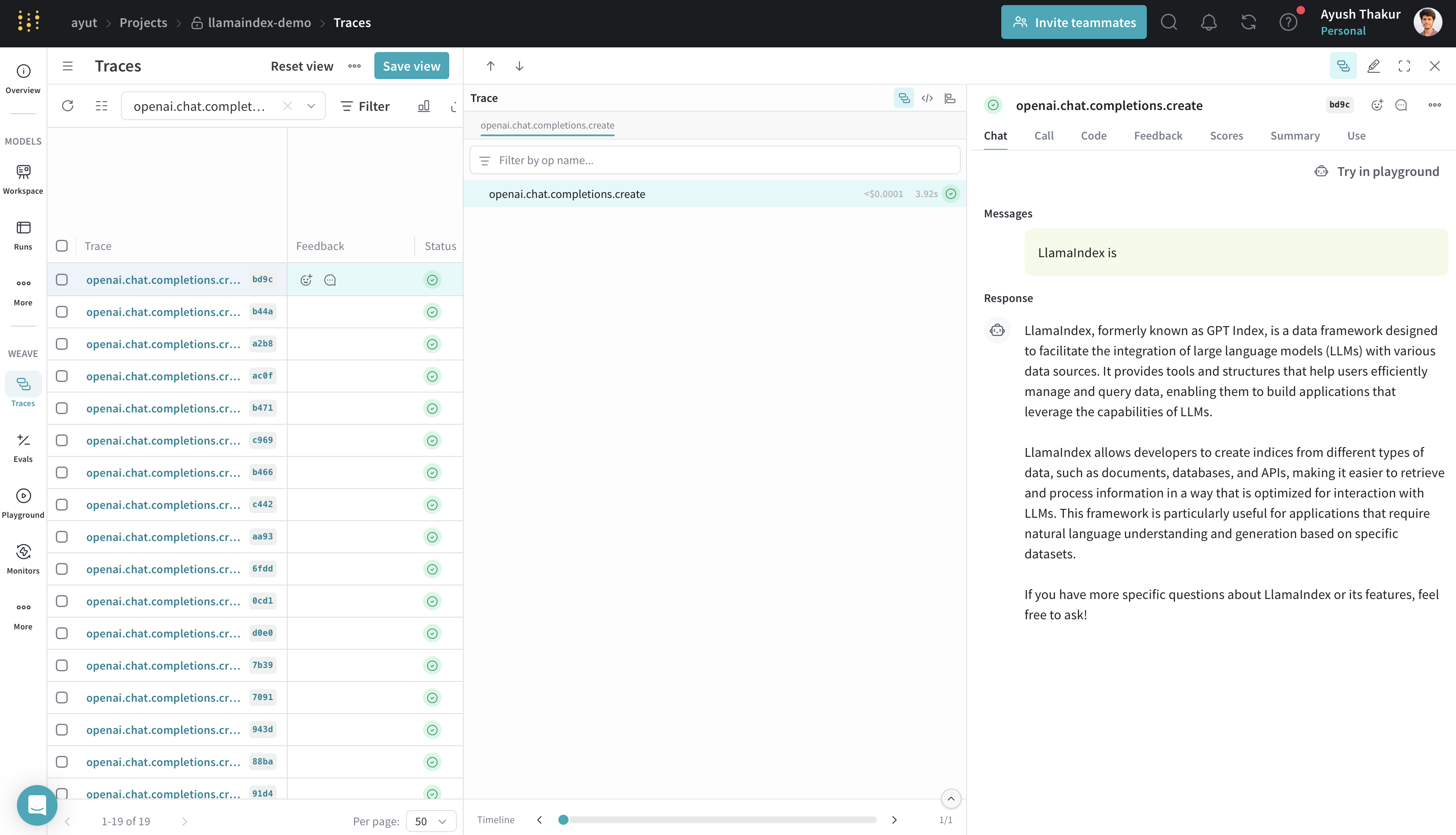
轨迹中包含执行时间、token 用量、成本、输入/输出、错误、嵌套操作以及流式数据。如果你刚接触 Weave 追踪,可在这里了解如何浏览轨迹。
如果某个自定义函数没有被追踪,用 @weave.op() 装饰它即可。
你也可以通过 weave.init 的 autopatch_settings 参数控制 patch 行为。例如,若不想追踪某个库/框架,可以这样关掉:
weave.init(..., autopatch_settings={"openai": {"enabled": False}})不需要额外的 LlamaIndex 配置;调用 weave.init() 后追踪就开始了。
指南
与 LlamaIndex 的集成支持几乎所有 LlamaIndex 组件——流式/异步、补全、对话、工具调用、agent、工作流以及 RAG。了解更多请见官方 W&B Weave × LlamaIndex 文档。
MLflow
MLflow 是一个开源的 MLOps/LLMOps 平台,关注机器学习项目的完整生命周期,确保每个阶段都可控、可追踪、可复现。MLflow Tracing 是基于 OpenTelemetry 的追踪能力,为 LlamaIndex 应用提供一键式 instrumentation。
使用方式
由于 MLflow 是开源的,你无需注册账号或配置 API key 就能开始使用。装好 MLflow 包即可直接上手写代码!
import mlflow

mlflow.llama_index.autolog() # Enable mlflow tracing指南
MLflow 的 LlamaIndex 集成还提供实验跟踪、评估、依赖管理等能力。更多细节请看 MLflow 文档。
支持情况一览
MLflow Tracing 支持 LlamaIndex 的全部功能范围。某些新功能,例如 AgentWorkflow,需要 MLflow >= 2.18.0。
| 流式 | 异步 | 引擎 | Agents | 工作流 | AgentWorkflow |
|---|---|---|---|---|---|
| ✅ | ✅ | ✅ | ✅ | ✅ (>= 2.18) | ✅ (>= 2.18) |
OpenLLMetry
OpenLLMetry 是一个基于 OpenTelemetry 的开源项目,用于追踪和监控 LLM 应用。它能接入所有主流可观测性平台,几分钟即可装好。
使用方式
from traceloop.sdk import Traceloop

Traceloop.init()指南
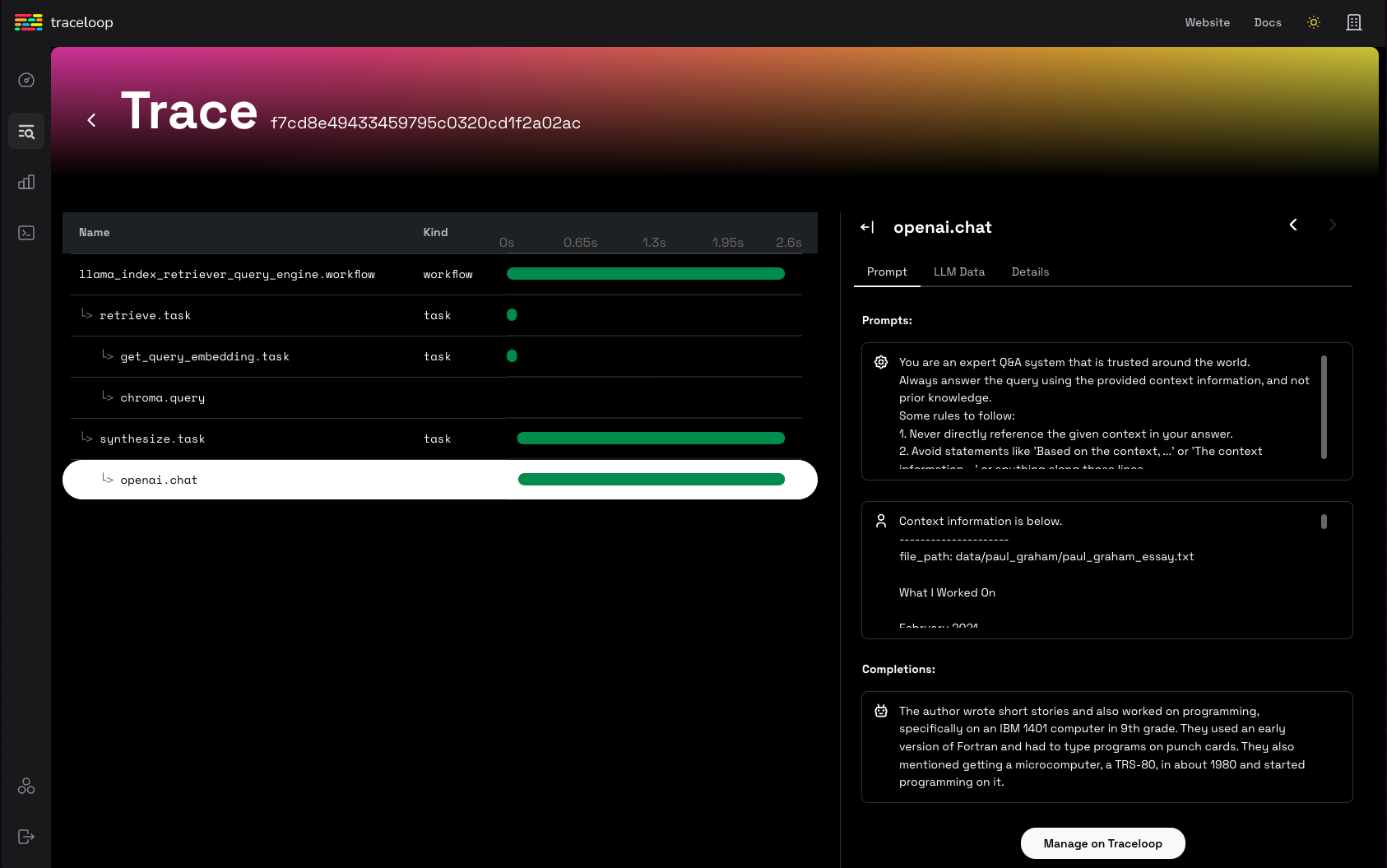
Arize Phoenix(本地)
你也可以通过这个开源项目使用本地的 Phoenix 实例。
这种情况下你不必在 LlamaTrace 注册账号,也不用为 Phoenix 设置 API key。phoenix 服务会在本地启动。
当你希望在开发过程中用开源方案做检查时,就用这套本地 Phoenix 流程。需要托管云或企业自部署的可观测性与评估能力的团队,请看 Arize AX。
使用方式
安装集成包:pip install -U llama-index-callbacks-arize-phoenix。
接着运行以下代码:
# Phoenix can display in real time the traces automatically
# collected from your LlamaIndex application.
# Run all of your LlamaIndex applications as usual and traces
# will be collected and displayed in Phoenix.

import phoenix as px

# Look for a URL in the output to open the App in a browser.
px.launch_app()
# The App is initially empty, but as you proceed with the steps below,
# traces will appear automatically as your LlamaIndex application runs.

import llama_index.core

llama_index.core.set_global_handler("arize_phoenix")
...示例指南
Langfuse 🪢
Langfuse 是一个开源的 LLM 工程平台,帮助团队协作地调试、分析和迭代他们的 LLM 应用。借助 Langfuse 集成,你可以跟踪并监控 LlamaIndex 应用的性能、轨迹与指标。上下文增强与 LLM 查询过程的详细轨迹都会被采集,可直接在 Langfuse UI 中查看。
使用方式
请确保 llama-index 与 langfuse 都已安装。
终端窗口
pip install llama-index langfuse openinference-instrumentation-llama-index接下来配置你的 Langfuse API key。这些 key 可以注册一个免费的 Langfuse Cloud 账号获得,也可以自托管 Langfuse。这些环境变量是 Langfuse 客户端向你的 Langfuse 项目鉴权并上报数据的必要条件。
import os

# Get keys for your project from the project settings page: https://cloud.langfuse.com

os.environ["LANGFUSE_PUBLIC_KEY"] = "pk-lf-..."
os.environ["LANGFUSE_SECRET_KEY"] = "sk-lf-..."
os.environ["LANGFUSE_HOST"] = "https://cloud.langfuse.com"  # 🇪🇺 EU region
# os.environ["LANGFUSE_HOST"] = "https://us.cloud.langfuse.com" # 🇺🇸 US region环境变量设好之后,就可以初始化 Langfuse 客户端。get_client() 会用环境变量中提供的凭据初始化 Langfuse 客户端。
from langfuse import get_client

langfuse = get_client()

# Verify connection
if langfuse.auth_check():
    print("Langfuse client is authenticated and ready!")
else:
print("Authentication failed. Please check your credentials and host.")现在,初始化 OpenInference LlamaIndex instrumentation。这个第三方 instrumentation 会自动捕获 LlamaIndex 的操作,并把 OpenTelemetry(OTel)span 导出到 Langfuse。
from openinference.instrumentation.llama_index import LlamaIndexInstrumentor

# Initialize LlamaIndex instrumentation
LlamaIndexInstrumentor().instrument()现在你就能在 Langfuse 里看到你的 LlamaIndex 应用日志:
示例指南
Literal AI
Literal AI 是一份主打的 LLM 评估与可观测性方案,帮助工程与产品团队可靠、更快、规模化地交付 LLM 应用。这依托一个协作式的开发循环:提示词工程、LLM 可观测性、LLM 评估与 LLM 监控。对话线程(Conversation Threads)与 Agent 运行都可以自动记录到 Literal AI。
上手体验 Literal AI 最简单的方式,是在我们的云实例上注册。之后进入 Settings 拿到你的 API key,就可以开始记录了!
使用方式
- 用
pip install literalai安装 Literal AI 的 Python SDK - 在你的 Literal AI 项目里进入 Settings 拿到 API key
- 如果你用的是自托管的 Literal AI 实例,还要记下它的 base URL
然后在你的应用代码里加上这几行:
from llama_index.core import set_global_handler

# You should provide your Literal AI API key and base url using the following environment variables:
# LITERAL_API_KEY, LITERAL_API_URL
set_global_handler("literalai")示例指南
Comet Opik
Opik 是 Comet 打造的开源端到端 LLM 评估平台。
开始使用只需在 Comet 注册账号并拿到你的 API key。
使用方式
- 用
pip install opik安装 Opik 的 Python SDK - 在 Opik 中通过用户菜单获取 API key。
- 如果你用的是自托管的 Opik 实例,还要记下它的 base URL。
如果你用的是自托管实例,可以通过环境变量 OPIK_API_KEY、OPIK_WORKSPACE 和 OPIK_URL_OVERRIDE 来配置 Opik。可以这样设置:
终端窗口
export OPIK_API_KEY="<OPIK_API_KEY>"
export OPIK_WORKSPACE="<OPIK_WORKSPACE - Often the same as your API key>"

# Optional
#export OPIK_URL_OVERRIDE="<OPIK_URL_OVERRIDE>"现在,只要设置好全局处理器,你就能把 Opik 集成与 LlamaIndex 一起使用:
from llama_index.core import Document, VectorStoreIndex, set_global_handler

# You should provide your OPIK API key and Workspace using the following environment variables:
# OPIK_API_KEY, OPIK_WORKSPACE
set_global_handler(
    "opik",
)

# This example uses OpenAI by default so don't forget to set an OPENAI_API_KEY
index = VectorStoreIndex.from_documents([Document.example()])
query_engine = index.as_query_engine()

questions = [
    "Tell me about LLMs",
    "How do you fine-tune a neural network ?",
    "What is RAG ?",
]

for question in questions:
    print(f"> \033[92m{question}\033[0m")
    response = query_engine.query(question)
print(response)你会在 Opik 中看到如下轨迹:
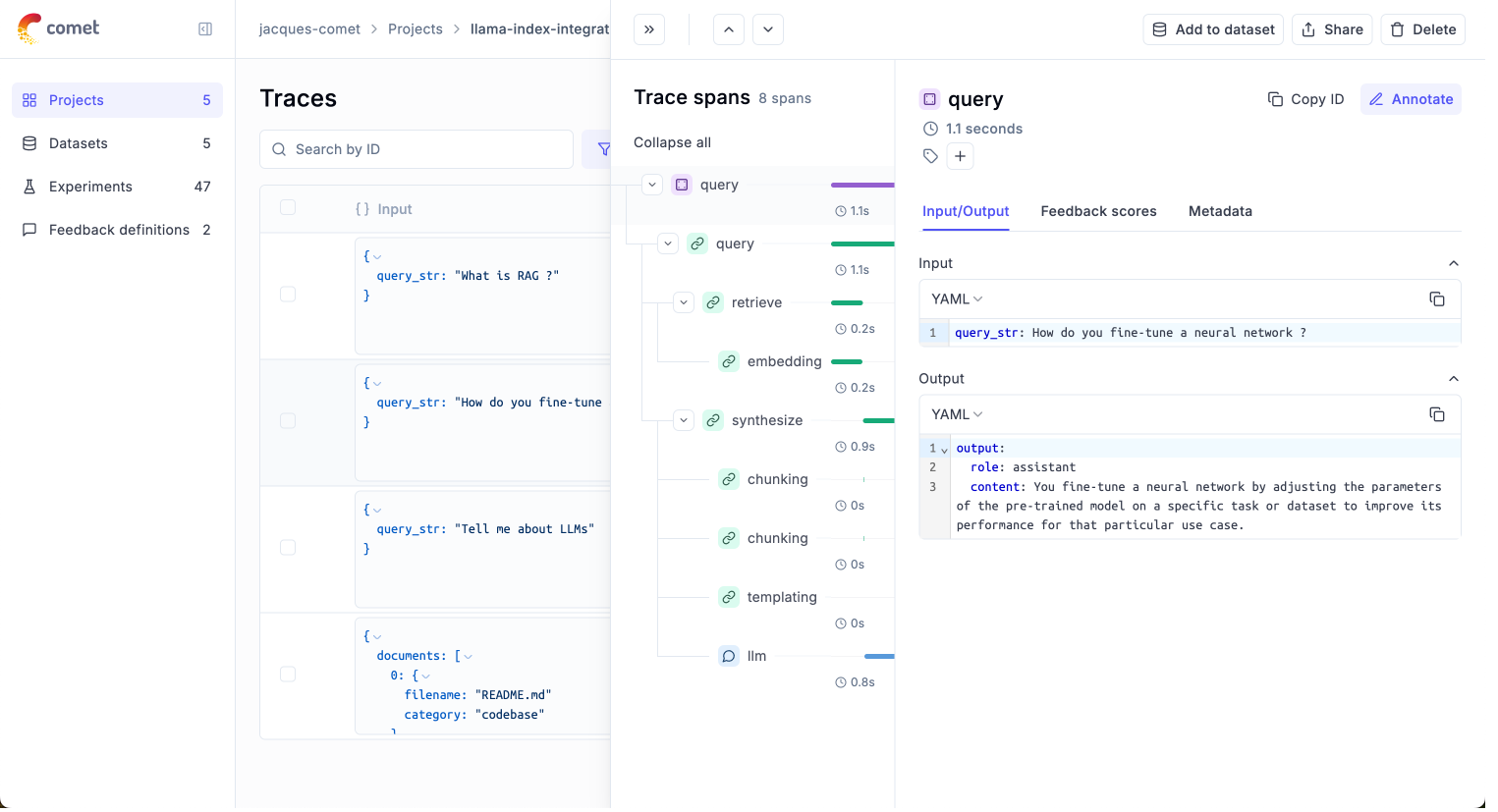
示例指南
Argilla
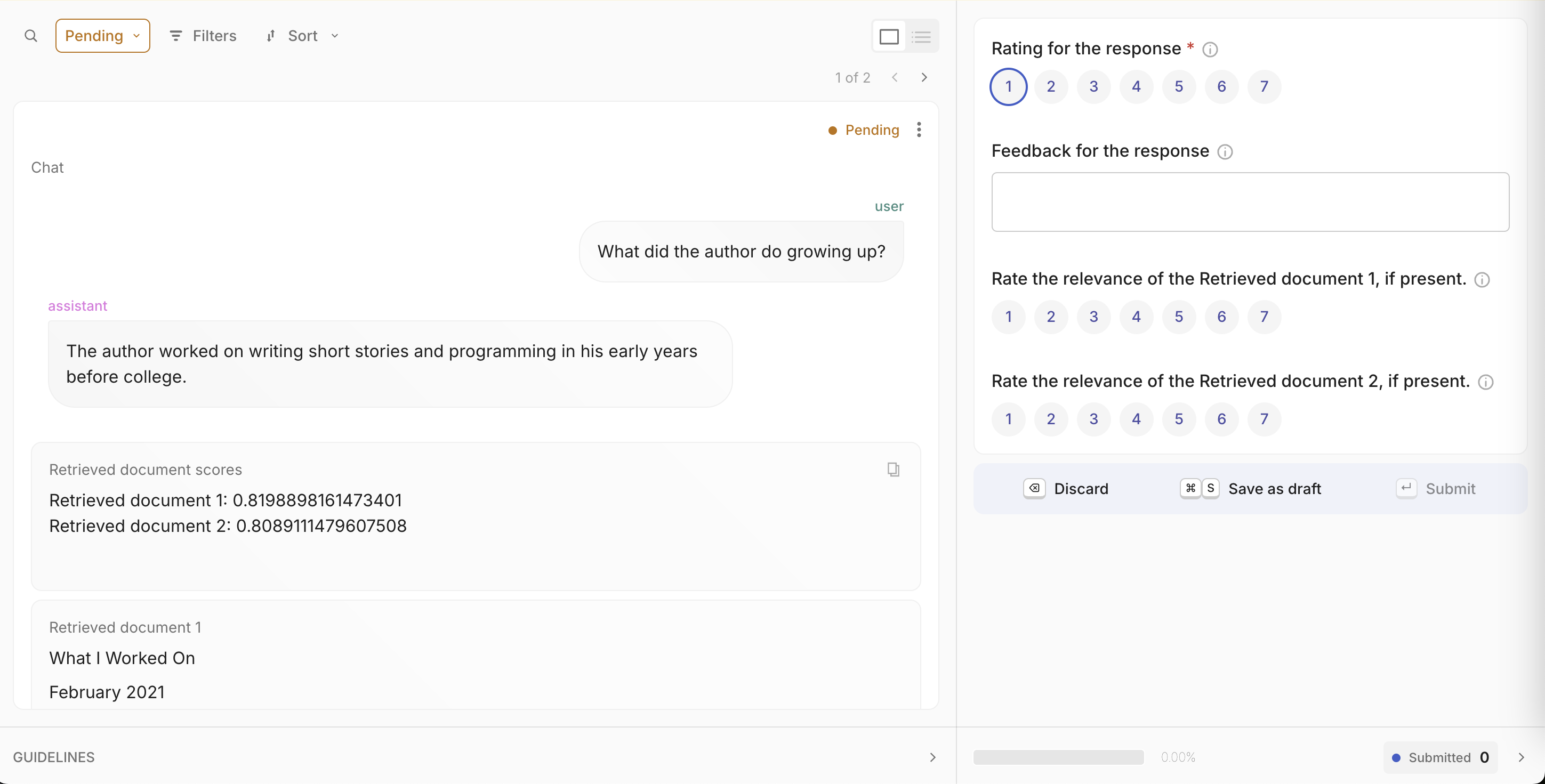
Argilla 是一个协作工具,面向需要为项目构建高质量数据集的 AI 工程师与领域专家。
开始使用前需要先把 Argilla 服务端部署起来。如果还没部署,照着这份指南就能轻松完成。
使用方式
- 用
pip install argilla-llama-index安装 Argilla 的 LlamaIndex 集成包 - 初始化 ArgillaHandler。
<api_key>在你的 Argilla Space 的My Settings页面里,但请确认你用的是创建该 Space 的owner账号登录。<api_url>就是浏览器地址栏里的 URL。 - 把 ArgillaHandler 加入 dispatcher。
from llama_index.core.instrumentation import get_dispatcher
from argilla_llama_index import ArgillaHandler

argilla_handler = ArgillaHandler(
    dataset_name="query_llama_index",
    api_url="http://localhost:6900",
    api_key="argilla.apikey",
    number_of_retrievals=2,
)
root_dispatcher = get_dispatcher()
root_dispatcher.add_span_handler(argilla_handler)
root_dispatcher.add_event_handler(argilla_handler)示例指南
Agenta
Agenta 是一个开源 LLMOps 平台,帮助开发者与产品团队构建由 LLM 驱动的稳健 AI 应用。它把可观测性、提示词管理与工程、LLM 评估所需的工具一次备齐。
使用方式
安装该集成所需的依赖:
终端窗口
pip install agenta llama-index openinference-instrumentation-llama-index配置好你的 API 凭据并初始化 Agenta:
import os
import agenta as ag
from openinference.instrumentation.llama_index import LlamaIndexInstrumentor

# Set your Agenta credentials
os.environ["AGENTA_API_KEY"] = "your_agenta_api_key"
os.environ[
    "AGENTA_HOST"
] = "https://cloud.agenta.ai"  # Use your self-hosted URL if applicable

# Initialize Agenta SDK
ag.init()

# Enable LlamaIndex instrumentation
LlamaIndexInstrumentor().instrument()构建你的带 instrumentation 的应用:
@ag.instrument()
def document_search_app(user_query: str):
    """
    Document search application using LlamaIndex.
    Loads documents, builds a searchable index, and answers user queries.
    """
    # Load documents from local directory
    docs = SimpleDirectoryReader("data").load_data()

    # Build vector search index
    search_index = VectorStoreIndex.from_documents(docs)

    # Initialize query processor
    query_processor = search_index.as_query_engine()

    # Process user query
    answer = query_processor.query(user_query)

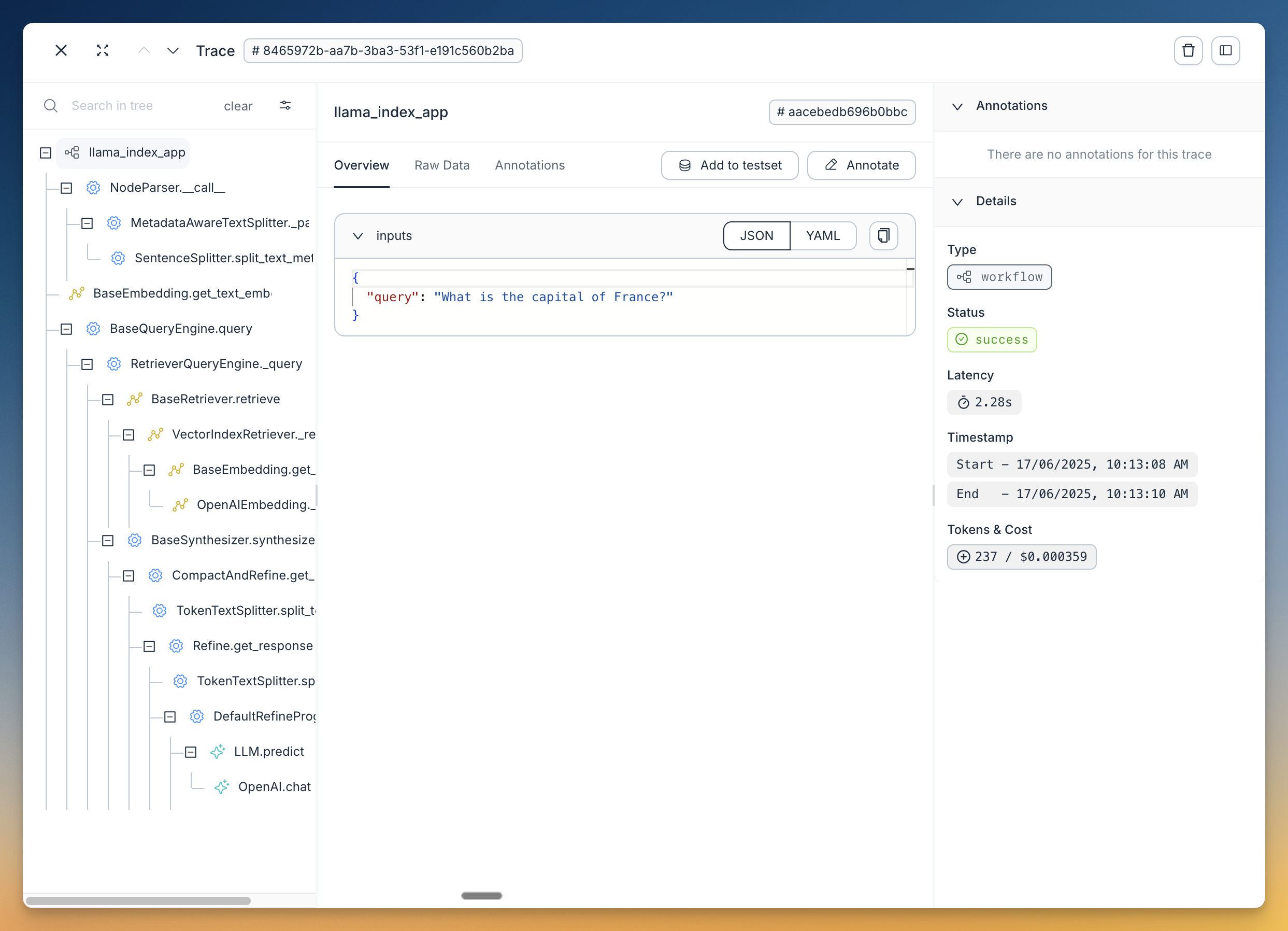
return answer配置完成后,Agenta 会自动捕获所有执行步骤。随后你可以在 Agenta 里查看轨迹来调试应用、把它们与特定的配置和提示词关联、评估其表现、查询数据并监控关键指标。
示例指南
Confident AI
Confident AI 是一个 LLM 可观测性与评估平台。它的 OpenTelemetry 原生追踪 SDK confident-trace 会订阅 LlamaIndex 的 instrumentation dispatcher,因此每次 agent 运行、工作流步骤、检索与工具调用都会保持原有层级地出现在 Observatory 中。
使用方式
终端窗口
pip install confident-trace llama-index-core llama-index-llms-openai从 Confident AI 获取项目 API key,并与你的模型服务商 key 一起设置好。位于欧盟区域的用户请设置 CONFIDENT_OTEL_ENDPOINT="https://eu.otel.confident-ai.com/v1/traces",否则你的轨迹会被转发到美国服务器。
终端窗口
export CONFIDENT_API_KEY="<your-confident-api-key>"
export OPENAI_API_KEY="<your-openai-key>"在启动时(定义或运行 agent 之前)调用一次 init()。保持你平常的 agent.run 调用不变。你不需要配置任何 handler 或 dispatcher:
import asyncio

from confident_trace import init, shutdown
from llama_index.core.agent.workflow import FunctionAgent
from llama_index.core.tools import FunctionTool
from llama_index.llms.openai import OpenAI

def multiply(a: float, b: float) -> float:
    """Useful for multiplying two numbers."""
    return a * b

async def main():
    init()
    try:
        agent = FunctionAgent(
            name="assistant",
            llm=OpenAI(model="gpt-4o-mini"),
            tools=[FunctionTool.from_defaults(multiply)],
            system_prompt="You are a helpful assistant that can perform calculations.",
        )
        print(await agent.run("What is 3 * 12?"))
    finally:
        shutdown()

if __name__ == "__main__":
asyncio.run(main())Agent 运行、工作流步骤、检索、工具调用,以及带用量统计的模型调用都会被自动捕获。模型 span 需要受支持的提供商 SDK,因此自定义或本地模型的包装层只会显示 agent 结构而没有 LLM span,嵌入调用也不会被追踪。在长期运行的服务里,请在启动时调用 init()、在优雅关闭时调用 shutdown(),而不是每个请求都调用。
传入的轨迹会如何处理,可在 Confident AI 的工作流页面配置:
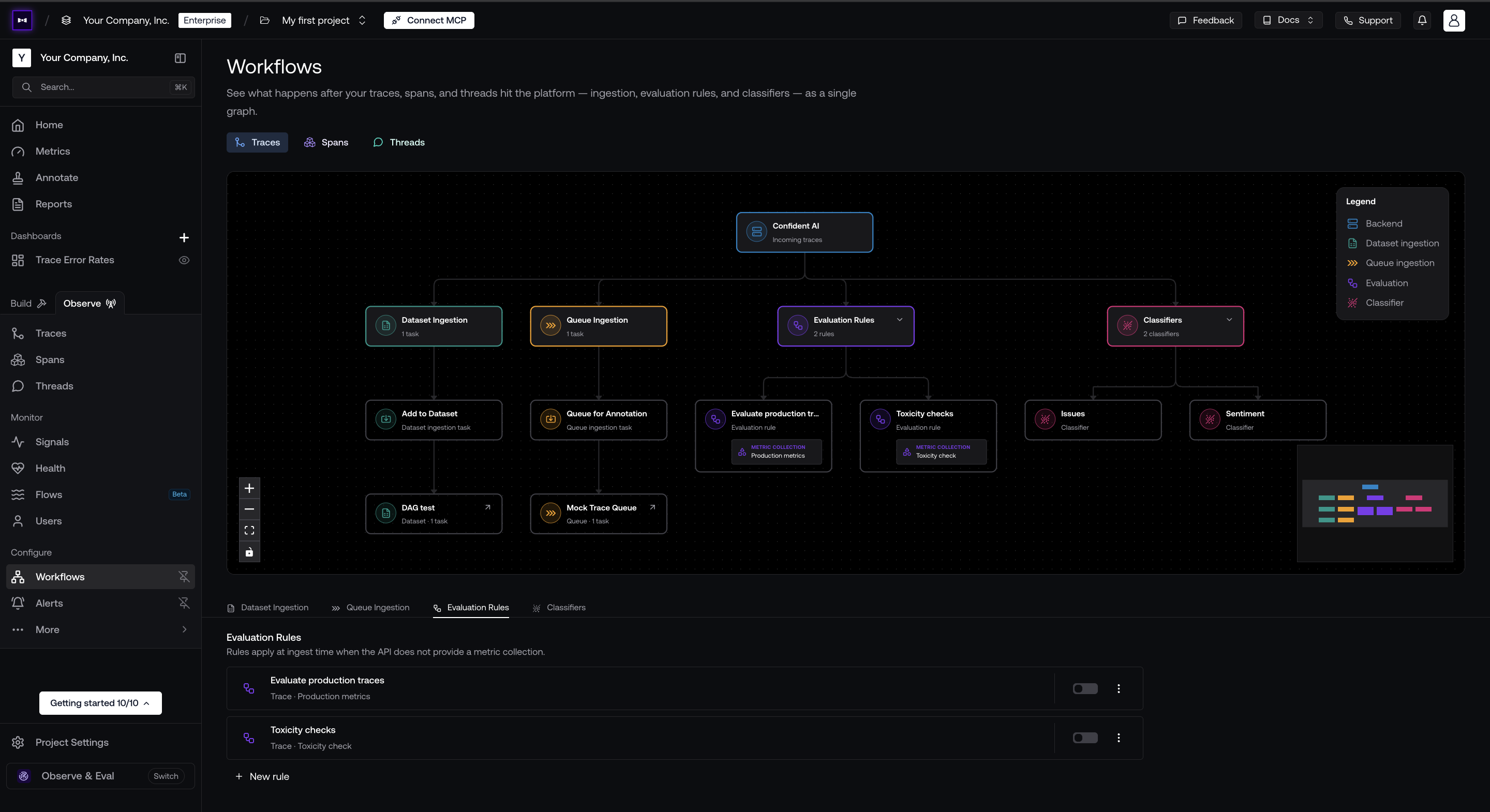
- 评估规则:用指标集合对传入的轨迹做评估。
- 分类器:按问题类型、情绪或你自己定义的任意维度为轨迹打标签,方便后续分组或筛选。
- 队列摄取:把生产环境的轨迹路由进标注队列,交给内部审阅团队。
- 数据集摄取:把生产轨迹收集成数据集,用作测试用例。
轨迹、span 和线程各自都有自己的工作流。若想改从代码里为单条轨迹设置指标集合,把它传给 update_trace。
示例指南
- LlamaIndex 集成指南 —— 完整配置、轨迹属性,以及把多次运行归组成线程
- 在 Confident AI 上做 LLM 追踪
- 在线评估
- 集成需要帮助?和真人聊聊。
Maxim AI
Maxim AI 是一个智能体模拟、评估与可观测性平台,帮助开发者构建、监控并改进他们的 LLM 应用。Maxim 与 LlamaIndex 的集成为你的 RAG 系统、agent 及其他 LLM 工作流提供完整的追踪、监控与评估能力。
使用方式
安装所需的包:
终端窗口
pip install maxim-py设置好环境变量:
import os
from dotenv import load_dotenv

# Load environment variables from .env file
load_dotenv()

# Get environment variables
MAXIM_API_KEY = os.getenv("MAXIM_API_KEY")
MAXIM_LOG_REPO_ID = os.getenv("MAXIM_LOG_REPO_ID")

# Verify required environment variables are set
if not MAXIM_API_KEY:
    raise ValueError("MAXIM_API_KEY environment variable is required")
if not MAXIM_LOG_REPO_ID:
raise ValueError("MAXIM_LOG_REPO_ID environment variable is required")初始化 Maxim 并为 LlamaIndex 加上 instrumentation:
from maxim import Config, Maxim
from maxim.logger import LoggerConfig
from maxim.logger.llamaindex import instrument_llamaindex

# Initialize Maxim logger
maxim = Maxim(Config(api_key=os.getenv("MAXIM_API_KEY")))
logger = maxim.logger(LoggerConfig(id=os.getenv("MAXIM_LOG_REPO_ID")))

# Instrument LlamaIndex with Maxim observability
# Set debug=True to see detailed logs during development
instrument_llamaindex(logger, debug=True)

print("✅ Maxim instrumentation enabled for LlamaIndex")此后你的 LlamaIndex 应用会自动把轨迹发送给 Maxim:
from llama_index.core.agent import FunctionAgent
from llama_index.core.tools import FunctionTool
from llama_index.llms.openai import OpenAI

# Define tools and create agent
def add_numbers(a: float, b: float) -> float:
    """Add two numbers together."""
    return a + b

add_tool = FunctionTool.from_defaults(fn=add_numbers)
llm = OpenAI(model="gpt-4o-mini", temperature=0)

agent = FunctionAgent(
    tools=[add_tool],
    llm=llm,
    verbose=True,
    system_prompt="You are a helpful calculator assistant.",
)

# This will be automatically logged by Maxim instrumentation
import asyncio

response = await agent.run("What is 15 + 25?")
print(f"Response: {response}")指南
其他合作方的一键集成(旧模块)
这些合作方集成使用的是我们较早的 CallbackManager 或第三方调用方式。
Langfuse
该集成已弃用。我们建议改用基于新 instrumentation 的 Langfuse 集成,做法见这里。
使用方式
from llama_index.core import set_global_handler

# Make sure you've installed the 'llama-index-callbacks-langfuse' integration package.

# NOTE: Set your environment variables 'LANGFUSE_SECRET_KEY', 'LANGFUSE_PUBLIC_KEY' and 'LANGFUSE_HOST'
# as shown in your langfuse.com project settings.

set_global_handler("langfuse")指南
OpenInference
OpenInference 是一个用于采集与保存 AI 模型推理过程的开放标准。它让你能借助 Phoenix 这类 LLM 可观测性方案,对 LLM 应用做实验、可视化与评估。
使用方式
import llama_index.core

llama_index.core.set_global_handler("openinference")

# NOTE: No need to do the following
from llama_index.callbacks.openinference import OpenInferenceCallbackHandler
from llama_index.core.callbacks import CallbackManager
from llama_index.core import Settings

# callback_handler = OpenInferenceCallbackHandler()
# Settings.callback_manager = CallbackManager([callback_handler])

# Run your LlamaIndex application here...
for query in queries:
    query_engine.query(query)

# View your LLM app data as a dataframe in OpenInference format.
from llama_index.core.callbacks.open_inference_callback import as_dataframe

query_data_buffer = llama_index.core.global_handler.flush_query_data_buffer()
query_dataframe = as_dataframe(query_data_buffer)注意:要发挥 Phoenix 的能力,你还需要额外定义一些步骤,把查询/上下文 dataframe 喂进去。见下文!
指南
TruEra TruLens
TruLens 让用户能够对 LlamaIndex 应用做 instrumentation 与评估,手段包括反馈函数、追踪等。
使用方式与指南
# use trulens
from trulens_eval import TruLlama

tru_query_engine = TruLlama(query_engine)

# query
tru_query_engine.query("What did the author do growing up?")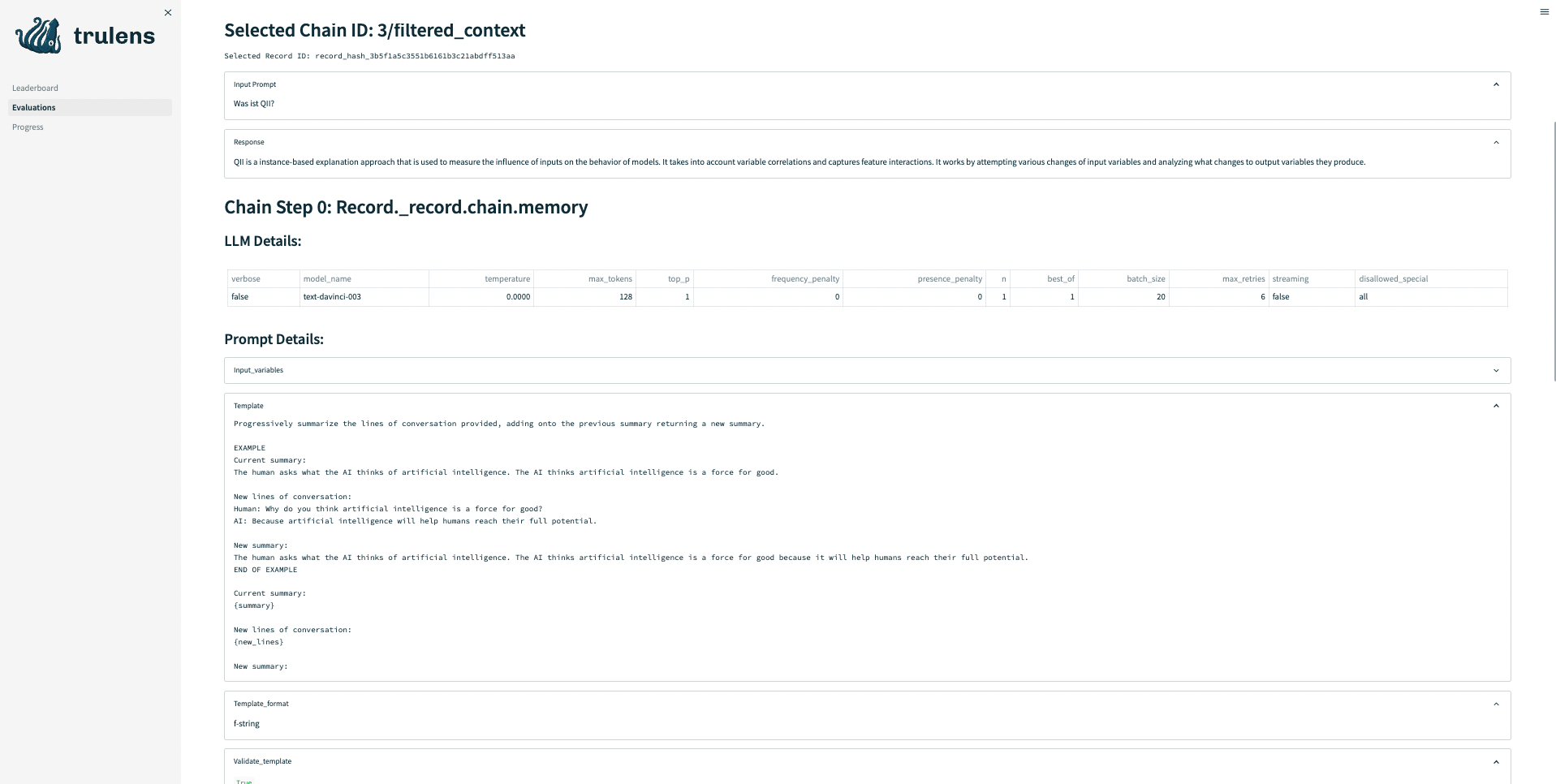
指南
HoneyHive
HoneyHive 可以追踪任意 LLM 工作流的执行流程。随后用户可以调试并分析这些轨迹,或针对特定轨迹事件自定义反馈,从而从生产环境构建评估或微调数据集。
使用方式
from llama_index.core import set_global_handler

set_global_handler(
    "honeyhive",
    project="My HoneyHive Project",
    name="My LLM Workflow Name",
    api_key="MY HONEYHIVE API KEY",
)

# NOTE: No need to do the following
from llama_index.core.callbacks import CallbackManager

# from honeyhive.utils.llamaindex_tracer import HoneyHiveLlamaIndexTracer
from llama_index.core import Settings

# hh_tracer = HoneyHiveLlamaIndexTracer(
#     project="My HoneyHive Project",
#     name="My LLM Workflow Name",
#     api_key="MY HONEYHIVE API KEY",
# )
# Settings.callback_manager = CallbackManager([hh_tracer])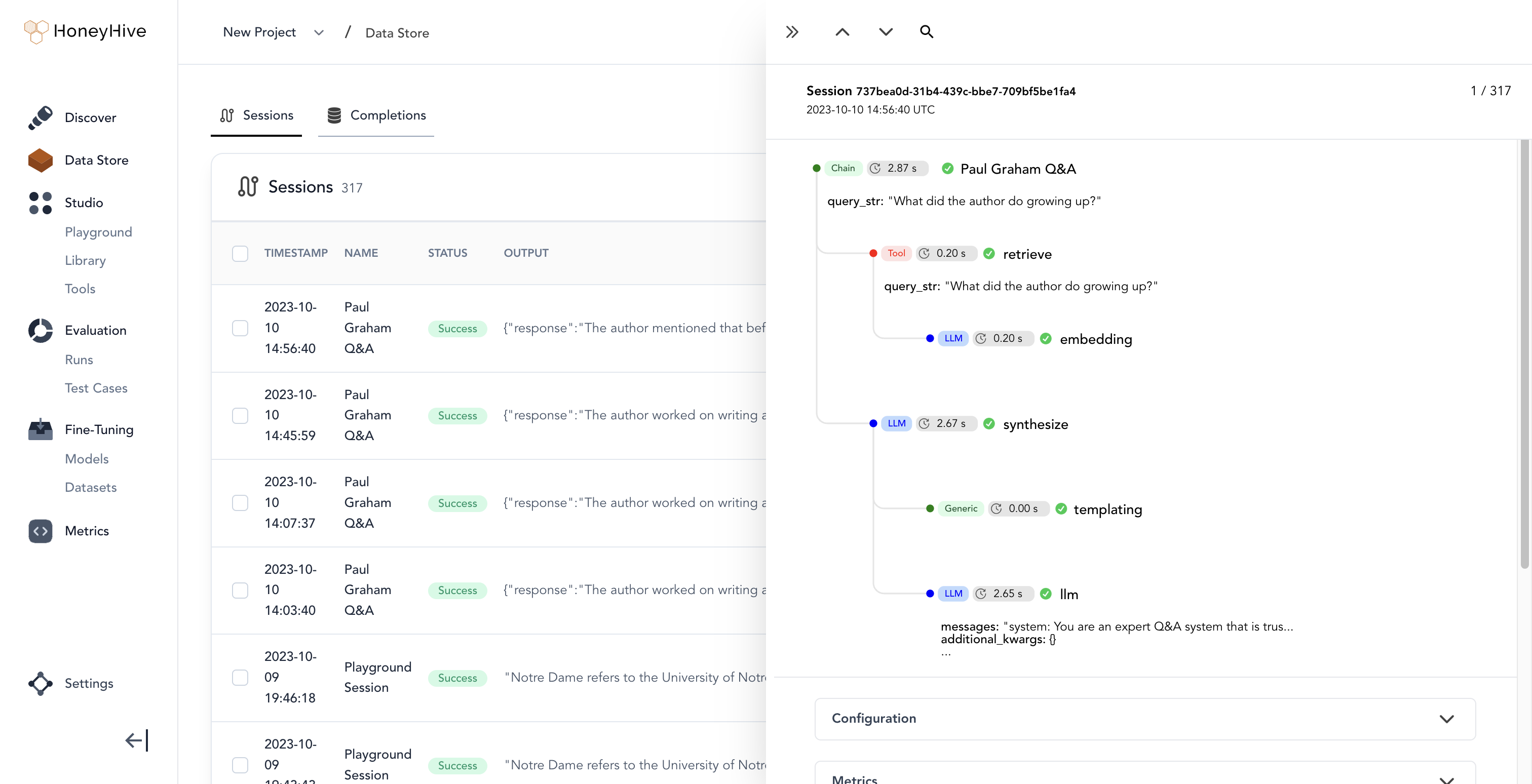
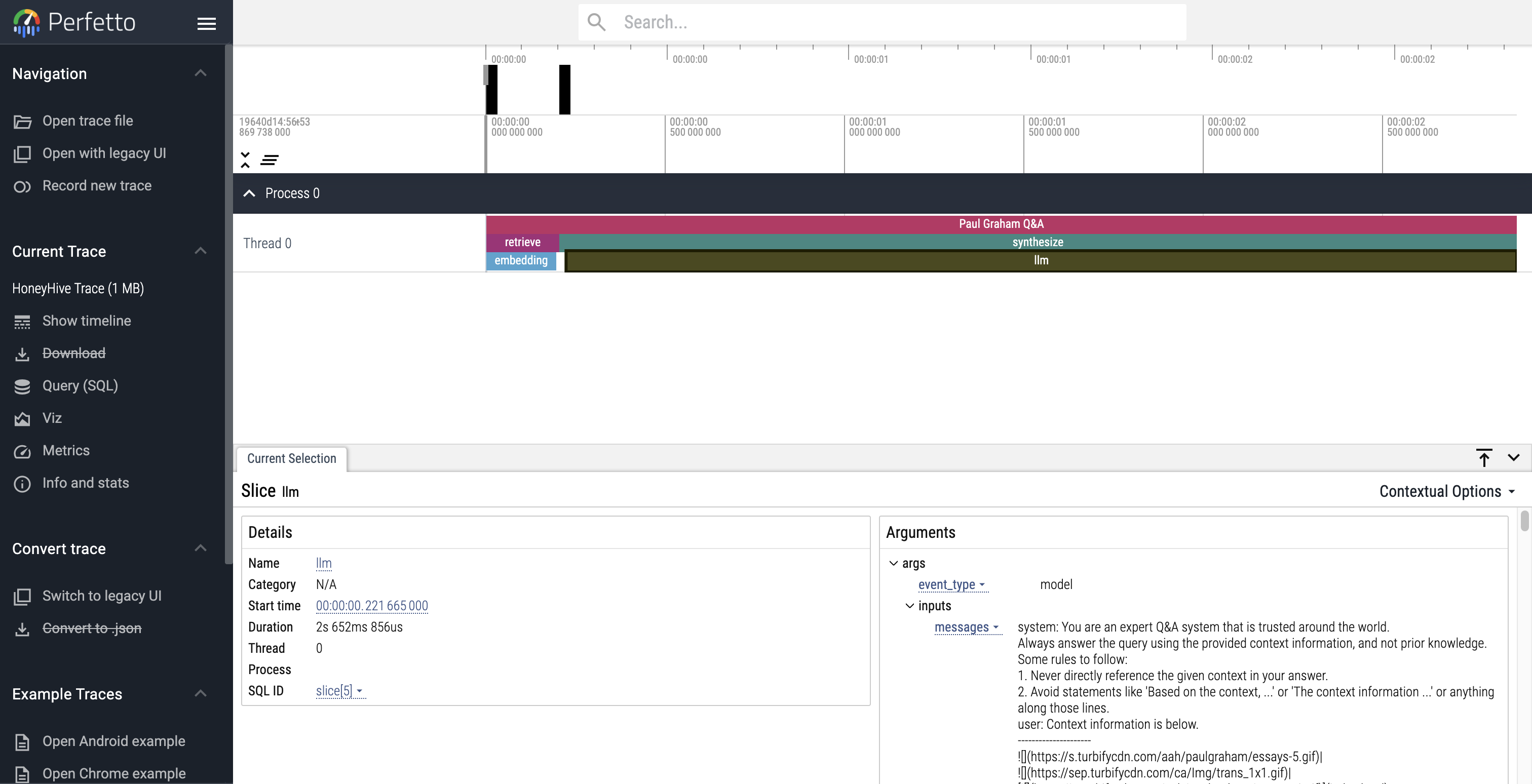 Use Perfetto to debug and analyze your HoneyHive traces
指南
PromptLayer
PromptLayer 让你可以跟踪各次 LLM 调用的分析数据,为不同用途给提示词打标签、分析并评估。把它与 LlamaIndex 一起使用,就能跟踪你的 RAG 提示词等的表现。
使用方式
import os

os.environ["PROMPTLAYER_API_KEY"] = "pl_7db888a22d8171fb58aab3738aa525a7"

from llama_index.core import set_global_handler

# pl_tags are optional, to help you organize your prompts and apps
set_global_handler("promptlayer", pl_tags=["paul graham", "essay"])指南
Langtrace
Langtrace 是一个健壮的开源工具,支持 OpenTelemetry,专为无缝地追踪、评估和管理 LLM 应用而设计。Langtrace 直接与 LlamaIndex 集成,提供关于准确度、评估、延迟等表现指标的细粒度实时洞察。
安装
终端窗口
pip install langtrace-python-sdk使用方式
from langtrace_python_sdk import (
    langtrace,
)  # Must precede any llm module imports

langtrace.init(api_key="<LANGTRACE_API_KEY>")指南
OpenLIT
OpenLIT 是一个 OpenTelemetry 原生的 GenAI 与 LLM 应用可观测性工具。它的目标是让 GenAI 项目接入可观测性只需一行代码。OpenLIT 为多种 LLM、向量库以及 LlamaIndex 这类框架提供 OpenTelemetry 自动 instrumentation,并给出 LLM 应用的性能洞察、请求追踪,以及成本、token 等用量指标和更多内容的概览。
安装
终端窗口
pip install openlit使用方式
import openlit

openlit.init()指南
AgentOps
AgentOps 帮助开发者构建、评估并监控 AI 智能体。它会陪你把 agent 从原型推到生产,实现智能体监控、LLM 成本跟踪、基准测试等能力。
安装
终端窗口
pip install llama-index-instrumentation-agentops使用方式
from llama_index.core import set_global_handler

# NOTE: Feel free to set your AgentOps environment variables (e.g., 'AGENTOPS_API_KEY')
# as outlined in the AgentOps documentation, or pass the equivalent keyword arguments
# anticipated by AgentOps' AOClient as **eval_params in set_global_handler.

set_global_handler("agentops")Simple(LLM 输入/输出)
这个简易可观测性工具会把每一对 LLM 输入/输出打印到终端。当你想给 LLM 应用快速打开调试日志时最有用。
使用方式
import llama_index.core

llama_index.core.set_global_handler("simple")