
主题
已弃用
本页记录的是已弃用的 Extract v1 API。新的接入请使用 Extract v2;改造已有的 v1 代码请见v1 到 v2 迁移指南。
这个示例演示如何用 PER_TABLE_ROW 抽取目标,从含重复实体(表格、列表或目录)的文档里抽取结构化数据。
为什么要用表格型抽取目标?
PER_DOC(各抽取目标的速览见下表)是 LlamaExtract 的默认抽取目标,它会在抽取时通观整份文档的上下文。而抽取实体列表时,基于 LLM 的抽取有一个致命的失败模式 —— 往往只抽出长列表最前面几十条。这是因为 LLM 对重复性数据的注意力有限。文档级抽取并不保证覆盖穷尽,长列表必然导致抽取不完整。
解法:PER_TABLE_ROW 逐个、或以较小批次处理每个实体,从而无论列表多长都能穷尽抽取全部条目。
实体级抽取
使用 extraction_target=ExtractTarget.PER_TABLE_ROW 时,你为单个实体(例如一家医院、一个产品、一条发票行项目)定义 schema,而不是为整份文档。LlamaExtract 会自动:
- 找出区分各个实体的排版模式(表格行、列表项、章节标题等)
- 把你的 schema 应用到每一个被识别出的实体
- 返回一个
list[YourSchema],每个实体一条
当每个实体在本地就含齐了你 schema 所需的信息时,这种做法最为理想。
选择合适的抽取目标
| 抽取目标 | 最适合 | 返回什么 |
|---|---|---|
PER_DOC | 单实体文档、摘要或短列表 | 整份文档对应一个 JSON 对象 |
PER_PAGE | 每页各自独立的长文档 | 每页一个 JSON 对象 |
PER_TABLE_ROW | 长列表、表格、含重复实体的目录 | 一个 JSON 对象列表(每实体一条) |
📖 更多细节见抽取目标文档。
- Python
- Typescript
- Python(legacy)
终端窗口
pip install llama_cloud<2.0from llama_cloud import LlamaCloud, AsyncLlamaCloud
client = LlamaCloud(api_key="your_api_key") # Or reads from LLAMA_CLOUD_API_KEY env var终端窗口
npm install @llamaindex/llama-cloud zodimport LlamaCloud from "@llamaindex/llama-cloud";
const client = new LlamaCloud({
apiKey: "your_api_key", // Or reads from LLAMA_CLOUD_API_KEY env var
});终端窗口
pip install llama_cloud_services python-dotenvfrom dotenv import load_dotenv
from llama_cloud_services import LlamaExtract
# Load environment variables (put LLAMA_CLOUD_API_KEY in your .env file)
load_dotenv(override=True)
# Optionally, add your project id/organization id
llama_extract = LlamaExtract()按县整理的医院与保险计划表
我们有一份 PDF,里面按县列出医院,以及 Blue Shield of California 提供的各种保险计划。
你可以在这里取得
BSC-Hospital-List-by-County.pdf
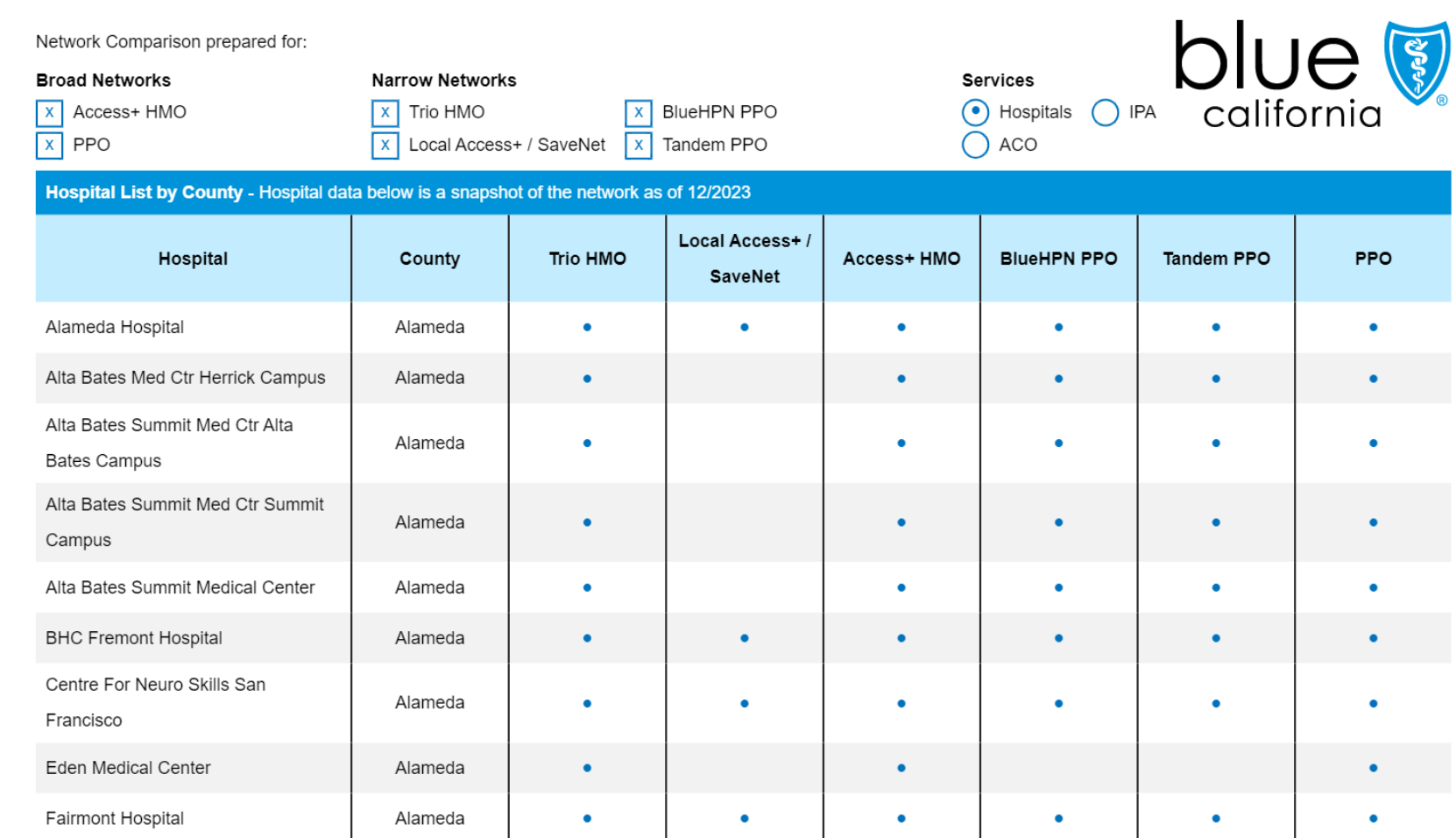
我们想把每家医院连同其适用的保险计划列表一起抽出来。
示例 1:结构化表格
这正是 PER_TABLE_ROW 抽取的理想场景:
- 结构清晰:文档有明确的行列表格格式
- 实体重复:每一行是一家医院,属性一致
- 信息局部:每家医院的全部数据(县、名称、计划)都在它自己那一行里
注意我们的 Hospital schema 描述的是一家医院,而不是整份文档。LlamaExtract 会返回一个 list[Hospital],每个表格行一条。
- Python
- Typescript
- Python(legacy)
from pydantic import BaseModel, Field

class Hospital(BaseModel):
    """List of hospitals by county available for different BSC plans"""

    county: str = Field(description="County name")
    hospital_name: str = Field(description="Name of the hospital")
    plan_names: list[str] = Field(
        description="List of plans available at the hospital. One of: Trio HMO, SaveNet, Access+ HMO, BlueHPN PPO, Tandem PPO, PPO"
)file_obj = await client.files.create(file="BSC-Hospital-List-by-County.pdf", purpose="extract")
file_id = file_obj.id
# Stateless one-shot extraction
result = client.extraction.extract(
file_id=file_id,
config={
"extraction_mode": "PREMIUM",
"extraction_target": "PER_TABLE_ROW",
"parse_model": "anthropic-sonnet-4.5",
},
data_schema=Hospital.model_json_schema(),
)import { z } from "zod";
const HospitalSchema = z.object({
county: z.string().describe("County name"),
hospital_name: z.string().describe("Name of the hospital"),
plan_names: z
.array(
z.enum([
"Trio HMO",
"SaveNet",
"Access+ HMO",
"BlueHPN PPO",
"Tandem PPO",
"PPO",
])
)
.describe(
"List of plans available at the hospital. One of: Trio HMO, SaveNet, Access+ HMO, BlueHPN PPO, Tandem PPO, PPO"
),
});import fs from "fs";
const fileObj = await client.files.create({
file: fs.createReadStream("BSC-Hospital-List-by-County.pdf"),
purpose: "extract",
});
const fileId = fileObj.id;
// Stateless one-shot extraction
const result = await client.extraction.extract({
file_id: fileId,
config: {
extraction_mode: "PREMIUM",
extraction_target: "PER_TABLE_ROW",
parse_model: "anthropic-sonnet-4.5",
},
data_schema: z.toJSONSchema(HospitalSchema),
});from pydantic import BaseModel, Field
class Hospital(BaseModel):
"""List of hospitals by county available for different BSC plans"""
county: str = Field(description="County name")
hospital_name: str = Field(description="Name of the hospital")
plan_names: list[str] = Field(
description="List of plans available at the hospital. One of: Trio HMO, SaveNet, Access+ HMO, BlueHPN PPO, Tandem PPO, PPO"
)from llama_cloud_services.extract import ExtractConfig, ExtractMode, ExtractTarget
result = await llama_extract.aextract(
data_schema=Hospital,
files="BSC-Hospital-List-by-County.pdf",
config=ExtractConfig(
extraction_mode=ExtractMode.PREMIUM,
extraction_target=ExtractTarget.PER_TABLE_ROW,
parse_model="anthropic-sonnet-4.5",
),
)结果
数一下抽出的医院条数,会发现 380 条全部拿到了!
打印前几条看看:
    [{'county': 'Alameda',
      'hospital_name': 'Alameda Hospital',
      'plan_names': ['Trio HMO',
       'SaveNet',
       'Access+ HMO',
       'BlueHPN PPO',
       'Tandem PPO',
       'PPO']},
     {'county': 'Alameda',
      'hospital_name': 'Alta Bates Med Ctr Herrick Campus',
      'plan_names': ['Trio HMO',
       'Access+ HMO',
       'BlueHPN PPO',
       'Tandem PPO',
       'PPO']},
     {'county': 'Alameda',
      'hospital_name': 'Alta Bates Summit Med Ctr Alta Bates Campus',
      'plan_names': ['Trio HMO',
       'Access+ HMO',
       'BlueHPN PPO',
       'Tandem PPO',
       'PPO']},
     {'county': 'Alameda',
      'hospital_name': 'Alta Bates Summit Med Ctr Summit Campus',
      'plan_names': ['Trio HMO',
       'Access+ HMO',
       'BlueHPN PPO',
       'Tandem PPO',
       'PPO']},
     {'county': 'Alameda',
      'hospital_name': 'Alta Bates Summit Medical Center',
      'plan_names': ['Trio HMO',
       'Access+ HMO',
       'BlueHPN PPO',
       'Tandem PPO',
       'PPO']},
     {'county': 'Alameda',
      'hospital_name': 'BHC Fremont Hospital',
      'plan_names': ['Trio HMO',
       'SaveNet',
       'Access+ HMO',
       'BlueHPN PPO',
       'Tandem PPO',
       'PPO']},
     {'county': 'Alameda',
      'hospital_name': 'Centre For Neuro Skills San Francisco',
      'plan_names': ['Trio HMO',
       'SaveNet',
       'Access+ HMO',
       'BlueHPN PPO',
       'Tandem PPO',
       'PPO']},
     {'county': 'Alameda',
      'hospital_name': 'Eden Medical Center',
      'plan_names': ['Trio HMO', 'Access+ HMO', 'PPO']},
     {'county': 'Alameda',
      'hospital_name': 'Fairmont Hospital',
      'plan_names': ['Trio HMO',
       'SaveNet',
       'Access+ HMO',
       'BlueHPN PPO',
       'Tandem PPO',
       'PPO']},
     {'county': 'Alameda',
      'hospital_name': 'Highland Hospital',
      'plan_names': ['Trio HMO',
       'SaveNet',
       'Access+ HMO',
       'BlueHPN PPO',
       'Tandem PPO',
       'PPO']}]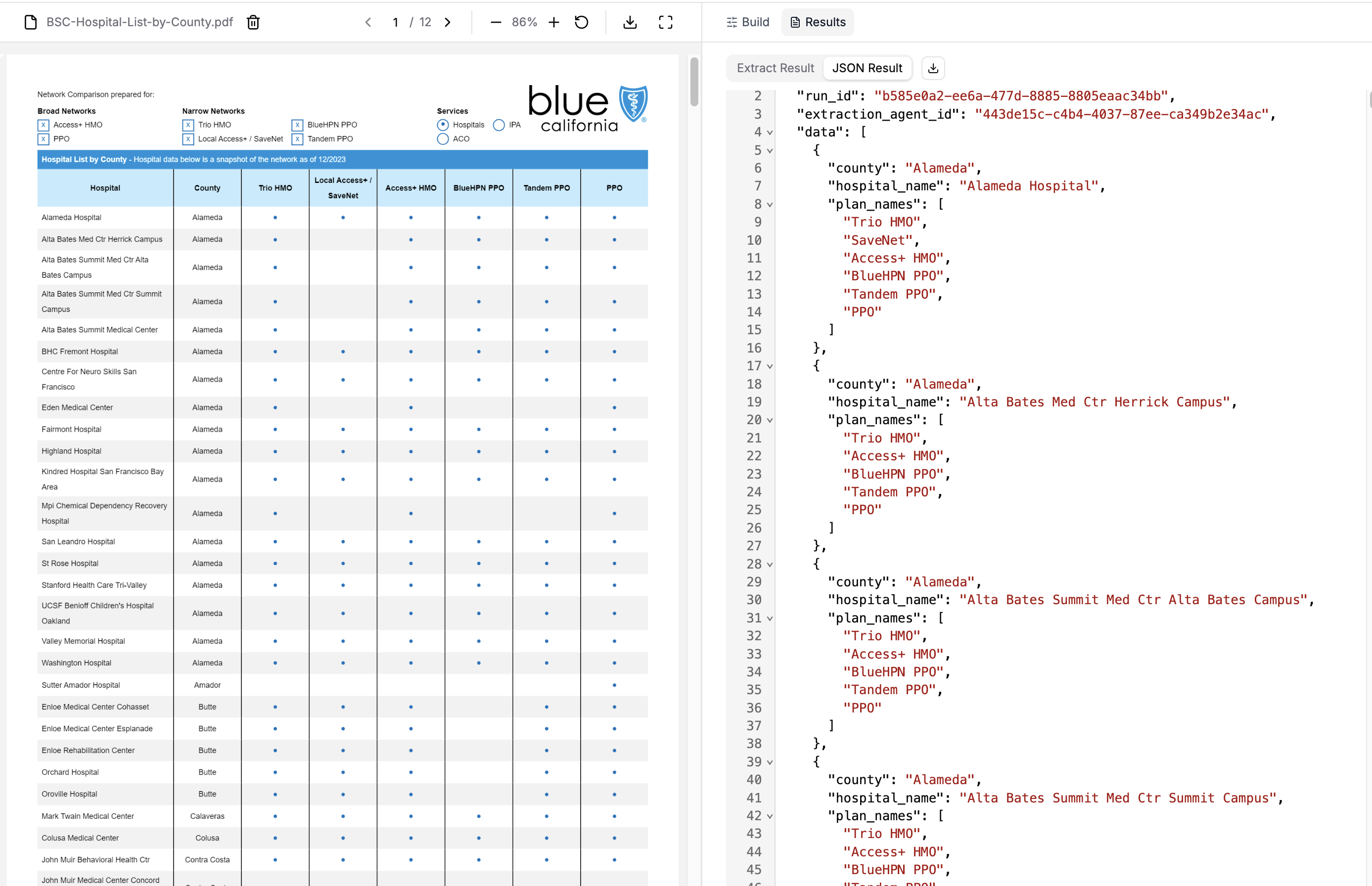
**成功!**我们从这份跨页 PDF 里抽出了全部 380 家医院,每个实体都带着自己的县、医院名与适用的保险计划被正确解析。若用 PER_DOC,大概率只能拿到最前面的 20-30 条。
从玩具目录抽取
示例 2:半结构化列表
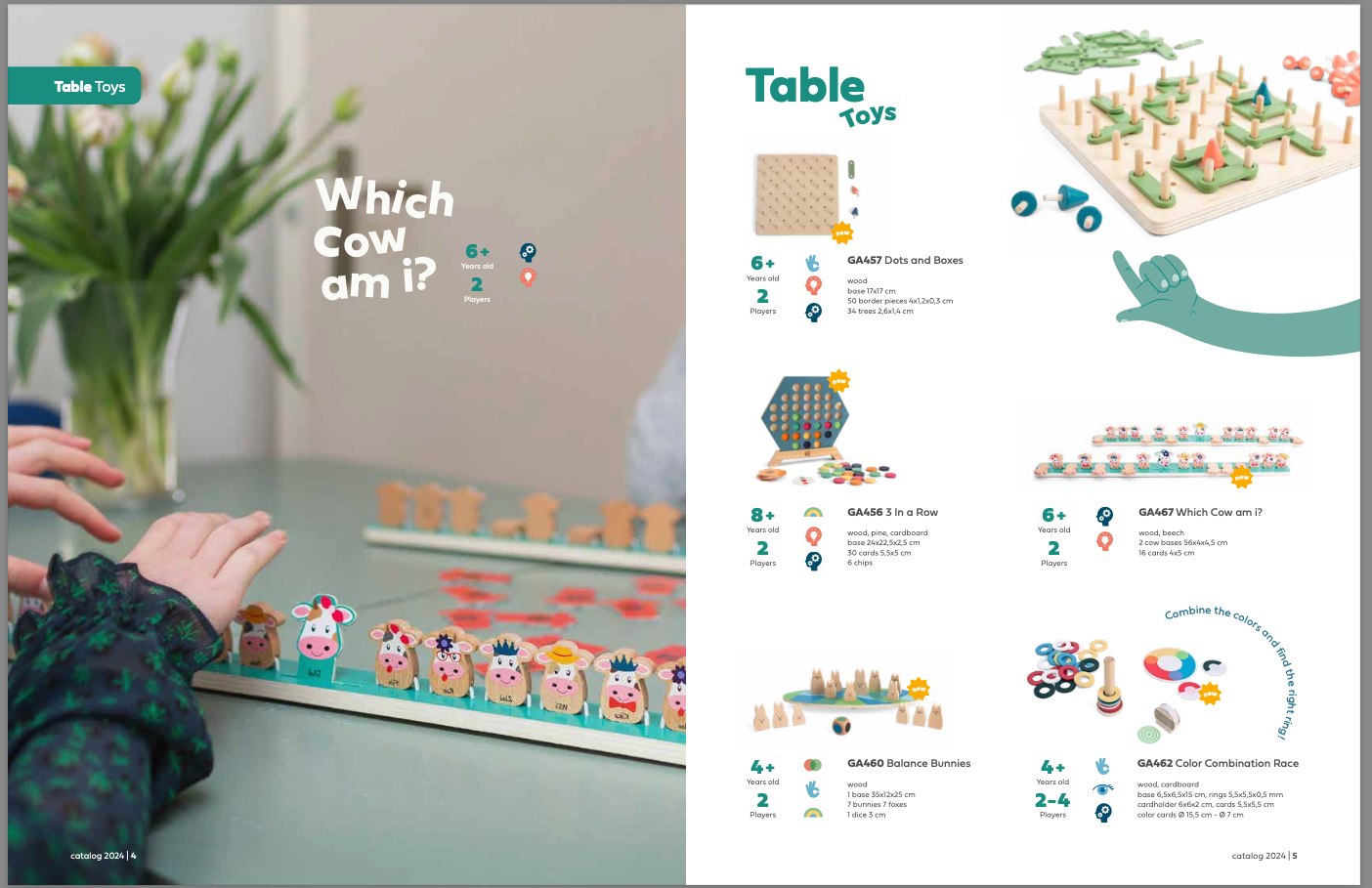
PER_TABLE_ROW 抽取目标同样适用于并非显式表格、但具备相似性质的文档:
- 有序罗列:玩具按顺序排列,彼此有视觉分隔(章节标题、留白)
- 模式重复:每个玩具条目的结构一致(编号、名称、规格、描述)
- 信息局部:每个玩具的全部属性都聚在它自己的条目里
尽管这不是传统的表格格式,每个玩具实体在本地仍含齐了 schema 所需的信息。LlamaExtract 会找出区分各个玩具的排版模式,并把它们作为独立实体抽取出来。
- Python
- Typescript
- Python(legacy)
from pydantic import BaseModel, Field

class ToyCatalog(BaseModel):
    """Product information from a toy catalog."""

    section_name: str = Field(
        description="The name of the toy section (e.g. Table Toys, Active Toys)."
    )
    product_code: str = Field(
        description="The unique product code for the toy (e.g., GA457)."
    )
    toy_name: str = Field(description="The name of the toy.")
    age_range: str = Field(
        description="The recommended age range for the toy (e.g., 6 +, 4 +).",
    )
    player_range: str = Field(
        description="The number of players the toy is designed for (e.g., 2, 2-4, 1-6).",
    )
    material: str = Field(
        description="The primary material(s) the toy is made of (e.g., wood, cardboard).",
    )
    description: str = Field(
        description="A brief description of the toy and its components and dimensions.",
)file_obj = await client.files.create(file="Click-BS-Toys-Catalogue-2024.pdf", purpose="extract")
file_id = file_obj.id
# Stateless one-shot extraction
result = client.extraction.extract(
file_id=file_id,
config={
"extraction_mode": "PREMIUM",
"extraction_target": "PER_TABLE_ROW",
"parse_model": "anthropic-sonnet-4.5",
},
data_schema=ToyCatalog.model_json_schema(),
)import { z } from "zod";
const ToyCatalogSchema = z.object({
section_name: z
.string()
.describe("The name of the toy section (e.g. Table Toys, Active Toys)."),
product_code: z
.string()
.describe("The unique product code for the toy (e.g., GA457)."),
toy_name: z.string().describe("The name of the toy."),
age_range: z
.string()
.describe("The recommended age range for the toy (e.g., 6 +, 4 +)."),
player_range: z
.string()
.describe(
"The number of players the toy is designed for (e.g., 2, 2-4, 1-6)."
),
material: z
.string()
.describe(
"The primary material(s) the toy is made of (e.g., wood, cardboard)."
),
description: z
.string()
.describe(
"A brief description of the toy and its components and dimensions."
),
});import fs from "fs";
const fileObj = await client.files.create({
file: fs.createReadStream("Click-BS-Toys-Catalogue-2024.pdf"),
purpose: "extract",
});
const fileId = fileObj.id;
// Stateless one-shot extraction
const result = await client.extraction.extract({
file_id: fileId,
config: {
extraction_mode: "PREMIUM",
extraction_target: "PER_TABLE_ROW",
parse_model: "anthropic-sonnet-4.5",
},
data_schema: z.toJSONSchema(ToyCatalogSchema),
});from pydantic import BaseModel, Field
class ToyCatalog(BaseModel):
"""Product information from a toy catalog."""
section_name: str = Field(
description="The name of the toy section (e.g. Table Toys, Active Toys)."
)
product_code: str = Field(
description="The unique product code for the toy (e.g., GA457)."
)
toy_name: str = Field(description="The name of the toy.")
age_range: str = Field(
description="The recommended age range for the toy (e.g., 6 +, 4 +).",
)
player_range: str = Field(
description="The number of players the toy is designed for (e.g., 2, 2-4, 1-6).",
)
material: str = Field(
description="The primary material(s) the toy is made of (e.g., wood, cardboard).",
)
description: str = Field(
description="A brief description of the toy and its components and dimensions.",
)from llama_cloud_services.extract import ExtractConfig, ExtractMode, ExtractTarget
result = await llama_extract.aextract(
data_schema=ToyCatalog,
files="Click-BS-Toys-Catalogue-2024.pdf",
config=ExtractConfig(
extraction_mode=ExtractMode.PREMIUM,
extraction_target=ExtractTarget.PER_TABLE_ROW,
parse_model="anthropic-sonnet-4.5",
),
)结果
同样地,我们的 schema 表示的是单个玩具产品,不是整本目录。系统会返回一个 list[ToyCatalog],每个玩具一条。
你可以在这里取得
Click-BS-Toys-Catalogue-2024.pdf
len(result.data) 153result.data[:10] [{'section_name': 'Table Toys',
'product_code': 'GA457',
'toy_name': 'Dots and Boxes',
'age_range': '6+',
'player_range': '2',
'material': 'wood',
'description': 'base 17x17 cm\n50 border pieces 4x1,2x0,3 cm\n34 trees 2,6x1,4 cm'},
{'section_name': 'Table Toys',
'product_code': 'GA456',
'toy_name': '3 In a Row',
'age_range': '8+',
'player_range': '2',
'material': 'wood, pine, cardboard',
'description': 'base 24x22,5x2,5 cm\n30 cards 5,5x5 cm\n6 chips'},
{'section_name': 'Table Toys',
'product_code': 'GA467',
'toy_name': 'Which Cow am i?',
'age_range': '6+',
'player_range': '2',
'material': 'wood, beech',
'description': '2 cow bases 56x4x4,5 cm\n16 cards 4x5 cm'},
{'section_name': 'Table Toys',
'product_code': 'GA460',
'toy_name': 'Balance Bunnies',
'age_range': '4+',
'player_range': '2',
'material': 'wood',
'description': '1 base 35x12x25 cm\n7 bunnies 7 foxes\n1 dice 3 cm'},
{'section_name': 'Table Toys',
'product_code': 'GA462',
'toy_name': 'Color Combination Race',
'age_range': '4+',
'player_range': '2-4',
'material': 'wood, cardboard',
'description': 'base 6,5x6,5x15 cm, rings 5,5x5,5x0,5 mm\ncardholder 6x6x2 cm, cards 5,5x5,5 cm\ncolor cards Ø 15,5 cm - Ø 7 cm'},
{'section_name': 'Table Toys',
'product_code': 'GA465',
'toy_name': 'Plop It',
'age_range': '6+',
'player_range': '2-4',
'material': 'wood, elastic, cardboard',
'description': 'Catch the right balls and plop them in the net!\n* 2 ploppers 8x5 cm\n* 2 net holders Ø 5cm, length 55 cm\n* 6 cards 1,5x2,5 cm, 30 balls Ø 2,5 cm\n* 1 rope 120 cm'},
{'section_name': 'Table Toys',
'product_code': 'GA466',
'toy_name': 'Whack a Shape',
'age_range': '4+',
'player_range': '2-4',
'material': 'wood',
'description': '* base 38,5x15,5 cm\n* 2 stands 36 half balls, 4 hammers\n* 1 dice 2,5 cm\n* 4 cards'},
{'section_name': 'Table Toys',
'product_code': 'GA458',
'toy_name': 'Sling Puck | Table Hockey',
'age_range': '6+',
'player_range': '2',
'material': 'wood',
'description': '* double sides base 39x21x3 cm\n* 10 chips Ø 2,5 cm\n* 2 pushers 4x4x3 cm'},
{'section_name': 'Table Toys',
'product_code': 'GA039',
'toy_name': 'DIY Birdhouse',
'age_range': '3+',
'player_range': '1',
'material': 'wood',
'description': '* house 9x9x13 cm'},
{'section_name': 'Table Toys',
'product_code': 'GA319',
'toy_name': 'Triangle Domino',
'age_range': '6+',
'player_range': '2-4',
'material': 'wood',
'description': '* 35 triangles 10x10 x10 cm'}]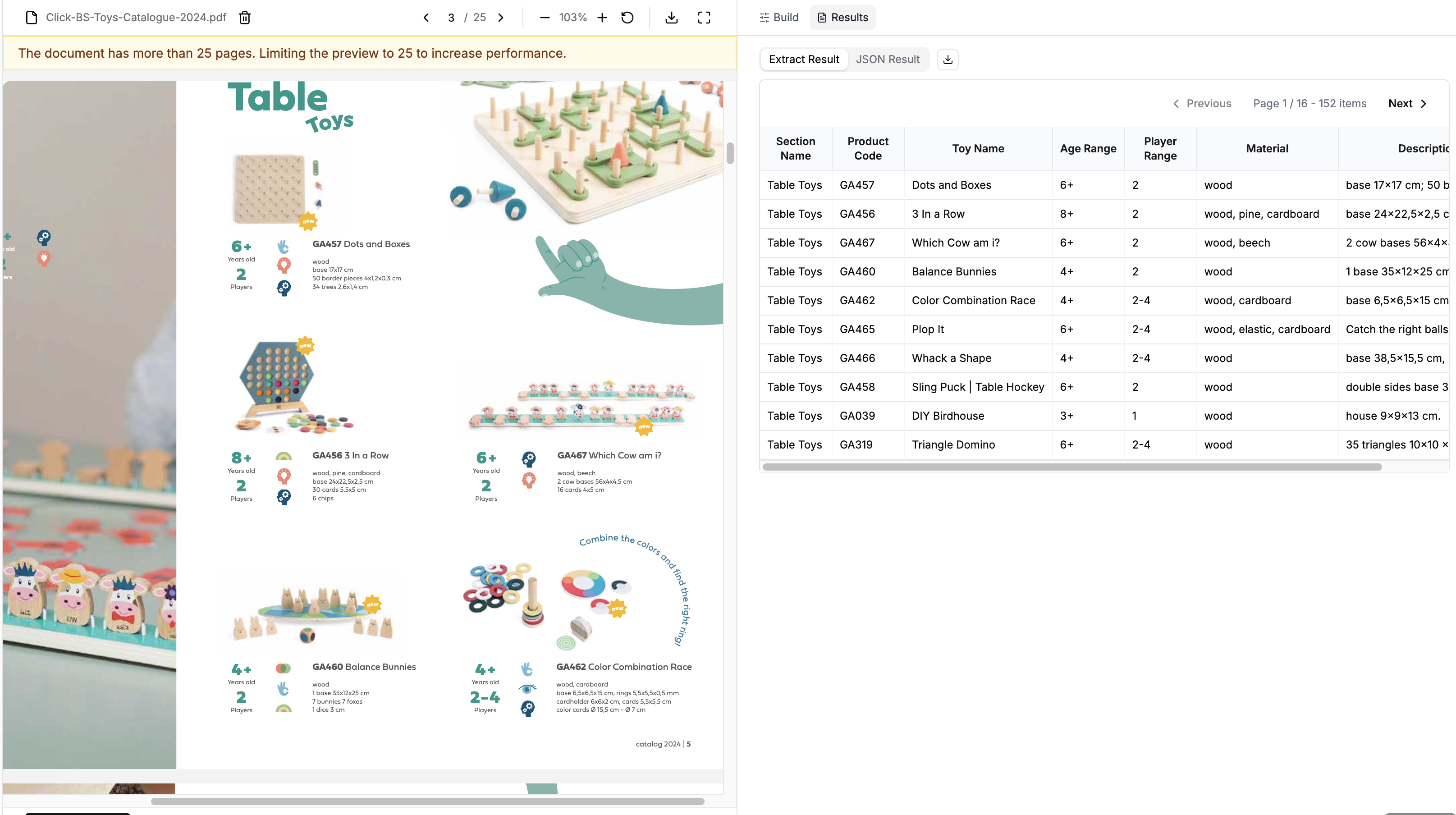
**成功!**尽管是半结构化格式,我们仍从目录里抽出了全部 152 个玩具产品(附录一节里有一个玩具被重复抽出)。LlamaExtract 自动识别出分隔各个玩具的视觉模式,并把我们的 schema 逐个应用上去。
总结
PER_TABLE_ROW 抽取目标在抽取文档里的重复结构化实体时非常有力。要点回顾:
schema 设计:为你的 schema 定义单个实体,而不是整份文档。系统返回
list[YourSchema]。适配多种格式:不限于传统表格 —— 任何有可区分重复实体的文档都行(项目符号、编号、标题、视觉分隔等)。共同的要求是每个实体在本地上下文里就含齐你 schema 需要的数据。
自动的模式识别:LlamaExtract 会找出区分实体的排版模式,并把你的 schema 应用到每一个上。