
主题
如果你在 Colab 中打开这个 Notebook,可能需要先安装 LlamaIndex 🦙。
%pip install llama-index-llms-azure-openai!pip install llama-index前置条件
你可以在本指南中找到更多详细信息。
记下 “模型名称” 和 “部署名称”,连接 LLM 时会用到。
环境设置
查找你的设置信息 - API 基础地址、API 密钥、部署名称(即引擎)等
要查找所需的设置信息,请执行以下步骤:
- 转到 Azure OpenAI Studio(此处)
- 转到聊天或补全操场(取决于你正在设置的 LLM)
- 点击“查看代码”(如下图所示)
from IPython.display import Image

Image(filename="./azure_playground.png")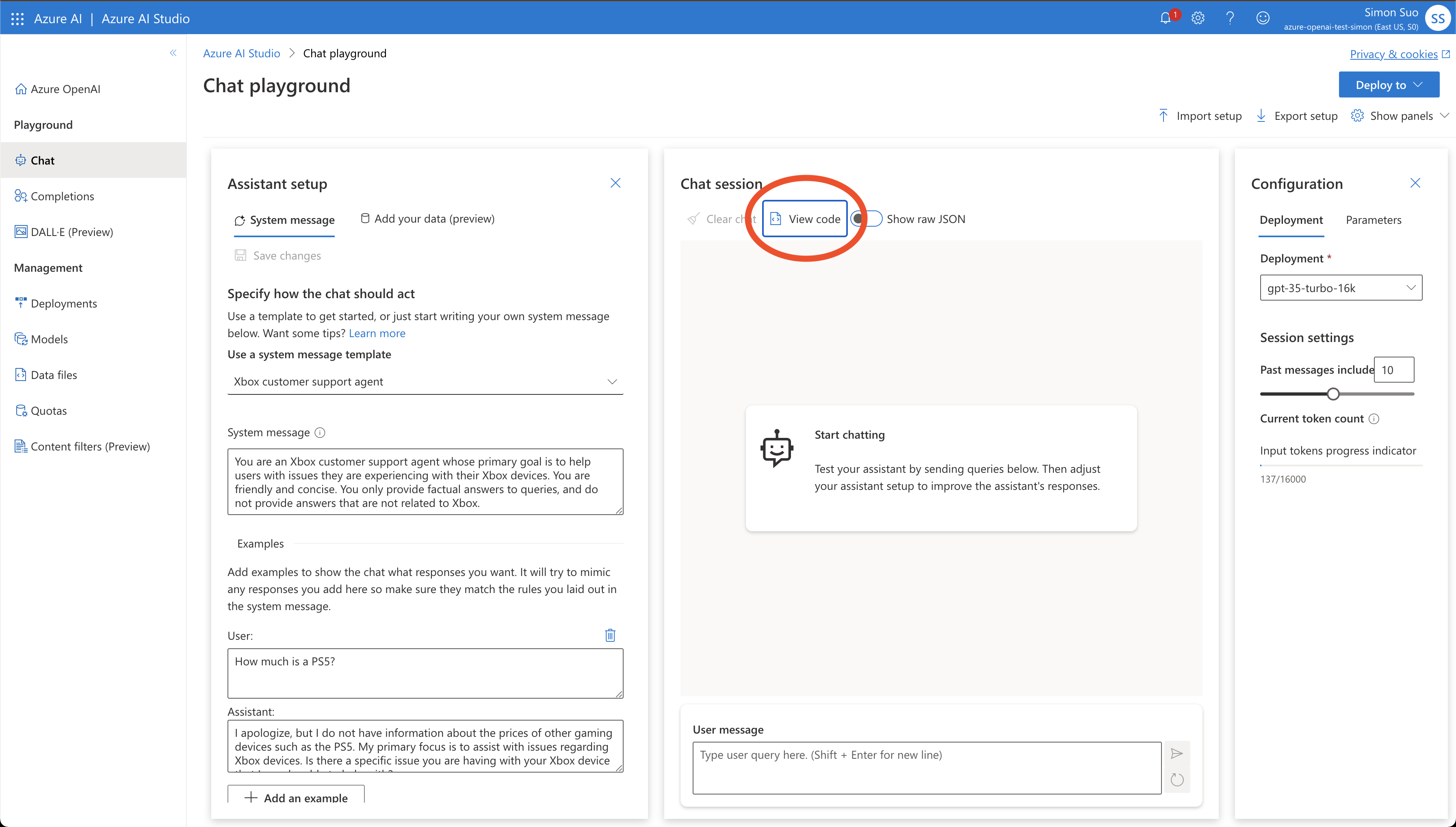
- 记下
api_type、api_base、api_version、engine(这应与之前的“部署名称”相同)以及key
from IPython.display import Image

Image(filename="./azure_env.png")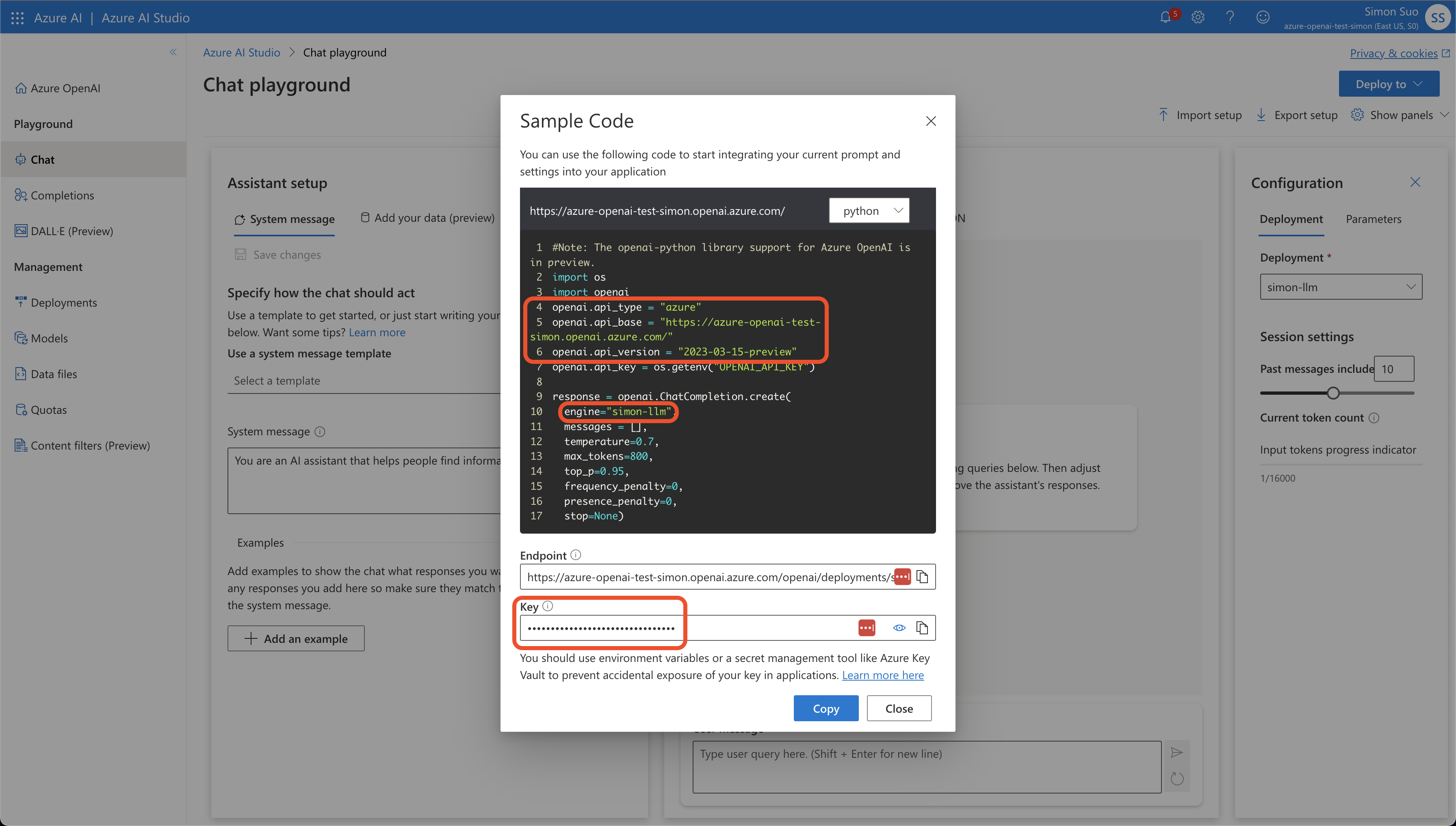
配置环境变量
使用 OpenAI 模型的 Azure 部署与普通 OpenAI 非常相似。你只需再配置几个环境变量。
OPENAI_API_VERSION:将其设置为2023-07-01-preview。将来可能会更改。AZURE_OPENAI_ENDPOINT:你的端点应类似于 https://YOUR_RESOURCE_NAME.openai.azure.com/AZURE_OPENAI_API_KEY:你的 API 密钥
import os

os.environ["AZURE_OPENAI_API_KEY"] = "<your-api-key>"
os.environ[
    "AZURE_OPENAI_ENDPOINT"
] = "https://<your-resource-name>.openai.azure.com/"
os.environ["OPENAI_API_VERSION"] = "2023-07-01-preview"使用你的 LLM
from llama_index.llms.azure_openai import AzureOpenAI与普通 OpenAI 不同,除了 model 之外,你还需要传入 engine 参数。engine 是你在 Azure OpenAI Studio 中选择的模型部署的名称。更多详情请参阅上一节“查找你的设置信息”。
llm = AzureOpenAI(
    engine="simon-llm", model="gpt-35-turbo-16k", temperature=0.0
)或者,你也可以跳过设置环境变量,直接通过构造函数传入参数。
llm = AzureOpenAI(
    engine="my-custom-llm",
    model="gpt-35-turbo-16k",
    temperature=0.0,
    azure_endpoint="https://<your-resource-name>.openai.azure.com/",
    api_key="<your-api-key>",
    api_version="2023-07-01-preview",
)使用 complete 端点进行文本补全
response = llm.complete("The sky is a beautiful blue and")
print(response)the sun is shining brightly. Fluffy white clouds float lazily across the sky, creating a picturesque scene. The vibrant blue color of the sky brings a sense of calm and tranquility. It is a perfect day to be outside, enjoying the warmth of the sun and the gentle breeze. The sky seems to stretch endlessly, reminding us of the vastness and beauty of the world around us. It is a reminder to appreciate the simple pleasures in life and to take a moment to admire the natural wonders that surround us.response = llm.stream_complete("The sky is a beautiful blue and")
for r in response:
print(r.delta, end="")the sun is shining brightly. Fluffy white clouds float lazily across the sky, creating a picturesque scene. The vibrant blue color of the sky brings a sense of calm and tranquility. It is a perfect day to be outside, enjoying the warmth of the sun and the gentle breeze. The sky seems to stretch endlessly, reminding us of the vastness and beauty of the world around us. It is a reminder to appreciate the simple pleasures in life and to take a moment to pause and admire the natural wonders that surround us.使用 chat 端点进行对话
from llama_index.core.llms import ChatMessage

messages = [
    ChatMessage(
        role="system", content="You are a pirate with colorful personality."
    ),
    ChatMessage(role="user", content="Hello"),
]

response = llm.chat(messages)
print(response)assistant: Ahoy there, matey! How be ye on this fine day? I be Captain Jolly Roger, the most colorful pirate ye ever did lay eyes on! What brings ye to me ship?response = llm.stream_chat(messages)
for r in response:
print(r.delta, end="")Ahoy there, matey! How be ye on this fine day? I be Captain Jolly Roger, the most colorful pirate ye ever did lay eyes on! What brings ye to me ship?不必在每次聊天或补全调用中添加相同参数,你可以通过 additional_kwargs 在实例级别设置它们。
llm = AzureOpenAI(
    engine="simon-llm",
    model="gpt-35-turbo-16k",
    temperature=0.0,
    additional_kwargs={"user": "your_user_id"},
)