
主题
概念
LlamaIndex 为「摄取、索引、查询外部数据」提供了一套高层接口。
在底层,LlamaIndex 还支持可替换的存储组件,让你自定义:
- 文档存储(Document stores):存放摄取后的文档(即
Node对象), - 索引存储(Index stores):存放索引元数据,
- 向量库(Vector stores):存放嵌入向量。
- 属性图存储(Property Graph stores):存放知识图谱(供
PropertyGraphIndex使用)。 - 聊天存储(Chat Stores):存放并组织聊天消息。
文档存储与索引存储都建立在同一套键值存储抽象之上,该抽象同样在下文详述。
凡是 fsspec 支持的存储后端,LlamaIndex 都能把数据持久化过去。我们已验证支持的后端有:
- 本地文件系统
- AWS S3
- Cloudflare R2
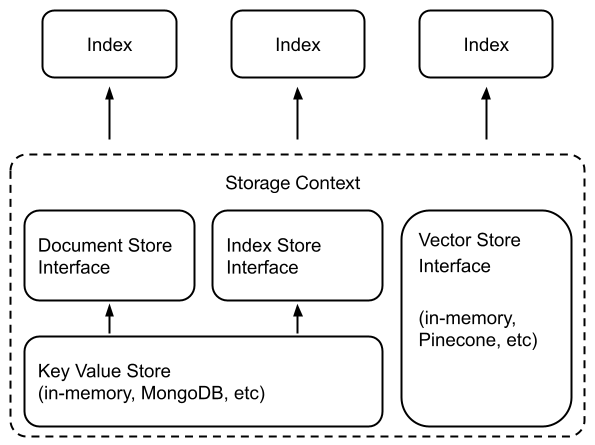
使用方式
许多向量库(FAISS 除外)会同时存放数据与索引(嵌入)。这意味着你不再需要单独的文档存储或索引存储;这也意味着你不必显式持久化这些数据——它会自动完成。用起来大致就像下面这样:新建一个索引,或重新加载一个已有索引。
## build a new index
from llama_index.core import VectorStoreIndex, StorageContext
from llama_index.vector_stores.deeplake import DeepLakeVectorStore

# construct vector store and customize storage context
vector_store = DeepLakeVectorStore(dataset_path="<dataset_path>")
storage_context = StorageContext.from_defaults(vector_store=vector_store)
# Load documents and build index
index = VectorStoreIndex.from_documents(
    documents, storage_context=storage_context
)

## reload an existing one
index = VectorStoreIndex.from_vector_store(vector_store=vector_store)更多细节见我们的向量库模块指南。
请注意,一般要使用这些存储抽象,你需要先定义一个 StorageContext 对象:
from llama_index.core.storage.docstore import SimpleDocumentStore
from llama_index.core.storage.index_store import SimpleIndexStore
from llama_index.core.vector_stores import SimpleVectorStore
from llama_index.core import StorageContext

# create storage context using default stores
storage_context = StorageContext.from_defaults(
    docstore=SimpleDocumentStore(),
    vector_store=SimpleVectorStore(),
    index_store=SimpleIndexStore(),
)关于定制与持久化的更多细节见下面的指南。
模块
各类存储组件都有深入指南。